Introduction
Someone on your team recorded a product walkthrough. Then support asked for a help article version. Marketing wanted a blog post. Sales needed a PDF they could attach to follow-up emails. Each request meant opening the video, watching it again, and typing out the same flow from scratch.
This is the content loop most product teams live in. You record once, then rewrite the same walkthrough four or five times for different audiences and formats. Each rewrite takes 30 to 60 minutes. Most teams just skip it. Nobody has that kind of time.
Docusmith ends that loop. It takes a demo and generates written documentation from it. No rewriting. No watching the video back frame by frame. You get a document you can publish, edit, or hand off in under a minute.
If you are new to how autonomous demo capture works, start with our guide to what an AI demo agent is and how it records your product without manual effort.
The rewriting problem
Here is how the content loop usually plays out. A product manager records a walkthrough of a new feature. It takes 10 minutes to record and another 10 to edit. The video goes live on the product page and everyone moves on.
Then the support lead asks for a help center article covering the same flow. They need step-by-step written instructions with screenshots. The PM sends them the video and says "just watch it and write it up." The support lead spends 45 minutes pausing, rewinding, and typing out each step. The result is decent but missing context the PM would have added if they had written it themselves.
Marketing sees the same walkthrough and asks for a blog post version. Sales wants a one-page PDF they can send after demos. The onboarding team wants a quick-start guide for new users. Each version requires someone to sit down, watch the video, and type it out again.
Most of these requests end up at the bottom of the backlog. The help article ships late. The blog post never ships at all. The sales PDF is a Google Doc someone threw together in 15 minutes. The onboarding guide stays outdated for two quarters because nobody has time to update it.
This happens because the gap between "we have a video" and "we have written content" is pure manual labor. The video already contains the full product flow. Every step, every screen, every transition is there. But getting it into a written format still requires a person to retype it.
When your product UI changes, the problem compounds. You re-record the demo, but every written asset tied to the old version is now out of date. Keeping walkthroughs current through UI changes is a challenge on its own. We cover that in our guide to keeping demos updated through UI changes.
What Docusmith does
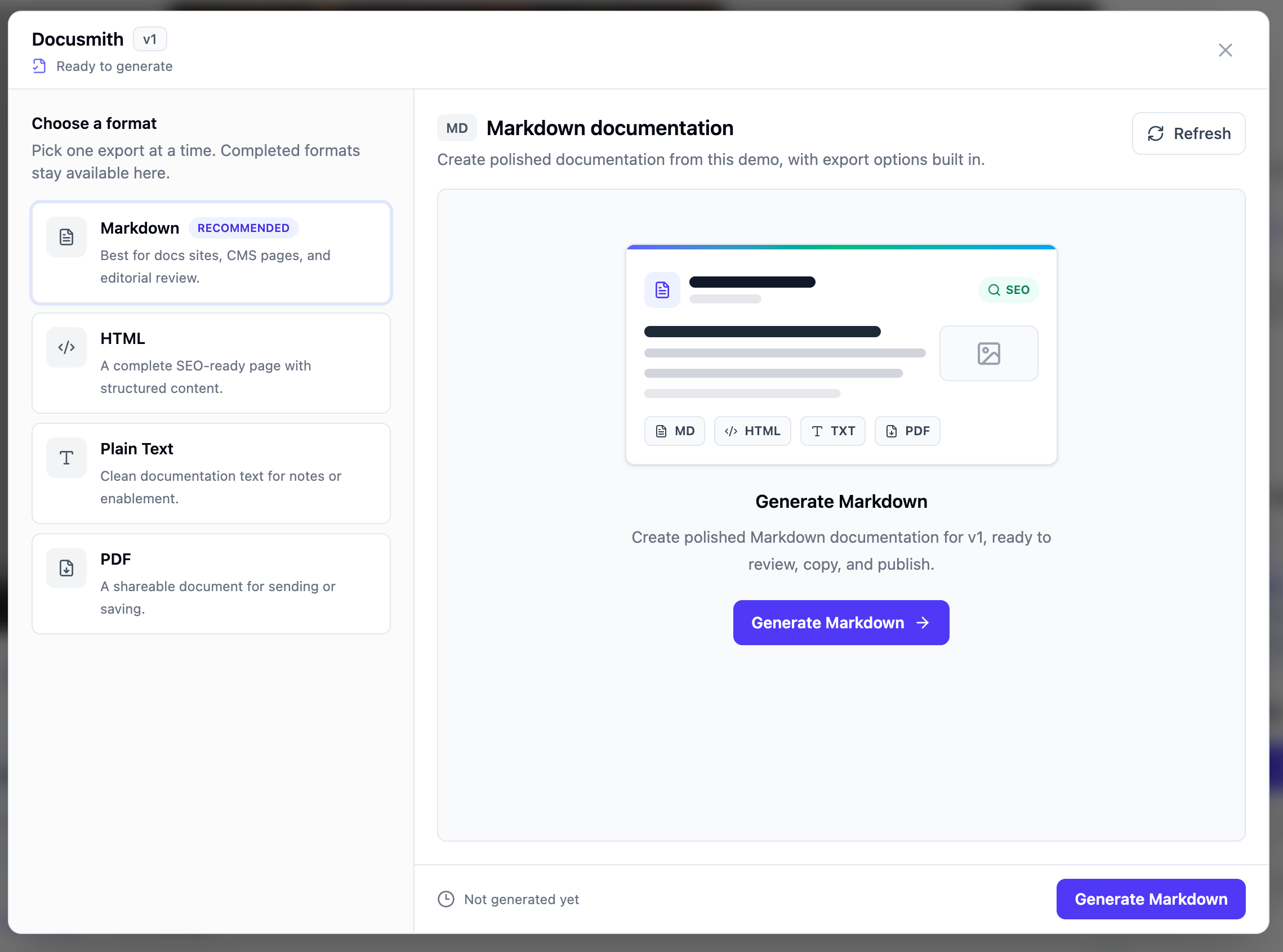
Docusmith reads a demo and turns it into written documentation. It uses the same flow the demo already recorded: every click, every screen transition, every action the agent took. The output is a structured document you can publish anywhere.
You get four output formats, one at a time:
- Markdown for docs sites, README files, and content management systems that accept Markdown input.
- HTML for help centers and knowledge bases that expect formatted web content.
- Plain text for ticket replies, email templates, and quick paste-into-slack moments.
- PDF for sales leave-behinds, onboarding packets, and printed handouts.
Pick the format that matches where the content will live. Generate once, edit what you need, and publish. The entire process takes under a minute from clicking Generate Document to having a finished document ready to use.
For a full walkthrough of the export process, including screenshots of each format, see our guide on how to turn a demo into a document.
Which teams benefit most
Any team that writes about product flows benefits from Docusmith. The biggest impact shows up in five places.
Product teams. You ship features and record demos. Docusmith gives you written versions you can drop straight into your docs site, changelog, or internal wiki. No more choosing between recording a video and writing a help article. You do the first and the second happens automatically.
Customer success. Onboarding handouts, quick-start guides, and step-by-step PDFs for new accounts. You already have the demo. Docusmith gives you the written version to attach to your welcome email or drop into a Notion page.
Support. Help center articles, ticket reply templates, and escalation docs. When a customer asks "how do I do X," your support team can pull up the generated document, copy the relevant section, and paste it into the reply. No need to write it from scratch or dig through old tickets for a previous answer. This is core to Demosmith for customer support: answering the recurring question once and reusing the answer everywhere.
Sales. PDF leave-behinds for post-call follow-ups. After a demo call, you generate a written version of the walkthrough and attach it to the follow-up email. The prospect gets a reference document that matches exactly what they saw on the call.
Marketing. SEO content, blog drafts, and social copy. Marketing teams can take the generated document and use it as a first draft for blog posts, landing page copy, or email sequences. The product flow is already accurate. They just add the editorial layer.
Before and after
The workflow before and after Docusmith tells the full story.
Before. You record a demo of a new feature. Support asks for a help article. You open the video, play it back, pause at each step, and type out instructions. You take screenshots. You format everything for the help center. Forty-five minutes later, you have one article. If marketing wants a blog version, that is another 30 to 45 minutes. Sales needs a PDF. Another 20 minutes. You spent more time rewriting the walkthrough than you spent recording it.
After. You record the same demo. When it finishes, you click Generate Document. You choose your format. Docusmith produces the written version. You review it, make any edits, and publish. The whole thing takes two or three minutes per format. Five documents across five formats takes less than 15 minutes total.
The time savings compound fast. If your team creates 10 demos a month and each one generates three written assets, that is 30 documents. At 45 minutes each, you save over 20 hours a month. For teams that also update existing content when the UI changes, the savings run even higher.
The quality is consistent, too. The generated document covers every step the demo showed. No step goes missing because someone lost patience rewinding. The order matches the video exactly.
Getting started
Generating a document from a demo takes three steps:
- Open your demo. Go to your Demosmith dashboard and open the demo you want to convert.
- Click Generate Document. This opens the Docusmith export panel.
- Choose your format and generate. Pick Markdown, HTML, plain text, or PDF. Click generate. You have the document in seconds.
Docusmith ships with every paid plan. Each plan gives you full access to all four output formats.
For detailed instructions including what each format looks like and how to edit the output, see our step-by-step guide on how to turn a demo into a document.
Key takeaways
- Every time your team records a demo, someone ends up rewriting the same walkthrough by hand for the help center, onboarding, sales, or SEO. Docusmith eliminates that rewrite.
- The tool generates written documentation directly from a demo. You get four formats: Markdown, HTML, plain text, and PDF. One at a time.
- Product, support, customer success, sales, and marketing teams all benefit. Any team that writes about product flows saves time with generated documentation.
- Before Docusmith, producing one written asset from a demo took 30 to 45 minutes. After, it takes under a minute per format.
- The generated document covers every step the demo showed, in the correct order, with nothing skipped. You get consistent quality without the manual effort.
- Docusmith comes with every paid plan. Open any demo, click Generate Document, choose your format, and publish.