Demosmith vs Vidyard: Two Different Approaches to Product Demos
Vidyard and Demosmith each involve video. That is roughly where the overlap ends. They sit in different categories, solve different problems, and serve different stages of the sales and marketing workflow. Comparing them only makes sense if you understand what job you are hiring each tool to do.
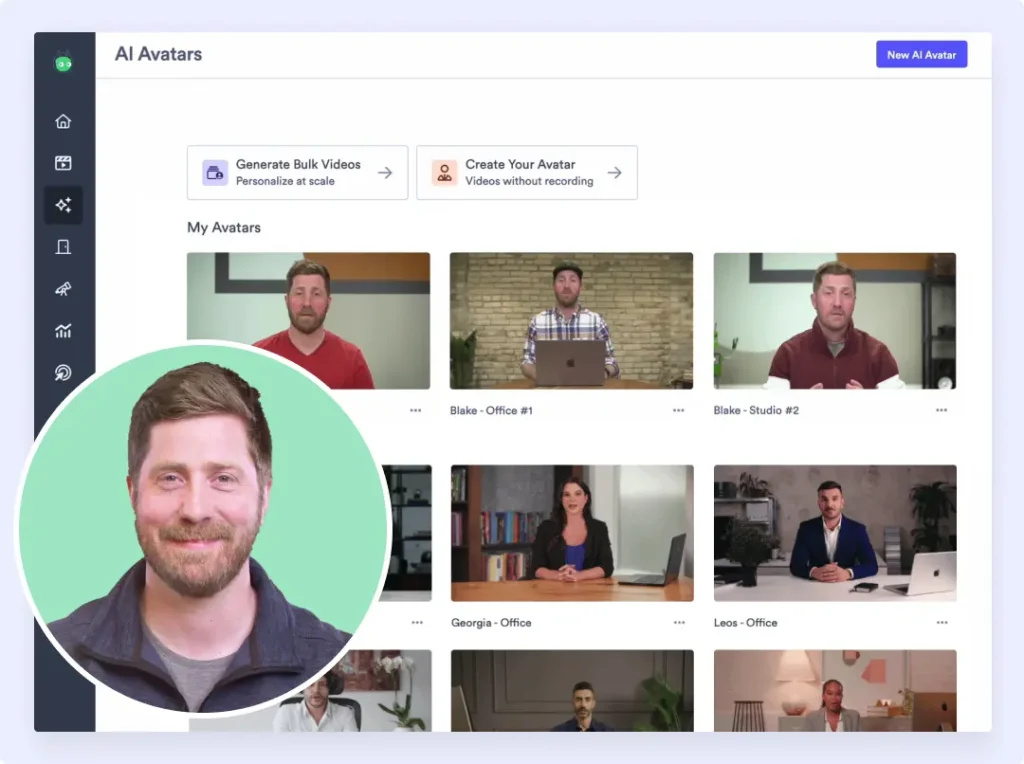
Vidyard is a video sales platform. It helps sales reps record, host, share, and track video messages. You record yourself on camera, send the video to a prospect, and Vidyard tells you whether they watched it, how long they watched, and when. More recently, Vidyard has added AI Avatars that generate personalised video messages from a trained likeness and a Video Sales Agent that auto-creates outreach videos from buyer actions. The platform's core job is video for sales communication.
Demosmith is an AI Demo Agent. You paste your product URL, describe the flow you want in plain English, and an AI agent navigates your product autonomously, captures the screens, and produces a polished video with voiceover, transitions, zoom effects, and captions. No recording. No microphone. No editing. The finished MP4 arrives in about 10 minutes. The platform's core job is product demo video generation.
One tool helps you talk about your product on camera. The other shows your product without a camera. This comparison breaks down what each does, where each excels, and which one fits the job you actually need done. For teams exploring the broader AI demo video generator landscape, this context is worth having before you evaluate either tool.
At a Glance: Demosmith vs Vidyard
| Feature | Vidyard | Demosmith |
|---|---|---|
| Primary Use Case | Video sales outreach and hosting | Product demo video generation |
| How It Works | You record or train an AI Avatar | AI agent navigates your product from a URL |
| Video Output | Yes, recorded or AI-generated sales videos | Yes, auto-edited MP4 + shareable link |
| AI Voiceover | AI Avatars only (trained likeness) | Yes, 29 languages |
| Autonomous Product Capture | No, manual recording required | Yes, fully autonomous |
| Multi-Language | AI Avatars in 25+ languages | 29 languages (voiceover + captions) |
| Product Navigation | Cannot navigate a product UI | AI agent clicks, types, scrolls autonomously |
| Starting Price | Free (5 videos/mo) | Teams $99/user/mo | Starter $40/mo | Pro $99/mo |
| Best For | Personalised sales video outreach | Polished product demos for marketing and sales |
What Vidyard Does
Vidyard has been in the video-for-sales space since 2011. The platform has evolved from a video hosting service into a full video sales platform with AI-powered features. Here is what it does and where it has been heading.
Video Recording and Hosting
Vidyard's foundation is recording and hosting sales videos. Reps use the Chrome extension or desktop app to record their screen, their webcam, or both. The recorded video is hosted on Vidyard's platform with a shareable link. The viewer sees the video in a branded player page with optional CTAs, and the rep gets notified when the prospect watches.
For sales teams that use video in outreach, Vidyard is the established player. Record a two-minute personalised message for a prospect, paste the link into an email or LinkedIn message, and track whether they watched. The workflow is simple and the platform handles the hosting, embedding, and analytics.
AI Avatars
Vidyard's most notable recent addition is AI Avatars. You record 90 seconds of footage to train your digital likeness, then generate personalised video messages at scale using that avatar. The AI version of you delivers scripted messages to prospects, with the ability to personalise by name, company, or other variables.
AI Avatars support 25+ languages, which means a rep can send personalised outreach in French, German, or Japanese without speaking those languages. The use case is clear: instead of recording 50 individual prospecting videos, you generate 50 avatar-delivered messages from a template. Vidyard has integrated this into HubSpot, Salesloft, Apollo, and Zapier for workflow automation.
Video Sales Agent
Vidyard's Video Sales Agent auto-creates personalised videos based on buyer actions. When a prospect visits your pricing page or downloads a whitepaper, the agent can trigger a personalised video response using your AI Avatar. This moves Vidyard toward automated video outreach, where videos are generated in response to buyer signals rather than manually triggered by a rep.
Video Analytics and Tracking
Vidyard's analytics are purpose-built for sales. You see who watched your video, how much they watched, whether they rewatched specific sections, and when they dropped off. This data flows into your CRM and sales engagement tools, helping reps prioritise follow-up based on engagement. For sales managers, the analytics provide visibility into team video activity and its correlation with pipeline metrics.
Bulk Personalisation
For teams running large-scale outbound campaigns, Vidyard offers bulk personalisation. You create a base video, define personalisation variables (prospect name, company logo, custom message), and Vidyard generates unique versions at scale. Combined with AI Avatars, this means a sales team can produce hundreds of personalised videos from a single template without recording each one individually.
What Demosmith Does
Demosmith takes a completely different approach. Instead of recording a person talking about a product, it generates a video of the product itself in action, without any human involvement in the capture or editing process.
Autonomous Product Navigation
You give Demosmith a URL and a plain-English description of the flow you want demonstrated. The AI agent opens your product in a cloud browser, navigates the interface autonomously (clicking, typing, scrolling), and captures the entire flow. No Chrome extension. No manual clicking. No test account setup instructions.
The agent handles realistic data entry. Instead of typing "test@test.com" into form fields, it generates contextually appropriate test data that makes the demo look like a real user session. A demo full of placeholder data looks like a rehearsal. A demo with realistic data looks like the actual product in use.
AI Voiceover in 29 Languages
Demosmith generates natural-sounding voiceover narration in 29 languages, synchronised to the visual flow of the demo. The voiceover explains what is happening on screen as it happens. English, Spanish, French, German, Japanese, Korean, Portuguese, Chinese, and 21 other languages are available in one workflow.
For teams selling internationally, this means one prompt produces a demo in your primary language, and regenerating it in another language takes minutes. No voiceover artist. No translation agency. No re-recording.
Auto-Editing
The raw capture from the AI agent goes through automated post-production. Demosmith adds smooth transitions between scenes, dynamic zoom effects that draw the viewer's eye to the relevant part of the UI, synchronised captions for accessibility and silent viewing, and professional pacing that matches the voiceover narration. The video that arrives is ready to use.
Brand Kit Applied Automatically
You configure your brand colours, logo, fonts, and intro/outro sequences once. Every video Demosmith generates matches your brand identity automatically. For teams producing demos across multiple products or features, this consistency eliminates the manual branding step.
MP4 + Shareable Link Output
Every Demosmith demo produces two outputs: a downloadable MP4 file and a shareable link. The MP4 works anywhere video works: YouTube, LinkedIn, sales decks, email attachments, conference displays, learning management systems. The shareable link provides a hosted viewing experience with analytics.
Key Differences Between Demosmith and Vidyard
What You Show: Person vs Product
This is the fundamental distinction. Vidyard's videos feature a person (either a real recording or an AI Avatar) talking about a product. Demosmith's videos feature the product itself in action, with AI-generated narration. Vidyard puts a face on the message. Demosmith puts the product on the screen.
Each approach has its place. A personalised video from a sales rep builds human connection. A product demo video builds product understanding. They answer different questions. "Who am I buying from?" versus "What does this product actually do?"
Video Creation: Recording vs Generation
Vidyard requires a human to create the source material. Either you record yourself on camera, or you record 90 seconds of training footage for your AI Avatar. Even the AI Avatars need you to provide the script and define the personalisation variables. The platform automates distribution and personalisation, but the creation step still involves a person.
Demosmith requires a URL and a text prompt. The AI agent handles everything from product navigation to capture to editing to voiceover. The human effort is writing a few sentences describing what the demo should show. No camera. No microphone. No script writing. No training footage.
Pricing Model: Per-Seat vs Flat
Vidyard's pricing scales per user. The free plan allows 5 videos per month. The Starter plan is $59 per user per month. The Teams plan is $99 per user per month. For a sales team of 25 reps on the Teams plan, that is $2,475 per month, roughly $30,000 per year. Enterprise pricing is custom and reportedly higher.
Demosmith uses flat pricing. Starter is $40 per month, Pro is $99 per month, Business is $250 per month, and Enterprise is custom. A free trial is available with no credit card required. The cost does not scale with the number of people on your team. A company with 5 people pays the same as a company with 50.
Localisation Approach
Vidyard's AI Avatars support 25+ languages for avatar-delivered messages. This is useful for sales outreach personalisation: a rep in New York can send a personalised video in German to a prospect in Munich. But the avatar speaks from a script. It does not navigate a product or create a demo. The multi-language capability applies to talking-head content, not product demonstrations.
Demosmith generates voiceover and captions in 29 languages as part of the demo creation process. The AI agent re-navigates the product and generates localised narration that matches the on-screen flow. For teams that need product demos in multiple languages (not just personalised sales messages), Demosmith's localisation covers the actual product demonstration, and teams comparing video tools for product demos consistently find that purpose-built demo tools handle localisation better than general-purpose video platforms.
Use Case Focus
Vidyard is built for the sales workflow: prospecting, outreach, follow-up, and pipeline acceleration. Every feature is oriented around helping individual reps connect with individual prospects through video. The analytics track engagement to inform sales follow-up. The integrations connect to sales engagement platforms. The AI features automate personalised outreach.
Demosmith is built for product demonstration: marketing videos, sales enablement content, onboarding walkthroughs, feature announcements, and multilingual product tours. The output is a reusable asset that works across every distribution channel, not a one-to-one message for a single prospect.
Maintenance and Updates
Vidyard's recorded videos become outdated when your product UI changes, the same as any screen recording. You re-record the affected videos manually. AI Avatar videos that reference specific product features need new scripts and regeneration.
Demosmith regenerates demos from saved prompts. When your product ships a UI update, you re-run the original prompt. The AI agent navigates the updated interface and produces a new video automatically. Twenty demos can be regenerated in parallel. The maintenance burden scales with prompts saved, not hours available.
When Vidyard Is the Better Choice
Vidyard is the right tool when you need personalised video communication between a sales rep and a prospect. Here is where it wins clearly.
Personalised sales outreach at scale. When your SDR team needs to send hundreds of personalised video messages per week, Vidyard's combination of AI Avatars, bulk personalisation, and sales engagement integrations is purpose-built for that workflow. Record once (or train an avatar once), personalise at scale, track engagement, and follow up based on viewing data.
Video hosting and analytics for sales. If you already have product demo videos and need a platform to host them, track who watches, and connect that data to your CRM, Vidyard's hosting and analytics are mature. The viewer engagement data (who watched, how much, when) is directly actionable for sales follow-up.
Talking-head videos where human connection matters. There are moments in the sales process where a prospect needs to see a person, not a product. The first outreach. The follow-up after a trial. The "here is what we discussed" recap after a call. For these, Vidyard's webcam recording and AI Avatars put a human face on the communication in a way that a product demo video cannot.
When Demosmith Is the Better Choice
Demosmith is the right tool when you need polished product demo videos that show your product in action. Here is where it wins.
Product demo videos for marketing. Website hero videos, YouTube product tours, social media clips, conference booth displays. These require the product on screen with professional production quality: clean transitions, consistent branding, narrated voiceover. Vidyard cannot navigate your product. Demosmith can.
Sales enablement libraries. Product overviews for different buyer personas, feature-specific demos for different use cases, competitive comparison walkthroughs. Sales teams need a library of product demos, not a library of talking-head videos. Demosmith produces these from text prompts, and teams evaluating Vidyard alternatives for product demos consistently find that demo-specific tools produce better results than repurposed sales video platforms.
Multilingual product demonstrations. If you sell in multiple countries and need your actual product demonstrated in 29 languages (not just a person talking about your product in those languages), Demosmith generates localised demo videos from the same prompt. One input, 29 output languages, same day.
Keeping demos current as the product evolves. Products ship updates constantly. Demosmith regenerates any demo by re-running the prompt against the current UI. The cost of maintaining a demo library drops from "re-record everything with updated scripts" to "re-run the prompts." For fast-shipping teams, this difference compounds.
Teams without dedicated video production resources. Vidyard still requires someone to record (or script for an avatar). Demosmith requires a URL and a sentence. For startups and lean teams that do not have a dedicated video person, the autonomous approach removes the bottleneck entirely.
The Bottom Line
Vidyard and Demosmith are not competitors. They serve different jobs in the go-to-market workflow. Vidyard is a video sales platform for personalised outreach, video hosting, and sales communication. Demosmith is an AI Demo Agent for autonomous product demo video generation. Comparing them head-to-head only makes sense once you are clear about which job you are hiring the tool to do.
If you need to send personalised video messages to prospects, record talking-head content for sales outreach, or host videos with engagement analytics that feed your CRM, Vidyard is the tool. It has been doing this for over a decade, and features like AI Avatars and the Video Sales Agent keep it at the front of the video sales category.
If you need to produce product demo videos that show your actual product in action, work across every distribution channel, support 29 languages, and stay current without re-recording every time you ship a UI update, Demosmith is the tool. It removes the two biggest bottlenecks in demo creation: the recording step and the editing step.
Many teams will use the two together. Vidyard for personalised sales outreach where a human face builds connection. Demosmith for product demos where the product itself needs to be the star. They sit in different parts of your pipeline and complement each other without overlap.
Vidyard puts your face in front of a prospect. Demosmith puts your product in front of a prospect. One builds personal connection. The other builds product understanding. Most sales motions need the two.
Key Takeaways
- Vidyard is a video sales platform for personalised outreach and video hosting. Demosmith is an AI Demo Agent for autonomous product demo generation. They solve different problems.
- Vidyard requires recording (or training an AI Avatar with 90 seconds of footage). Demosmith requires a URL and a text prompt, then produces a finished demo with voiceover, transitions, and branding in about 10 minutes.
- For personalised sales video outreach, talking-head content, and video hosting with CRM-connected analytics, Vidyard is the better tool.
- For polished product demos across marketing, sales enablement, and multilingual channels, Demosmith produces higher-quality product-focused output with less effort.
- Vidyard's per-seat pricing ($99/user/mo on Teams) adds up quickly for larger teams. Demosmith's flat pricing ($40 to $250/mo) does not scale with headcount.
- When your product UI changes, Demosmith regenerates demos from saved prompts. Vidyard requires re-recording or re-scripting affected videos manually.
