Demosmith vs Arcade: Different Product Categories, Different Strengths
Arcade and Demosmith sit in adjacent but distinct categories. Arcade is an interactive demo builder that lets teams create click-through product tours with branching paths, callouts, and visual polish. Demosmith is an AI Demo Agent that autonomously generates polished demo videos from a product URL. One produces interactive experiences. The other produces video.
What makes this comparison interesting is that Arcade has been moving toward video. Their Creator Studio AI Video feature, launched in 2025, generates sizzle reels from existing demo captures. Their ElevenLabs v3 voiceover integration adds narration to interactive demos. These are meaningful steps, but they are additions to an interactive demo platform, not a rethinking of how demo videos get made.
Demosmith started with video as the core output. Every design decision, from the autonomous navigation agent to the auto-editing pipeline to the 29-language voiceover, was built around producing finished MP4 files. That focus shows in the output.
This comparison covers what each tool does, where the overlap exists, and which is the better fit depending on what you actually need to produce.
At a Glance: Demosmith vs Arcade
| Feature | Arcade | Demosmith |
|---|---|---|
| Primary Use Case | Interactive click-through demos | Autonomous demo video generation + interactive demos |
| How It Works | Chrome extension captures screens | AI agent navigates your product from a URL |
| Video Output | Secondary (Creator Studio AI Video) | Primary output, MP4 + shareable link |
| AI Voiceover | ElevenLabs v3 integration | Yes, 29 languages |
| Autonomous Capture | No, Chrome extension required | Yes, fully autonomous |
| Multi-Language | Limited | 29 languages (voiceover + captions) |
| Editing | Manual editor with callouts and hotspots | Automatic: transitions, zoom, captions, brand kit |
| Starting Price | Free (3 demos) | Pro $32/user/mo | Starter $40/mo | Pro $99/mo |
| Best For | Website-embedded interactive tours | Video demos for marketing, sales, and YouTube |
What Arcade Does
Arcade has built one of the more polished interactive demo platforms on the market. It competes with Storylane, Navattic, and Supademo, but with a heavier emphasis on visual quality and, more recently, video capabilities. Their 2026 benchmarks show 14 million sessions across the platform, which speaks to real adoption.
Chrome Extension Capture and Clean Editor
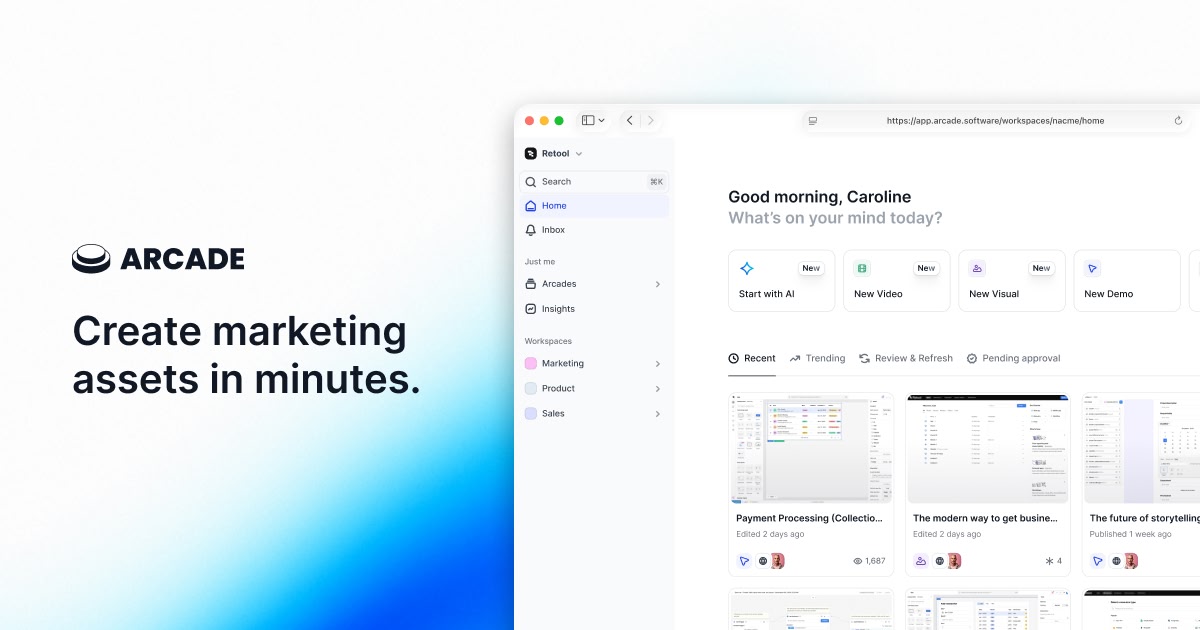
Arcade's workflow starts with a Chrome extension. You navigate through your product, and Arcade captures each screen. You then arrange these captures in their editor, adding callouts, annotations, hotspots, and tooltips. The editor is clean and well-designed. Compared to some interactive demo builders that feel cluttered, Arcade's editing experience is one of its genuine strengths.
The visual polish of the output also stands out. Arcade demos tend to look good by default. The styling, the animations between steps, and the overall presentation quality are a step above what most competitors produce without significant customisation.
Branching Paths
Arcade supports branching logic that lets viewers choose their own path through a demo. A prospect can select their role (developer, product manager, executive) and see a tailored flow. Or they can choose which feature to explore first. This is a powerful capability for website-embedded demos where different visitors have different needs.
Their 2026 benchmark data shows that question-based hotspot labels (the branching prompts) get 40% higher click rates than standard labels. That is a real engagement difference, and it validates the branching approach for interactive use cases.
Creator Studio AI Video
This is Arcade's most relevant feature for this comparison. Creator Studio lets you take an existing interactive demo and generate a video from it. The AI compiles the captured screens into a video reel with transitions and pacing. It is the closest Arcade has come to being a video production tool.
The important distinction is that Creator Studio builds on top of manual capture. You still need to record every screen through the Chrome extension first. The AI then edits that captured material into video. It is an AI video editor, not an AI video generator. The manual capture step remains.
ElevenLabs v3 Voiceover
Arcade integrated ElevenLabs v3 for voiceover in 2025, and their benchmark data shows that demos with voiceover get 14% higher completion rates. This is a meaningful addition. Adding narration to an interactive demo (or to a Creator Studio video) makes the content more engaging and accessible.
The voiceover applies to the interactive demo format. Viewers hear narration as they click through. It also carries over to Creator Studio video output. Language support is more limited than a tool built specifically for multilingual output, but for English and a handful of other languages, the quality is strong.
Auto-Updating Demos
One of Arcade's newer features is Auto-Updating Demos, which uses AI to re-capture screens when your product UI changes. Instead of manually recapturing every affected step, the system detects changes and regenerates the relevant screens. This addresses one of the biggest pain points of interactive demo platforms: maintenance.
It is a smart feature and a real time-saver for teams with large demo libraries. The re-capture is not fully autonomous (it updates within the existing demo framework), but it reduces the manual effort of keeping demos current.
What Demosmith Does
Demosmith approaches demo creation from the opposite direction. Instead of capturing screens and building an interactive experience on top of them, it generates finished demo videos autonomously from a URL and a text prompt.
Autonomous Product Navigation
You paste your product URL into Demosmith and describe the flow in plain English: "Show how a new user creates a workspace, invites a team member, and sets up their first project." The AI agent opens your product in a cloud browser, navigates the interface (clicking buttons, filling forms, scrolling pages), and captures the entire flow.
No Chrome extension. No manual clicking. The agent also injects realistic test data into forms instead of leaving "test@test.com" in every field. The result is a capture that looks like an actual user session, not a test run.
AI Voiceover in 29 Languages
Demosmith generates voiceover narration synchronised to the visual flow of the demo. The narration explains what is happening on screen as it happens, with natural pacing and intonation. 29 languages are supported in one workflow, which means producing a demo in English and then regenerating it in French, German, Japanese, or Korean takes minutes, not a separate production cycle.
For teams selling across multiple markets, this is a capability that changes the economics of localisation. A demo library that would take weeks to localise manually can be produced in an afternoon.
Auto-Editing
The raw capture goes through automated post-production: smooth transitions between scenes, dynamic zoom effects that highlight relevant UI elements, synchronised captions, and consistent pacing matched to the voiceover. The output is a finished video, not raw footage that needs a round in Premiere Pro. Teams exploring the best AI demo video generators often cite this automatic post-production as the deciding factor.
Brand Kit Applied Automatically
Colours, logo, fonts, intro sequences, and outro screens are configured once and applied to every video automatically. This ensures brand consistency across a library of demos without manual formatting on each one.
MP4 + Shareable Link Output
Every demo produces a downloadable MP4 file and a shareable link with a hosted viewer. The MP4 goes anywhere: YouTube, LinkedIn, Google Slides, email attachments, conference displays, LMS platforms. The shareable link provides a clean viewing experience with analytics on views and engagement.
Key Differences Between Demosmith and Arcade
Output Format
Arcade's primary output is an interactive click-through demo. Viewers click through steps, read callouts, and explore at their own pace. This format works well when embedded on a website or shared as a link where the viewer has the intent and context to engage actively.
Demosmith's output is video. MP4 files, shareable video links. The format works on every channel: YouTube, social media, sales decks, email, paid ads, conference booths, onboarding sequences. You cannot upload an interactive Arcade demo to YouTube. You can upload a Demosmith video anywhere. For a deeper look at the trade-offs between these formats, our interactive demos vs video demos comparison covers the decision framework in detail.
Capture Method
Arcade requires manual capture through a Chrome extension. You navigate your product, and the extension records each screen. This means someone on your team needs to know the flow, execute it cleanly, and manage the captured assets in the editor.
Demosmith requires a URL and a text prompt. The AI agent handles navigation, interaction, and capture autonomously. The human effort is writing a few sentences describing the desired demo, not clicking through the product manually.
AI Video: Secondary vs Primary
This is the most important distinction. Arcade's Creator Studio AI Video is a feature built on top of their interactive demo platform. It takes manually captured screens and compiles them into a video. The AI adds transitions and pacing, but the source material comes from manual capture.
Demosmith's entire product is AI video generation. The autonomous agent, the auto-editing pipeline, the voiceover generation, the brand kit application: every component is designed around producing video as the primary output. When video is the core product versus an add-on feature, the depth of capability shows in the output quality.
Pricing Structure
Arcade uses per-seat pricing. The free plan allows 3 demos. The Pro plan costs $32 per user per month. The Growth plan, which unlocks HTML capture and the most advanced features, starts at $297.50 per month (billed as a 5-seat minimum). Enterprise pricing is custom.
Demosmith uses flat pricing. Starter is $40 per month, Pro is $99 per month, Business is $250 per month, and Enterprise is custom. A free trial is available with no credit card required. For a team of five, Arcade Pro costs $160 per month versus Demosmith Starter at $40 per month. At the Growth tier, Arcade starts at $297.50 per month versus Demosmith Business at $250 per month.
Best Features Access
Arcade locks several of its most valuable features behind the Growth plan at $297.50 per month or higher. HTML capture, advanced analytics, and the full Creator Studio capabilities require this tier. The Pro plan at $32 per user per month is functional for basic interactive demos but does not include the features that differentiate Arcade from cheaper competitors.
Demosmith includes autonomous capture, AI voiceover, auto-editing, and brand kit on all paid plans. The pricing tiers scale on volume and advanced features, not on access to core capabilities. Every paid user gets the full autonomous workflow.
Localisation
Arcade's ElevenLabs integration supports voiceover in multiple languages, but the scope is more limited than a purpose-built multilingual workflow. Regenerating an entire demo in a new language requires re-recording through the Chrome extension (or relying on Auto-Updating Demos to handle the translation), then applying voiceover separately.
Demosmith generates voiceover and captions in 29 languages from the same prompt. Producing a demo in a new language means re-running the prompt with a language flag. The AI agent re-navigates the product and generates localised narration and captions in one pass.
When Arcade Is the Better Choice
Arcade is the right tool when you need interactive, click-through demos with visual polish. Here is where it wins clearly.
Website-embedded interactive product tours. If your primary use case is a product tour embedded on your marketing site, pricing page, or feature page, Arcade's interactive format is purpose-built for this. Visitors click through at their own pace, explore branching paths, and engage with callouts. Arcade's visual quality makes these embeds look professional.
Teams that need click-through interactivity. Some use cases require the viewer to interact, not just watch. Product-led growth flows where prospects self-serve through a demo before signing up. Sales enablement resources where buyers can explore features relevant to their role. Documentation where users follow along step by step. Interactive format is the right choice for all of these.
Branching, persona-specific demos. Arcade's branching paths let you build one demo that serves multiple audiences. If your product has different value propositions for developers, product managers, and executives, Arcade lets you build a single interactive demo that routes each persona to the right content.
Teams already invested in the interactive demo workflow. If you have a library of Arcade demos and the workflow is established on your team, the Creator Studio AI Video and Auto-Updating Demos features extend what you already have. Adding video output from existing captures is lower-friction than adopting a new tool.
When Demosmith Is the Better Choice
Demosmith is the right tool when you need polished demo videos, when you need them in volume, and when you need them without manual recording. Here is where it wins.
Video-first distribution channels. YouTube, LinkedIn, Twitter, paid video ads, sales decks, conference displays, and email outreach. All of these channels require video, not interactive embeds. Demosmith produces video as its primary output, optimised for these exact use cases, and since September 2026 the same recordings also compile into interactive demos for the website embed case.
Scale production without scaling effort. Need 30 demo videos covering different features and personas? Demosmith produces them from 30 text prompts. No Chrome extension sessions, no manual capture management, no editing queue. The effort scales with prompts, not with hours of human recording time.
Multilingual demo libraries. Producing demos in 29 languages from a single prompt workflow is something no interactive demo builder can match. For SaaS companies with a global customer base, this collapses a multi-week localisation project into an afternoon.
No recording workflow at all. Some teams do not want to record. They do not want to set up test accounts, clean up test data, click through flows carefully, and manage screen captures. Demosmith eliminates the recording step entirely. URL plus prompt equals finished video. For teams evaluating how to create SaaS demo videos without recording, this is the draw.
Keeping demos current automatically. When your product ships updates, re-running a Demosmith prompt regenerates the demo with the new UI. No manual re-capture. No updating individual screenshots. The maintenance burden drops from hours per demo to minutes per prompt.
The Bottom Line
Arcade and Demosmith are built for different jobs. Arcade builds interactive click-through demos with strong visual polish, branching logic, and a growing set of AI features including video output. Demosmith generates polished demo videos autonomously from a URL, with voiceover in 29 languages and automatic post-production.
The overlap is real but narrow. Arcade's Creator Studio AI Video moves it toward video output, but the video is built on top of manual screen captures. Demosmith's output is video from step one, generated by an autonomous agent that never needs a Chrome extension or a human clicking through the product.
For many teams, these tools are complementary. Arcade handles the interactive demos embedded on your website, where click-through engagement matters. Demosmith handles the video content distributed across YouTube, social media, sales decks, and every other channel where video is the format that works. Pairing them gives you full coverage across interactive and video formats without compromising on either.
The question is which job is primary for your team right now. If you need interactive product tours for your website, start with Arcade. If you need demo videos for marketing, sales, and multilingual distribution, start with Demosmith. And if you need both, the combined cost of Arcade Pro and Demosmith Starter ($72 per user per month and $40 per month, respectively) is still less than what many teams pay for a single enterprise demo platform.
Arcade lets prospects click through your product. Demosmith lets them watch it in action. The best demo strategy deploys each format where it performs best.
Key Takeaways
- Arcade is an interactive demo builder. Demosmith is an autonomous demo video generator. They produce different output formats for different distribution channels.
- Arcade's Creator Studio AI Video generates video from manually captured screens. Demosmith generates video from a URL and text prompt with no manual capture required.
- Arcade's per-seat pricing ($32/user/mo Pro, $297.50+/mo Growth) can exceed Demosmith's flat pricing ($40-$250/mo) for teams of three or more.
- Arcade locks its best features (HTML capture, advanced analytics, Creator Studio) behind the Growth tier. Demosmith includes autonomous capture, voiceover, and auto-editing on all paid plans.
- For website-embedded interactive tours with branching paths, Arcade is the stronger tool. For video demos across YouTube, social, sales, and multilingual markets, Demosmith produces better output with less effort.
- The two tools complement each other well. Arcade for interactive embeds on your site, Demosmith for video everywhere else.