Why Teams Are Looking Beyond Reprise
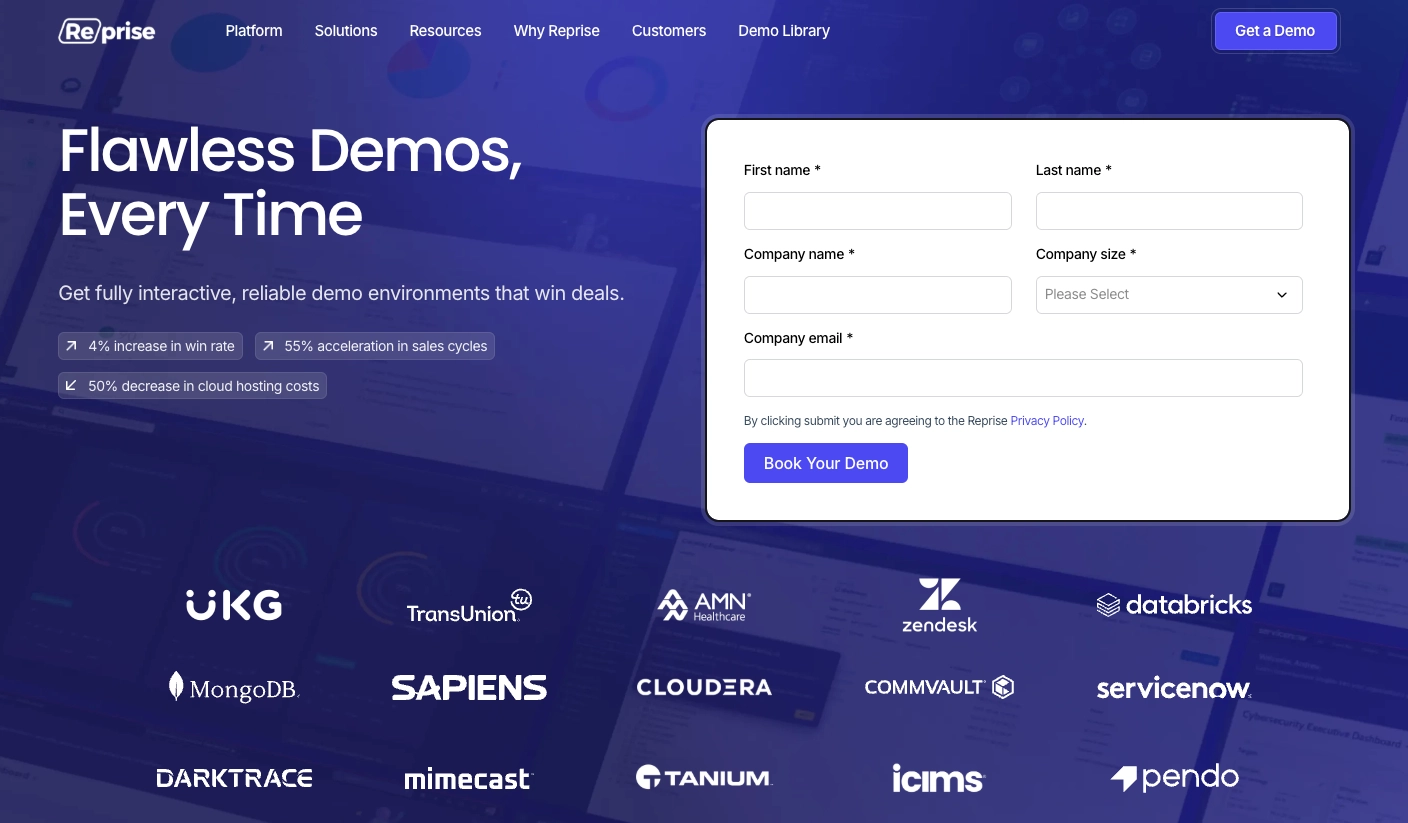
Reprise calls itself the world's leading AI demo platform, and that claim is not without foundation. Among enterprise demo tools, Reprise has built one of the most technically sophisticated offerings in the space: three distinct demo technologies, deep customisation capabilities, enterprise-grade security certifications, and integrations with the CRM and analytics tools that large revenue organisations depend on. If you have a sales engineering team, a six-figure software budget, and a complex product that needs bespoke demos for Fortune 500 buyers, Reprise is a serious option.
But the vast majority of teams evaluating demo platforms do not fit that profile. They are product marketing managers at Series B companies. They are growth leads at mid-market SaaS firms. They are founders who need to show their product on a sales call tomorrow and cannot wait six weeks for a demo environment to be provisioned by an SE. For those teams, Reprise's enterprise model creates more friction than it removes.
The price alone is a significant filter. Reprise starts at approximately $38,000 per year. The median contract, according to Vendr data, sits around $28,000. That is before factoring in the staff cost of the Sales Engineers or developers required to operate the platform effectively. Most teams that end up looking for Reprise alternatives are not rejecting its capabilities; they are rejecting the infrastructure cost that comes bundled with those capabilities.
There is also the question of output format. Reprise is built for interactive, live-environment and captured-HTML demos: the kind that a Sales Engineer walks a prospect through during a discovery call or leaves behind as a leave-behind link. It is not built for producing MP4 video demos: the kind that work on YouTube, in a LinkedIn post, in a sales email, or on a loop at a conference booth. In 2026, with video content dominating every distribution channel that matters, that gap has grown from a minor limitation to a genuine strategic problem for go-to-market teams.
This guide covers both sides of that picture. We will give Reprise full credit for what it does well before explaining where it leaves teams underserved. Then we will walk through the best AI demo video generators that fill that gap, with detailed coverage of each tool's strengths, limitations, and pricing, starting with the options most accessible to teams without dedicated presales engineering.
What Reprise Does Well
Reprise has earned its position in the enterprise demo space by solving problems that genuinely matter to large revenue organisations. Before discussing alternatives, it is worth understanding what the platform actually delivers, and why teams with the budget for it often find it worth the investment.
Three Distinct Demo Technologies for Different Use Cases
Reprise offers three separate capture and presentation technologies, which is unusual in this space and reflects the platform's depth. Replay captures your product interface as it appears, creating a faithful reproduction that sales teams can use without touching the live product. Replicate clones your application's actual functionality, creating a working demo environment that behaves like the real product. Reveal adds data overlays to your live product environment, letting you inject custom data without needing a full sandbox.
This three-technology approach gives enterprise teams genuine flexibility. A Sales Engineer can choose the right tool for each situation: Replay for a quick overview, Replicate for a hands-on proof of concept, Reveal for an executive briefing where the prospect wants to see their own data in the interface. Few platforms offer this range of options within a single product.
Advanced HTML, CSS, and JavaScript Editing
One of Reprise's most cited strengths among technical users is the depth of customisation available in the demo editor. You can edit HTML, CSS, and JavaScript directly within captured demos, which means you can make surgical changes to the appearance and behaviour of a demo without recapturing from scratch. Buttons can be renamed. Navigation flows can be simplified. Data can be changed at the code level. For Sales Engineers who know what they are doing, this level of control is powerful.
The global find-and-replace feature is particularly useful for personalisation at scale. If a prospect's company name needs to appear throughout a 50-step demo, one find-and-replace operation handles it across the entire flow. This kind of feature is purpose-built for enterprise sales teams that need to personalise demos for each account without rebuilding every time.
AI-Powered Demo Management Features
Reprise has invested in AI capabilities across its platform. The AI can fill sandbox environments with custom data, which saves the time that would otherwise be spent manually seeding a demo environment with realistic-looking content. It can anonymise personally identifiable information automatically, which matters for enterprise sales demos where real customer data might appear in a screen capture. It can also identify content within existing demos that needs to be updated as the product evolves, reducing the manual review burden when a new product version ships.
These are not superficial AI features. They address real pain points that enterprise presales teams face daily: demo data quality, compliance with data handling policies, and demo maintenance at scale across a large library of existing assets.
Enterprise Security Certifications
Reprise holds both SOC 2 Type II and ISO 27001:2022 certifications. It is, according to available information, the only demo platform in the space that holds ISO 27001 certification. For enterprise procurement processes where security review is mandatory, this matters. Being able to point to ISO 27001 certification can shorten a security review that might otherwise take weeks. For companies selling into financial services, healthcare, or government, these certifications are often non-negotiable vendor requirements.
Team Collaboration and Asset Library
Reprise includes demo templates and a shared image library that give large demo teams a foundation for brand consistency. When you have 20 Sales Engineers each building their own demos, shared templates and a centralised asset library reduce the variance between what different reps show in the field. The platform also supports offline demo capabilities, which is useful for field sales teams who cannot always rely on a stable internet connection during an in-person presentation.
Integrations with Enterprise Go-to-Market Stack
Reprise integrates with Google Analytics, HubSpot, and Salesforce, along with an API that lets engineering teams embed Reprise demos in complex enterprise sales workflows. For organisations where demo engagement data needs to flow into CRM records and inform lead scoring, these integrations close an important loop. The API access in particular makes Reprise extensible beyond its out-of-the-box feature set, which matters for sophisticated revenue operations teams.
Where Reprise Shines: Complex Enterprise Sales Cycles
Reprise is at its best when the deal is large, the sales cycle is long, the product is complex, and there is a dedicated Sales Engineer to own the demo environment. In that context, the depth of customisation, the security certifications, the team collaboration features, and the multiple capture technologies come together to support a genuinely sophisticated presales operation. Users consistently credit Reprise as flexible and customisable, and for enterprise accounts where that flexibility is necessary, the investment can be justified.
Where Reprise Falls Short
Reprise's strengths are real, but they come attached to constraints that make the platform unsuitable for a large portion of the teams who need demo capabilities. The gap is not a matter of missing features; it is a matter of the platform being designed for a specific organisational model that most teams do not have.
The Price Point Excludes Most Teams
Reprise starts at approximately $38,000 per year, with a median contract around $28,000 according to Vendr. Contracts for larger deployments climb to $60,000, and large enterprise accounts can reach $100,000 or more annually. There is no free trial and no self-serve path: you have to go through a sales process to get access.
For startups, mid-market companies, and any team without a dedicated presales engineering budget, this pricing is simply not viable. Even teams with meaningful software budgets often find it difficult to justify a five-figure annual commitment to a single demo tool when other options exist at a fraction of the cost. The $38,000 floor is not just a pricing decision; it is a statement about which customers Reprise is designed to serve.
Requires Technical Staff to Operate Effectively
Reprise's depth of customisation is a genuine strength, but it comes with a prerequisite: you need someone technical enough to use it. The HTML, CSS, and JavaScript editing capabilities are powerful in the hands of a Sales Engineer or developer who is comfortable in a code editor. In the hands of a product marketer or growth manager who is not, those same capabilities become a source of frustration and a reason to call for engineering help.
G2 reviews of Reprise consistently mention this friction. Users describe the editor as "buggy" and "finicky." Autosave problems have been flagged across multiple reviews. The learning curve is steep even for technical users, and the time investment required to become proficient on the platform is significant. Teams without dedicated presales engineering find themselves dependent on the engineering team to manage and update demos, which creates exactly the kind of bottleneck that a demo tool is supposed to eliminate.
No Mobile Demo Support
Reprise demos can technically be viewed on a mobile browser, but the experience is poor. The platform is built around desktop browser capture, and that orientation does not translate well to mobile viewports. In 2026, this is a meaningful gap. Buyers open emails on their phones, review sales content in transit, and share demo links with colleagues who may be on a mobile device. A demo that degrades significantly on mobile reaches fewer of the decision-makers in the buying process than it should.
For SaaS companies with a mobile product, the limitation is even sharper. If your product has a mobile app, or if your web product is designed to work responsively across device sizes, Reprise's desktop-centric capture approach makes it difficult to demonstrate the mobile experience accurately.
No Video Output
This is the structural limitation that drives the largest category of teams to look for alternatives. Reprise produces interactive demos: captured HTML environments, live overlays, and guided walkthroughs. It does not produce video. There is no MP4 export, no AI voiceover, no video rendering pipeline.
That means Reprise demos cannot go to YouTube. They cannot be embedded as native video on LinkedIn. They cannot be attached to a sales email as a video thumbnail that plays on click. They cannot be dropped into a Google Slides deck and played during a board presentation. They cannot loop on a screen at a trade show booth. Every channel where video is the required or preferred format is off-limits for Reprise output.
For teams whose go-to-market motion extends beyond the controlled environment of a one-on-one discovery call, this is a significant constraint. The channels that drive the highest volume of demo consumption in 2026 are video channels, and Reprise does not address them.
Engineering Dependency Creates GTM Bottlenecks
Because Reprise requires technical expertise to operate, go-to-market teams without their own Sales Engineers end up routing demo requests through the engineering team. A product marketer who needs a new demo for a campaign launch has to file a ticket, wait for availability, brief an engineer on the use case, and review the output. What should be a self-serve creative task becomes a cross-functional project with a queue and a lead time.
This bottleneck is not unique to Reprise: it affects any tool that requires technical operation. But Reprise's price point means teams are paying enterprise rates for a tool that still requires enterprise-level staffing to unlock. If the goal is to move faster on demo creation without growing headcount, Reprise is not the answer.
What to Look For in a Reprise Alternative
When evaluating alternatives to Reprise, the criteria that matter depend on why you are looking for an alternative in the first place. Most teams fall into one of two camps: those who need video output that Reprise cannot provide, and those who need the core interactive demo functionality but cannot justify the cost or complexity. Here are the dimensions that matter most.
Accessibility Without Technical Prerequisites
If the reason you are leaving Reprise (or never joining it) is the requirement for technical staff, the first thing to evaluate in an alternative is whether non-technical team members can operate it independently. Product marketers, sales enablement managers, and growth leads should be able to create, publish, and update demos without filing a ticket with engineering. Look for tools with intuitive editors, clear documentation, and a support model that does not assume Sales Engineer-level technical knowledge.
Video as a Native Output Format
If your primary gap with Reprise is the inability to produce video content, prioritise tools where video is not an afterthought but the core product. A tool that was designed from day one to produce MP4 output will produce dramatically better video than one that has bolted video export onto an interactive demo builder. Purpose-built video means a full pipeline: autonomous or minimal-effort capture, professional auto-editing, AI voiceover, brand kit application, and export in formats that work across every channel.
Accessible Pricing with a Free Trial Path
Reprise's $38,000 floor and lack of a free trial create an evaluation process that is itself a significant commitment. The alternative you choose should let you evaluate the product before buying, ideally with a free trial that gives you enough access to test the core workflow end to end. Pricing should be transparent and should scale with your usage, not with a sales team's assessment of what your budget can support.
Multi-Language Support
If your company sells internationally, the ability to produce demos in multiple languages without hiring voiceover artists or rebuilding demos from scratch is a meaningful efficiency gain. Look for tools with native multi-language support: not just translated UI strings, but actual AI voiceover that narrates the demo in the buyer's language. This capability, once reserved for enterprise budgets, is now available at Starter plan pricing on some platforms.
Mobile-Ready Output
Given Reprise's weakness on mobile, pay attention to how alternatives handle mobile viewing. Demo content shared as a link will be opened on a phone by a meaningful percentage of the people who receive it. A demo that degrades on mobile means lost attention and lost conviction at a critical point in the buying process. Video demos, in particular, are mobile-native by default: they play in any mobile browser and any mobile video player without the layout problems that affect interactive HTML demos on small screens.
Self-Serve Creation and Rapid Iteration
The right alternative should compress the time from "I need a new demo" to "I have a finished demo" from days or weeks to hours or minutes. Whether that comes from an AI agent that navigates your product autonomously, a simplified capture workflow, or AI-assisted editing, the tool should enable rapid creation and even faster updating when your product changes. Speed of iteration is often more valuable than depth of customisation for teams operating in fast-moving markets.
Best Reprise Alternatives for Product Demo Videos
1. Demosmith -- Best Overall Reprise Alternative for Video Demos
Demosmith approaches the demo problem from a fundamentally different angle than Reprise. Where Reprise is built for Sales Engineers who need to configure complex interactive environments for enterprise discovery calls, Demosmith is an AI Demo Agent that autonomously navigates your product and produces a polished video demo with no human operation of the capture process required. The two tools are built for different teams with different needs, which is precisely why Demosmith is the right alternative for the majority of teams that find Reprise out of reach.
The workflow starts with a URL and a description. You paste your product URL into Demosmith, describe the flow you want to demonstrate in plain English (something like "show how a user creates their first dashboard and invites a collaborator"), and the AI agent handles everything from there. It opens your product in a browser, navigates through the flow, captures the screens, and runs the footage through an automated editing pipeline that applies transitions, dynamic zoom effects, captions, and AI voiceover narration. The output is a finished MP4 video, typically delivered in under 10 minutes.
That output format is the core differentiator relative to Reprise. Where Reprise produces interactive demos that live in a browser and require someone to click through them, Demosmith produces video that works everywhere: uploaded to YouTube, shared natively on LinkedIn, embedded in a sales email as a clickable thumbnail, dropped into a Google Slides deck, or played on a loop at a conference booth. Every channel that Reprise cannot serve, Demosmith covers.
Where Demosmith beats Reprise for most teams:
- No engineers required. Any team member can create a demo by pasting a URL and writing a description. No Sales Engineer, no developer, no Chrome extension, no manual screen recording.
- Video output for every channel. Reprise produces interactive demos. Demosmith produces MP4 video that works on YouTube, LinkedIn, in sales emails, in decks, and at events.
- AI voiceover in 29 languages. Arabic, Bulgarian, Chinese, Croatian, Czech, Danish, Dutch, English, Filipino, Finnish, French, German, Greek, Hindi, Indonesian, Italian, Japanese, Korean, Malay, Polish, Portuguese, Romanian, Russian, Slovak, Spanish, Swedish, Turkish, Ukrainian, and Vietnamese. Narration is generated automatically and synced to the visual flow. No voiceover artist, no recording studio, no re-recording per language.
- Free trial with no credit card required. Reprise has no self-serve path and no free trial. Demosmith lets you evaluate the full workflow before committing.
- Accessible pricing. Starter at $40 per month. Pro at $99 per month. Business at $250 per month. Enterprise pricing for custom contracts. The gap between Demosmith's Starter plan and Reprise's minimum contract is roughly $37,500 per year.
- Brand kit auto-applied. Configure your brand colours, logo, and fonts once. Every video Demosmith generates reflects your brand identity automatically.
- Rapid iteration on product changes. When your UI updates, run the same prompt again. No screenshot-by-screenshot recapture. No tooltip repositioning. A new video in minutes rather than a week of SE time.
- Mobile-ready output. Video plays correctly on any device. No layout degradation, no broken interactive elements, no mobile-specific build required.
Teams scaling demo production across multiple features, personas, and languages will find Demosmith's approach to scaling demo production particularly compelling. The autonomous generation model means that producing 20 demos takes roughly the same effort as producing one: describe the flow, let the agent work, download the video.
Pricing: Free trial, no credit card required. Starter at $40/mo, Pro at $99/mo, Business at $250/mo, Enterprise custom.
Limitations to be clear about:
- Updated September 2026: Demosmith also compiles interactive demos from its own recordings of your product, so website click-through tours no longer require a separate tool. Live demo environments with personalised data remain Reprise's territory.
- Complex flows that involve third-party authentication or multi-service integrations may need a second generation pass or some guidance.
- Frame-by-frame editing control is more limited than a traditional video editor like Premiere Pro or Final Cut. For most demo use cases this is not a constraint, but for teams that need surgical post-production control, the tradeoff is worth knowing.
Best for: Product marketing teams, sales teams, growth leads, and founders who need polished demo videos without the engineering overhead. Particularly strong for teams distributing demos across video channels (YouTube, LinkedIn, sales emails, decks, events) where interactive demos either do not work or perform poorly.
For the video-led route, the SaaS demo video generator category page has the details.
Reprise is built for the Sales Engineer who has three hours to configure a bespoke demo environment for a single enterprise account. Demosmith is built for the product marketer who needs ten polished demo videos by Friday. Those are different problems, and the right tool depends entirely on which one you have.
2. Navattic -- Accessible Interactive Demo Platform
Navattic is a strong alternative for teams whose primary need is interactive demos rather than video, but who find Reprise's price and complexity excessive. It positions itself as an interactive demo platform for revenue teams, with HTML capture, CRM integrations, and an AI Copilot that accelerates demo creation. Teams looking at the broader landscape of interactive demo tools often explore Navattic alternatives when they need more than click-through tours, but Navattic itself is a credible step down from Reprise's complexity and price.
The Navattic workflow is more accessible than Reprise's. Marketing and sales team members who are not engineers can build and publish interactive demos using the platform's editor. The AI Copilot can auto-generate demo flows and annotations based on your product, which reduces the time spent on manual step-by-step construction. Analytics and CRM integrations (Salesforce, HubSpot) are solid and support lead scoring based on demo engagement data.
Where Navattic competes directly with Reprise is in the HTML capture tier. At the Base plan and above, Navattic captures the actual front-end code of your application, creating an interactive environment that behaves more like the real product than a screenshot slideshow does. This is a meaningful capability for sales teams that need to demonstrate dynamic product behaviour without provisioning a full sandbox.
Pricing: Starter Plus at $40/mo. Base at $500/mo. Growth at $1,200/mo. Enterprise custom.
Where Navattic beats Reprise:
- Significantly lower starting price and no requirement for Sales Engineers to operate the platform.
- AI Copilot accelerates demo creation for non-technical team members.
- Free trial available for evaluation before commitment.
- Strong analytics and CRM integration at accessible price points.
Limitations:
- No video output. Navattic shares Reprise's core limitation: the output is an interactive demo, not a video.
- HTML capture is locked behind the Base plan at $500/mo. The Starter Plus plan at $40/mo is screenshot-based only.
- Does not address the video distribution problem at all.
- Less depth of customisation than Reprise for complex enterprise use cases.
Best for: Teams that need interactive product tours without Reprise's enterprise overhead. Not a replacement if video is the primary output requirement.
3. Walnut -- Sales-Focused Interactive Demo Platform
Walnut targets a similar buyer to Reprise: sales teams at B2B companies with complex products and longer sales cycles. It offers HTML-based interactive demos, personalisation features, and analytics designed to support enterprise sales motions. The positioning is explicitly sales-first, with features like demo branching, team collaboration, and account-specific personalisation built around the needs of Account Executives and Sales Engineers.
Compared to Reprise, Walnut is somewhat more accessible: the starting price is lower and the platform is designed to be operable by sales team members without deep technical backgrounds. The tradeoff is less depth of customisation. Walnut does not offer the three-technology approach (Replay, Replicate, Reveal) that Reprise provides, and the HTML editing depth is more limited. For teams that need Reprise-level technical control, Walnut is a step down. For teams that need Reprise-level results without Reprise-level complexity, Walnut sits in an interesting middle ground. Teams who find Walnut's own pricing or feature set a barrier often search for Walnut alternatives for similar reasons to those covered in this guide.
Pricing: Starts at approximately $9,200 per year. No free trial. Enterprise custom pricing.
Where Walnut compares to Reprise:
- Lower starting price: $9,200/year versus Reprise's $38,000 floor.
- Less technical overhead: sales team members can operate it without dedicated Sales Engineers.
- Similar sales-first positioning and enterprise CRM integrations.
- Less depth in customisation and fewer capture technology options than Reprise.
Limitations:
- No free trial, which makes evaluation a commitment without hands-on testing.
- No video output: the same interactive-only limitation as Reprise and Navattic.
- Still a meaningful price investment for smaller teams.
- Less suitable for use cases that require the depth of Reprise's Replicate or Reveal technologies.
Best for: Sales teams at mid-market B2B companies that need interactive demos with enterprise sales features but cannot justify Reprise's price or complexity. Not a video demo solution.
4. Storylane -- Accessible Interactive Demo Builder
Storylane occupies the more accessible end of the interactive demo market. Its screenshot-based demos and HTML capture tier are well-suited for product marketing teams, customer success teams, and sales enablement managers who need to build guided product tours without engineering involvement. The Chrome extension capture workflow is intuitive, the editor is clean, and the analytics dashboard provides enough engagement data to optimise demo flows over time.
Compared to Reprise, Storylane is dramatically more accessible: the Starter plan at $40/mo is screenshot-based and covers many common use cases. The Growth plan at $500/mo unlocks HTML capture with more sophisticated interactive capabilities. Neither requires a Sales Engineer to operate, and neither demands the six-figure budget that Reprise does.
The tradeoff is depth. Storylane does not offer the three capture technologies, the direct HTML/CSS/JS editing, or the enterprise security certifications that justify Reprise's price for large accounts. For the majority of teams who never needed that depth, that is not a tradeoff; it is a feature.
Pricing: Free tier available. Starter at $40/mo. Growth at $500/mo. Enterprise custom.
Where Storylane compares to Reprise:
- Dramatically lower starting price and no requirement for Sales Engineers.
- Free tier available for evaluation.
- AI-powered annotation generation speeds up demo creation.
- Good analytics and CRM integrations for the price point.
Limitations:
- No video output. Like all interactive demo tools in this list, Storylane does not produce video.
- HTML capture is only available on the Growth plan at $500/mo.
- Less enterprise depth than Reprise in terms of customisation, security certifications, and capture technology range.
- Mobile demo experience has limitations similar to other HTML-capture tools.
Best for: Product marketing and sales enablement teams that need interactive product tours at an accessible price. Not a Reprise replacement for complex enterprise presales workflows, and not a video demo solution.
5. Supademo -- Affordable Entry for Smaller Teams
Supademo is the most accessible option in this comparison on price. At $27/mo for the Pro plan, it delivers screenshot-based interactive demos with AI-generated annotations, making it a practical choice for startups and small teams that want interactive product tours without significant budget commitment. The AI annotation feature writes tooltip text and step descriptions automatically after capture, which reduces the manual effort of building out a guided walkthrough from raw screenshots.
Supademo does not attempt to match Reprise's depth. There is no HTML capture, no multi-technology demo approach, no enterprise security certifications. What it offers is speed and affordability for teams whose use case fits within its scope: simple guided product tours, documentation walkthroughs, and onboarding flows where screenshot fidelity is sufficient.
Pricing: Free plan available. Pro at $27/mo. Scale at $38/mo. Enterprise custom.
Where Supademo compares to Reprise:
- Entry price roughly 1,400 times lower than Reprise's starting contract.
- No engineering requirement: any team member can build and publish a demo.
- AI annotations reduce manual creation time significantly.
- Free plan available for zero-commitment evaluation.
Limitations:
- Screenshot-based only: no HTML capture, no live environment cloning.
- No video output, voiceover, or video editing capabilities.
- Limited analytics and CRM integrations compared to Reprise, Navattic, or Walnut.
- Not suitable for enterprise presales use cases that require the depth Reprise provides.
Best for: Startups and small teams that want guided product tours for their website, documentation, or onboarding without the cost or complexity of enterprise demo tools. Not a Reprise replacement for complex sales engineering workflows, and not a video demo solution.
Reprise vs Alternatives: Interactive vs. Video Demos
One of the most useful frames for evaluating Reprise and its alternatives is the distinction between interactive demos and video demos. These are not different quality levels of the same output; they are fundamentally different formats that serve different audiences, different channels, and different stages of the buying process. Most teams who evaluate Reprise end up needing both formats, and understanding which tools serve which need clarifies the decision considerably.
When Interactive Demos Are the Right Tool
Interactive demos are at their best when the buyer has intent, attention, and the willingness to engage actively. When a prospect lands on your pricing page after researching your category, clicks "See the product," and wants to explore specific features relevant to their use case, an interactive demo is the ideal format. The click-through structure lets them move at their own pace, focus on what matters to them, and develop a genuine sense of the product experience without needing to book a demo call.
Interactive demos also work well in post-meeting leave-behinds, where a Sales Engineer sends a personalised demo link after a discovery call with the prospect's company name, data, and relevant features pre-configured. Reprise is genuinely strong in this use case. Walnut and Navattic serve it well at lower price points. Storylane and Supademo cover the simpler version of it effectively.
When Video Demos Are the Right Tool
Video demos are the right format for every context where the viewer is passive: watching rather than clicking. Consider the channels where most B2B go-to-market teams distribute demo content in 2026:
- YouTube and video search. You cannot upload an interactive demo to YouTube. Video is the only option, and video SEO drives meaningful organic discovery for SaaS products.
- LinkedIn and social media. Native video posts on LinkedIn generate significantly higher reach than links to external interactive demos. Platform algorithms reward content that keeps users on the platform, and video does that more effectively than any other format.
- Sales emails and outreach sequences. A video thumbnail in an email drives more clicks than a plain text link. When the prospect clicks, they expect to watch something, not to interact with a browser-based demo environment.
- Sales decks and presentations. An Account Executive presenting to a buying committee needs a demo video that plays within Google Slides or PowerPoint. An interactive demo in a presentation breaks the flow and requires the presenter to navigate away from the deck.
- Conference booths and events. Screens at trade shows loop video content continuously. An interactive demo requires a person standing beside it to operate it.
- Paid video advertising. LinkedIn Video Ads, YouTube pre-roll, and Meta video placements all require video files. Interactive demos are not a valid ad format on any major platform.
- Onboarding and in-app education. Video walkthroughs that new users can watch at their own pace are a staple of modern SaaS onboarding. They work in welcome emails, in-app modals, and help centers far more naturally than interactive demos.
None of the interactive demo tools covered in this guide, including Reprise, produce video output that is competitive with purpose-built video tools. Reprise's focus on interactive and live-environment demos means it has invested its development resources in depth of capture and customisation, not in video production pipelines.
The Combined Approach: Both Formats for Different Contexts
The most effective go-to-market teams in 2026 are not choosing between interactive and video. They are using interactive demos where click-through engagement is the right format (website embeds, personalised leave-behinds) and video demos everywhere else (social, email, decks, events, advertising, onboarding). The two formats are complementary, not competing.
The practical implication is that even teams who find genuine value in an interactive demo tool like Navattic or Storylane often add Demosmith to their stack to cover the video side. At $40/mo for Demosmith's Starter plan, the combined cost of interactive and video demo capabilities is well within reach for teams at any stage.
Reprise vs Alternatives: Side-by-Side Comparison
Here is how Reprise stacks up against the best alternatives across the dimensions that matter most:
| Feature | Reprise | Demosmith | Navattic | Walnut | Storylane |
|---|---|---|---|---|---|
| Primary Output | Interactive HTML / live overlay | MP4 video + shareable link | Interactive click-through | Interactive click-through | Interactive click-through |
| Video Export | No | Yes — primary output | No | No | Limited — not primary |
| AI Voiceover | No | Yes — 29 languages | No | No | No |
| Engineers Required | Yes — Sales Engineers needed | No — fully self-serve | No — self-serve | Partial — less technical than Reprise | No — self-serve |
| Free Trial | No | Yes — no credit card | Yes | No | Yes — free tier |
| Starting Price | ~$38,000/year | $40/mo (Starter) | $40/mo (Starter Plus) | ~$9,200/year | $40/mo (Starter) |
| Best For | Enterprise presales with dedicated SEs | Video demos for all channels | Interactive demos without SE overhead | Mid-market sales teams | Website-embedded interactive tours |
Conclusion: Choosing the Right Tool for the Job
Reprise is a serious product built for a specific organisational model. If you have a dedicated presales engineering team, an enterprise software budget, and a sales motion centred on highly customised, one-to-one demos for large accounts, Reprise delivers capabilities that few platforms can match: three distinct demo technologies, deep HTML editing, ISO 27001 certification, and the kind of technical depth that serious enterprise sales environments require. Its users who credit it as "flexible and customisable" are not wrong. In the right context, that flexibility is worth the investment.
But that context describes a small fraction of the teams looking for demo tools in 2026. For the majority: startups, mid-market companies, product marketing teams, growth leads, and founders, Reprise's model imposes costs and complexity that are not justified by the problems those teams actually need to solve. The $38,000 price floor, the Sales Engineer requirement, the lack of a free trial, and the absence of mobile and video support are not minor inconveniences. They are structural incompatibilities with how most go-to-market teams actually operate.
The alternatives covered here serve different segments of the gap. Navattic and Storylane serve teams that need accessible interactive demos without enterprise overhead. Walnut serves sales teams at mid-market companies that want more structure than Storylane but less complexity than Reprise. Supademo serves small teams and startups that want affordable screenshot-based tours for their website and documentation.
Demosmith serves a different need entirely: the growing number of teams for whom video is the primary demo format. If the channels that drive the most demo consumption in your go-to-market motion are YouTube, LinkedIn, sales emails, decks, and events, then the interactive demo tools in this list, including Reprise, are solving the wrong problem. Demosmith's AI Demo Agent approach produces polished MP4 video demos in under 10 minutes, with AI voiceover in 29 languages and no engineering team required, and since September 2026 the same recordings also compile into interactive demos for the website side. That is the answer to the video distribution problem that Reprise, by design, does not address.
For many teams, the clearest path forward is a combination: an accessible interactive demo tool for website embeds and personalised leave-behinds, and Demosmith for every video distribution channel. The combined cost is a fraction of a Reprise contract, and the coverage is broader.
Reprise is the right tool if you have a Sales Engineering team, a six-figure budget, and complex enterprise demos to build. If you have none of those three things, the right tool is one that was designed for you from the start.
Key Takeaways
- Reprise is a legitimate enterprise platform with real strengths: three demo technologies, deep HTML/CSS/JS editing, ISO 27001 certification, and AI-powered demo management. It deserves consideration if your organisation fits the profile it was built for.
- The $38,000 starting price, Sales Engineer requirement, and lack of a free trial make Reprise inaccessible for the majority of teams that need demo capabilities in 2026.
- Reprise produces interactive and live-environment demos but no video. Every distribution channel that requires video (YouTube, LinkedIn, sales emails, decks, events, paid advertising) is outside its scope.
- Demosmith is the strongest alternative for teams whose primary need is video demos. Its AI Demo Agent produces polished MP4 output with voiceover in 29 languages, starting at $40/mo with a free trial, and requires no engineers to operate.
- Navattic, Walnut, and Storylane are credible alternatives for teams that need interactive demos without Reprise's enterprise overhead. None of them produce video either, so they address only part of the gap.
- The most effective approach for most teams is a combined stack: an accessible interactive demo tool for website embeds and leave-behinds, and Demosmith for video distribution across every channel where interactive demos do not work.