Arcade in 2026: What You Need to Know
Arcade has carved out a clear position in the interactive demo space: the tool you choose when your demos need to look good. Founded in 2022, it has built a reputation for visual polish that competitors have struggled to match. On G2, Arcade holds a 4.6 out of 5 rating across roughly 180 reviews. The numbers are smaller than some competitors, but the sentiment is strong.
In 2026, Arcade pushed into territory that separates it further from pure interactive demo builders. Creator Studio, its AI-powered video feature, turns a screen recording into a narrated video and lets you publish the same source as an interactive demo and an MP4. AI voiceover with a voice named Avery narrates the output. These are ambitious additions that signal where Arcade is heading.
The question is whether the execution matches the ambition. Arcade's public pricing is Free, Growth at $50 per month, or $42.50 per month billed annually, and Enterprise with custom pricing. The free plan gives you one demo and one video, watermarked. Growth removes the watermark and unlocks branching and translations. For small teams, weighing that spend against the AI credit limits can be hard to justify.
This review covers what Arcade does well, where the pricing creates friction, who should use it, and where other tools might serve you better. We have tested Arcade ourselves, tracked its 2026 updates, and spoken with teams that use it in production. Here is what we found.
What Is Arcade?
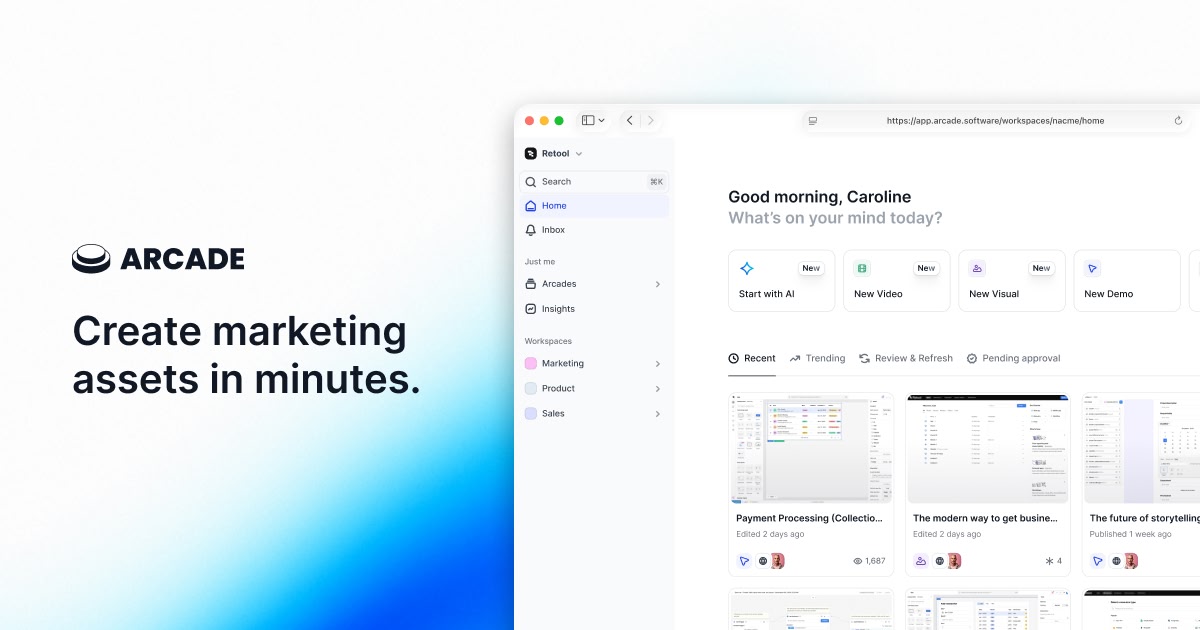
Arcade is an interactive demo creation platform. You install a Chrome extension, click through your product, and Arcade captures each step as a screenshot with cursor tracking and click annotations. The output is an interactive walkthrough that viewers can click through at their own pace. On the Growth plan, you can also capture HTML snapshots that preserve interactive UI elements.
What sets Arcade apart from Supademo, Storylane, and Navattic is its emphasis on visual presentation. Arcade demos have a cinematic quality that other screenshot-based tools lack. Background blur, smooth cursor animations, branded colour themes, and callout styling give Arcade demos a more polished feel out of the box. Marketing teams consistently cite this visual quality as the reason they chose Arcade over alternatives.
With 14 million demo sessions processed, Arcade has also built useful benchmark data. Their 2026 benchmarks show that demos with voiceover achieve 14% higher completion rates, and hotspot labels phrased as questions get 40% higher click-through rates than statement-based labels. These data points help teams optimise their demos based on real engagement patterns, not guesswork.
Arcade Features Worth Knowing
Screenshot and Video Capture
Arcade's core capture workflow uses its Chrome extension to grab screenshots as you click through your product. Each step records the cursor position, the click target, and the resulting screen state. You can also record video segments and combine them with screenshot steps in a single demo. The recording quality is high, and the cursor tracking produces smooth, professional-looking movement between steps.
On the Growth plan, HTML capture preserves interactive elements. Viewers can type, scroll, and interact with a cloned version of your interface rather than clicking through static images. This is useful for product-led growth teams that want prospects to experience the product without signing up.
Creator Studio AI Video Editing
This is Arcade's most ambitious 2026 feature. Creator Studio takes your demo content and uses AI to generate video output: sizzle reels, product overview videos, and marketing clips. You select demo segments, choose a style, and the AI assembles a video with transitions, music, and pacing. The idea is to turn your interactive demo library into a source for video marketing content without a separate production workflow.
In practice, Creator Studio is still early. The AI makes decent choices for short clips and social media content, but longer videos can feel formulaic. Teams using it for YouTube or website hero videos find they need to edit the output further. It is a promising direction, but not yet a replacement for dedicated video production.
ElevenLabs v3 Voiceover
Arcade integrated ElevenLabs v3 for AI-generated voiceover narration on demos. You type a script, choose a voice, and the narration syncs to your demo steps. The voice quality is noticeably better than earlier versions, and Arcade's own benchmark data shows that demos with voiceover achieve 14% higher completion rates than silent demos. For teams that want narrated walkthroughs without recording their own voice, this is a meaningful upgrade.
Record Once, Publish to Many
Arcade's model is record once, publish to many. You capture a single flow through your product, then repurpose that source across formats. The same recording can ship as an interactive click-through demo, a narrated MP4 through Creator Studio, and a shorter clip for social or sales outreach.
This reduces the effort of maintaining separate assets for each channel. Instead of building an interactive demo and then recording a video separately, you work from one capture and let Arcade adapt it. For teams that publish demos across a website, onboarding flows, and outbound sequences, working from a single source saves real time.
Intercom Integration
Arcade added native Intercom integration in 2026, letting you embed interactive demos directly in Intercom messages, help articles, and product tours. For customer success teams using Intercom as their primary support channel, this means you can answer "how do I do X?" with an embedded demo rather than a text explanation or a link to a help doc.
Private Teams
Private Teams lets organisations create separate workspaces within Arcade with their own permissions, demo libraries, and brand settings. For agencies managing demos for multiple clients, or large companies with separate product lines, this keeps content organised and access controlled. It is a basic but necessary feature for multi-team deployments.
Engagement Analytics and Benchmarks
Arcade provides step-level engagement data: which steps viewers complete, where they drop off, how long they spend on each screen, and which hotspots they click. The 2026 benchmarks (14% higher completion with voiceover, 40% higher click rates with question-based hotspot labels) give teams concrete optimisation targets based on aggregate data from 14 million sessions.
Arcade Pricing in 2026
Arcade's pricing is Free, Growth, and Enterprise. AI credit limits and seat counts drive the cost as teams grow.
| Plan | Price | Key Features |
|---|---|---|
| Free | $0 | 1 demo, 1 video, watermarked, monthly AI credit allowance |
| Growth | $50/mo, or $42.50/mo billed annually | Watermark removed, branching, translations, Creator Studio video, analytics |
| Enterprise | Custom | SSO, dedicated support, custom integrations, SLA, onboarding |
The free plan gives you one demo and one video, watermarked, plus a monthly AI credit allowance. It is enough to test the capture workflow and the Creator Studio output before you pay. For a solo marketer trying Arcade for the first time, it lowers the barrier to entry.
Growth at $50 per month, or $42.50 per month billed annually, removes the watermark and unlocks branching, translations, Creator Studio video, and analytics. This is the plan most teams land on for real work. Extra seats and higher AI credit limits raise the cost as usage grows, so the effective price depends on how many demos and videos you generate.
Compared to direct competitors, Arcade's Growth plan sits above Supademo's Pro ($27/creator/mo) but stays in reach for small teams that want the video output and branding controls. Teams that generate many demos should model the AI credit usage, since heavy use is where the cost climbs.
What Users Like About Arcade
- Visual polish that stands out. This is Arcade's most consistent piece of praise. G2 reviewers frequently describe Arcade demos as "beautiful" and "professional-looking." The default styling, cursor animations, background treatments, and callout designs produce demos that look like they were designed by a marketing team, even when they were built by a product manager in 20 minutes.
- Fast to create, easy to share. Arcade's capture workflow is quick. Install the extension, click through your product, annotate, publish. Most users report having a shareable demo ready in 15 to 30 minutes. The sharing options (embed, link, custom domain) cover the standard distribution channels without friction.
- Creator Studio is a genuine innovation. While still early, the ability to generate video content from interactive demo assets is something no other tool in the category offers in the same way. Teams that produce content across interactive demos and video find value in a single tool that serves each format.
- Record once, publish to many. Teams that ship demos across a website, onboarding, and outbound sequences praise the ability to capture one flow and repurpose it as an interactive demo, a narrated video, and shorter clips. Working from a single source saves hours over building separate assets per channel.
- Strong branding controls. Arcade gives you detailed control over colours, fonts, backgrounds, callout styles, and intro/outro screens. For marketing teams that need every piece of content to match brand guidelines, these controls matter more than most demo tools provide.
- Useful engagement benchmarks. The aggregate benchmark data from 14 million sessions gives teams concrete targets for optimisation. Knowing that voiceover adds 14% to completion rates is the kind of data point that changes how you build demos.
What Users Complain About
- AI credit limits add up. Growth includes a monthly AI credit allowance, and teams that generate many videos hit that ceiling. Several reviewers mention the effective cost climbing once they factor in extra seats and higher credit tiers, which makes budgeting harder than the headline $50 per month suggests.
- Free plan is thin. The free plan caps you at one demo and one video, each watermarked. It is enough to test the workflow, but you outgrow it quickly, which pushes most real use onto Growth. Users who wanted a longer runway on free mention this as a friction point.
- Editing can be cumbersome for complex demos. Several reviewers note that reordering steps, adjusting annotations on multiple screens, and managing branching paths becomes tedious in longer demos. The editor handles simple demos well but gets unwieldy when you are building 30-plus step walkthroughs with conditional logic.
- Creator Studio AI needs more refinement. Early adopters report that the AI video output works for short social clips but requires significant manual adjustment for longer-form content. The AI's creative choices (transitions, pacing, emphasis) do not always match what a human editor would choose, and the controls for overriding those choices are limited.
- Teams outgrow the tool. Some G2 reviewers describe a pattern where Arcade worked well for initial demo needs but became limiting as requirements grew. Deeper CRM integrations, advanced analytics beyond step-level data, and more flexible embedding options are common requests from teams that started on Arcade and found the ceiling.
- Limited customisation in certain areas. While branding controls are strong, other customisation options are more restricted. Custom CSS, advanced hotspot behaviour, and layout flexibility get mentioned as areas where power users want more control than Arcade provides.
Who Should Use Arcade
Arcade is the right tool for marketing teams that care deeply about how their demos look. If the visual presentation of your product walkthroughs matters as much as the content, Arcade produces a more polished result than any other screenshot-based demo builder. The default styling, cursor animations, and branding controls mean your demos look professional without hiring a designer to customise them.
It also fits teams that want to bridge interactive demos and video content. If you are producing demos for your website and also need short video clips for social media or sales outreach, Creator Studio lets you work from one set of assets rather than maintaining separate interactive and video workflows. This dual-format capability is unique to Arcade in the interactive demo category.
Where Arcade becomes harder to recommend is for teams that generate a high volume of demos. The Growth plan at $50 per month covers steady use, but heavy AI video generation runs into credit limits and extra-seat costs. For those teams, weighing Arcade against Supademo at $27 per seat or a flat-rate alternative that does not meter usage is a fair question to ask.
Arcade Alternatives to Consider
If Arcade does not fit your budget or workflow, these tools approach demo creation differently.
Demosmith is an AI Demo Agent and AI product demo generator that skips the manual capture step entirely. You provide a product URL and a text description, and Demosmith navigates your product autonomously in a cloud browser, captures the flow, and produces a polished MP4 video with voiceover, transitions, captions, and branding. No Chrome extension, no clicking through screens, no editing. The finished video arrives in under 10 minutes. AI voiceover supports 29 languages. Pricing starts at $40 per month (Starter), with Pro at $99 and Business at $250, all flat-rate. Free trial, no credit card required. If you need video output, or video plus interactive demos from the same recording, Demosmith is the strongest alternative, and you can browse real SaaS demo video examples to see the finished output before you commit.
Arcade and Demosmith each output video, but they get there differently. Arcade layers AI voiceover and editing on a screen recording you capture. Demosmith's agent captures the product for you. Here is how they line up.
| Capability | Arcade | Demosmith |
|---|---|---|
| Primary output | Interactive demo plus video from your recording | Narrated MP4 plus interactive demos from an AI agent run |
| How the video is made | You record the screen, AI adds voiceover and edits | AI agent navigates and records for you |
| Autonomous capture | You record first | Fully autonomous |
| AI voiceover and captions | AI voiceover | Built in, 29 languages |
| Starting price | Free; Growth $50/mo | $40/mo |
| Best for | Repurpose one recording across channels | Hands-off demo videos from a URL |
Supademo is the budget option. At $27 per creator per month on Pro, it is the most affordable interactive demo tool in the category. It lacks Arcade's visual polish and AI features, but for teams that need basic screenshot-based demos without a significant spend, it delivers. The free plan (5 demos) lets you test the approach before committing.
Storylane offers stronger customisation and HTML capture at lower price points than Arcade's Growth plan. It also includes demo hubs for organising multiple demos into a browsable library. For teams that want more control over demo structure and presentation without paying Growth-tier pricing, Storylane is worth evaluating. See our Navattic vs Storylane vs Arcade comparison for details.
Navattic targets mid-market and enterprise teams with deep analytics and CRM integrations. It tracks demo engagement at the account level and ties that data into Salesforce and HubSpot workflows. If your primary goal is connecting demo engagement to pipeline metrics, Navattic focuses on that problem more than Arcade does.
Our Verdict
Arcade is the most visually impressive interactive demo builder on the market. If you care about how your demos look, and you should, Arcade consistently produces output that is a step above what Supademo, Storylane, or Navattic deliver with default settings. The 2026 addition of Creator Studio, which turns one recording into an interactive demo and a narrated video, is a genuine step that few direct competitors match.
The challenge is metered pricing. The free plan gives you one demo and one video to test the workflow. Growth at $50 per month, or $42.50 billed annually, removes the watermark and unlocks Creator Studio video, branching, and translations. Heavy AI video use runs into credit limits and extra-seat costs, so teams that generate many demos should model usage before committing. For steady use, Arcade covers interactive demos and video from one recording in a single tool.
Arcade makes the best-looking interactive demos in the category. Whether you can access the features that make it more than a pretty demo builder depends on whether your budget reaches the Growth plan.
Key Takeaways
- Arcade produces the most visually polished interactive demos in the category. Default styling, cursor animations, and branding controls are a clear strength.
- Creator Studio AI Video is an innovative feature that generates video content from demo assets. It works well for short clips but needs refinement for longer-form content.
- Arcade's model is record once, publish to many. One capture becomes an interactive demo, a narrated video, and shorter clips, which cuts the work of maintaining separate assets per channel.
- Pricing is Free, Growth at $50 per month or $42.50 billed annually, and Enterprise with custom pricing. AI credit limits and extra seats are where the cost climbs for high-volume teams.
- For teams that need video output rather than interactive click-throughs, tools like AI demo video generators produce MP4s autonomously without manual capture.
- Arcade is the right choice for marketing teams that want visual polish and video from one recording in a single platform. For high-volume teams, model the AI credit usage against cheaper alternatives that do not meter output.
Disclosure: Demosmith competes in the demo creation space. We have done our best to provide a fair, accurate review of Arcade based on publicly available information, G2 reviews, and our own testing. Where we mention Demosmith as an alternative, we are transparent about our position as a competitor. All pricing and feature details are accurate as of March 2026.