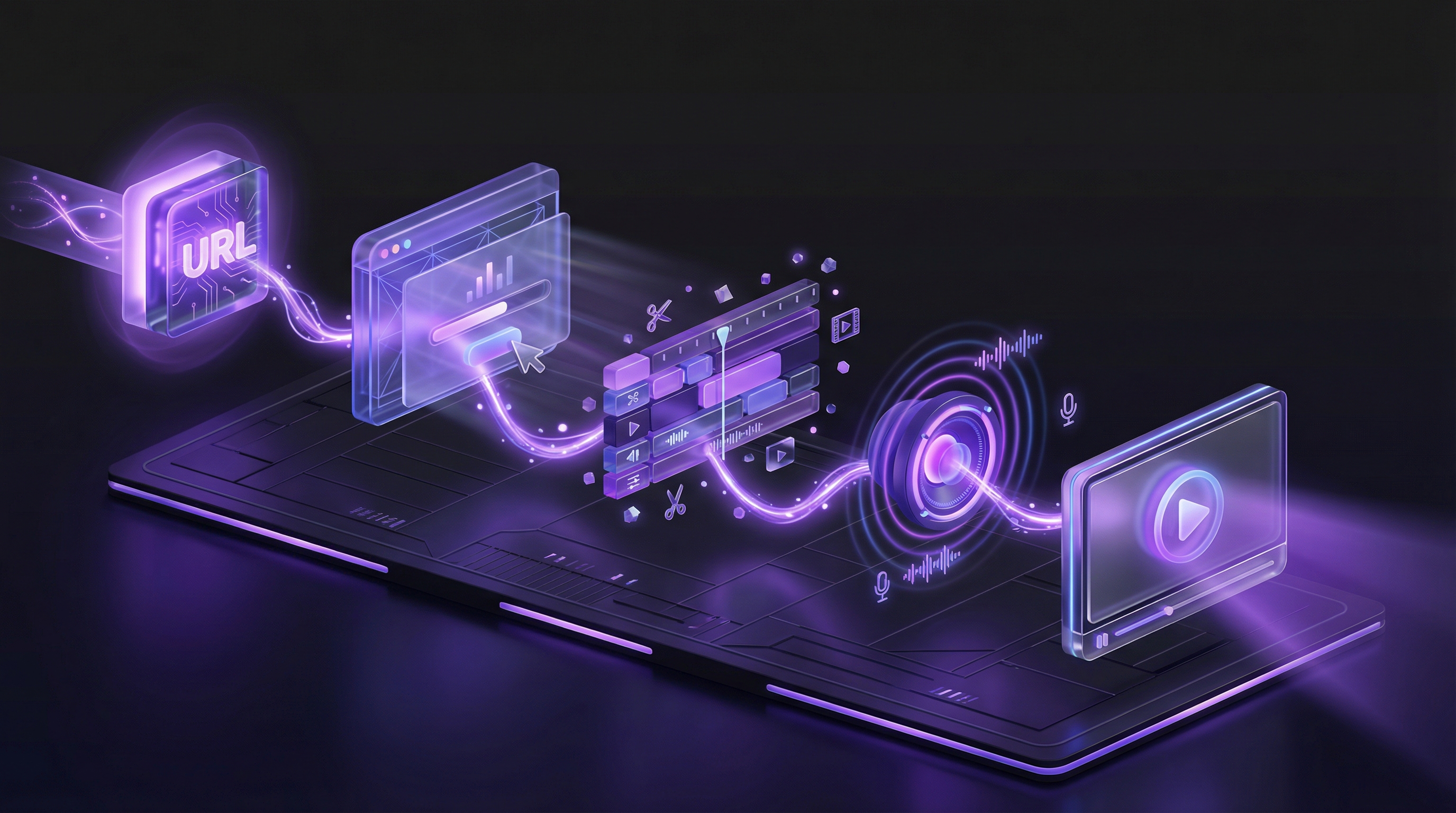
You spent two weeks building a new feature. The landing page is live, the docs are updated, and now you need a demo video. So you open your recording tool, hit capture, and start talking. Twenty minutes later you have a rambling walkthrough where the first 40 seconds are "Hey everyone, so today I wanted to show you our new, um, reporting dashboard." Nobody watches past the intro.
The problem is not the recording tool. It is the script, or the lack of one. A demo video without a script is a meeting without an agenda. It wanders, it repeats itself, and it loses the audience before the product ever gets a chance to impress. This guide gives you four ready-to-use script templates, a proven three-act framework, and the fundamentals you need to write demo scripts that hold attention from the first word to the final CTA.
Why Your Demo Video Script Matters More Than Your Video Tools
Teams obsess over video tools. They compare screen recorders, test microphones, and debate whether to use Loom or OBS. None of that matters if the script is weak. A $50 microphone with a great script will outperform a $500 setup with no script every single time.
Here is why: viewers decide whether to keep watching within the first 10 seconds. Those 10 seconds are roughly 20-25 words. If those words are "Hi, my name is Sarah and I work at Acme Corp, and today I am going to walk you through our platform," the viewer is already gone. But if those words are "Your sales team sends 200 cold emails a week and gets 3 replies. Here is how to change that," they stay.
Most demo videos fail because they list features instead of telling a story. They show what the product does without explaining why anyone should care. A script forces you to answer the hard question before you record: what is the one thing this viewer needs to walk away understanding?
The best demo videos share three qualities. They open with a problem the viewer recognizes. They show the product solving that problem in concrete steps. And they end with a clear outcome and a single next action. That structure does not happen by accident. It happens because someone wrote a script.
Demo Video Scripting Fundamentals
Five principles apply to every demo video script, whether you are writing for a 30-second social clip or a 5-minute feature walkthrough.
Words Per Minute: The Math Behind Video Length
Natural narration lands between 130 and 150 words per minute. That is the sweet spot where a voiceover feels conversational without sounding rushed. Go above 160 words per minute and viewers struggle to process the information. Drop below 120 and the pacing drags.
Use this as your planning tool:
- 30-second video: ~65-75 words
- 60-second video: ~130-150 words
- 90-second video: ~195-225 words
- 2-minute video: ~260-300 words
- 3-minute video: ~390-450 words
One important caveat: these counts assume continuous narration. In practice, you want 2-3 seconds of breathing room after key moments so viewers can process what they just saw. Factor in those pauses and your actual word count per minute drops closer to 120-130. For more on choosing the right length for each use case, see our guide on how long a product demo video should be.
The One-Problem Rule
Every demo video should solve exactly one problem. Not two. Not "and also, we can do this other thing." One problem, one solution, one outcome. If you have a product with ten features, that is ten demo videos, not one 15-minute marathon.
The one-problem rule forces clarity. When you sit down to write the script, the first question is: "What problem does this demo solve?" If the answer includes the word "and," you need to split the video.
Lead with Why, Not What
Your viewer does not care about your product yet. They care about their problem. Every demo script should open with the pain point, not the product. The product enters the story only after the viewer nods and thinks "yes, that is exactly my situation."
Compare these two openings:
- Feature-first (weak): "Our platform includes an automated reporting engine that generates custom dashboards with real-time data."
- Problem-first (strong): "You spend the first two hours of every Monday morning pulling data from three different tools to build a report your manager glances at for 30 seconds."
The second version earns the right to show the product because it proved it understands the viewer's world first.
Write for the Ear, Not the Eye
A demo script is not a blog post. It is spoken language. That means short sentences. Contractions. Everyday words. If you would not say it out loud to a colleague, do not put it in the script.
Read every script out loud before recording. Better yet, read it to someone who has never seen the product. If they furrow their brow or ask "wait, what?" at any point, rewrite that section. Phrases like "leverage our proprietary algorithm" become "use our system." "Facilitate cross-functional collaboration" becomes "help your team work together."
Every Sentence Earns Its Place
After you write the first draft, go through it sentence by sentence and ask: "Does this advance the story?" If a sentence does not introduce the problem, show the solution, or reinforce the outcome, cut it. No throat-clearing. No "before we get started." No "as you can see here." The viewer can see. Your job is to tell them what it means.
The Three-Act Demo Script Framework
Every compelling demo video follows the same arc. It is the same structure used in film, advertising, and storytelling for thousands of years, adapted for a 60-to-180-second product demo. Here is how to apply it.
Act 1: The Problem (10-15% of Script Length)
Open by naming the pain point your audience experiences. Be specific. Do not say "managing projects is hard." Say "you have three project trackers, a shared spreadsheet, and a Slack channel, and somehow tasks still fall through the cracks."
The goal of Act 1 is a head nod. The viewer should think: "Yes, that is me. That is my Tuesday afternoon." You are not selling yet. You are proving that you understand their world.
Example script lines for Act 1:
"Every week, your team records the same product walkthrough
for a different prospect. Different reps, different quality,
different messaging. It takes an hour each time, and the
result still looks like a screen recording with background noise."
Act 2: The Solution (70-75% of Script Length)
This is where your product enters the story. Show it solving the problem you just described, step by step. The key word is "show." Do not tell viewers the product is powerful. Show the cursor clicking, the form filling, the report generating.
Focus on three key actions, not every feature. Three is easy to remember. Three creates a sense of progression (setup, action, result). More than three and the viewer loses the thread.
Use guiding phrases to direct attention:
- "Notice how..." points the viewer to a specific detail they might miss
- "This means..." translates a feature into a benefit
- "Instead of..." contrasts the old way with the new way
- "In just..." emphasizes speed or simplicity
Example script lines for Act 2:
"Paste your product URL here and describe the flow you want
to show. In this case, we will walk through creating a new
project from the dashboard.

Notice how the AI navigates your product on its own. It
clicks through each step, fills in realistic data, and
captures everything in high resolution. No screen recording
needed.

This means your demo looks the same every time. Same quality,
same pacing, same messaging. Whether you send it to one
prospect or one thousand."
Act 3: The Result (10-15% of Script Length)
End by showing the outcome. Not a feature. An outcome. The report is generated. The workflow is complete. The email is sent. Show the finished state, then quantify the benefit.
"What used to take an hour now takes under 10 minutes" is more powerful than "our tool is fast." Numbers create belief. Vague claims create skepticism.
Close with one CTA. Not three. One. "Start your free trial" or "Book a call" or "Watch the next demo." Pick the action that makes sense for this viewer at this stage of the funnel.
Example script lines for Act 3:
"Your demo is ready. Studio-quality video with voiceover,
captions, and your branding. What used to take your team
4 hours just happened in under 10 minutes.

Try it free at demosmith.ai. No credit card required."
Template 1: The Homepage Demo Script (60 Seconds)
This is the workhorse. The 60-second homepage demo sits above the fold on your website, auto-plays on mute with captions, and gives first-time visitors an instant understanding of what your product does and why it matters. It also works for Product Hunt launch pages and paid landing pages.
Target word count: ~130 words
HOMEPAGE DEMO SCRIPT TEMPLATE (60 seconds)

[HOOK - 10 seconds]
"[DESCRIBE THE PAINFUL TASK YOUR AUDIENCE DOES MANUALLY].
It takes [TIME], and the result [DESCRIBE THE MEDIOCRE OUTCOME]."

[INTRODUCE PRODUCT - 5 seconds]
"[PRODUCT NAME] fixes this. [ONE-SENTENCE DESCRIPTION OF WHAT
IT DOES]."

[SHOW STEP 1 - 10 seconds]
"Start by [FIRST ACTION THE USER TAKES]. Notice how
[DETAIL THAT SHOWS EASE OR SPEED]."

[SHOW STEP 2 - 10 seconds]
"Next, [SECOND ACTION]. This means [BENEFIT OF THIS STEP]."

[SHOW STEP 3 - 10 seconds]
"[THIRD ACTION]. Instead of [OLD WAY], you now have
[NEW RESULT]."

[RESULT + CTA - 15 seconds]
"In [TIME SAVED], you went from [STARTING STATE] to
[FINISHED STATE]. [QUANTIFIED BENEFIT].

[CTA - e.g., 'Start your free trial at YOURSITE.com']."
When to use this template: Homepage hero section, landing pages, Product Hunt launches, paid ad landing pages. Anywhere a first-time visitor needs to "get it" in under a minute.
Template 2: The Feature Walkthrough Script (2-3 Minutes)
Feature walkthroughs go deeper. They target viewers who already know what your product is and want to understand a specific capability. These live on feature pages, in your help center, and in sales enablement libraries. If you want to learn the end-to-end process, our guide on how to make a product demo video covers the full workflow.
Target word count: ~300-400 words
FEATURE WALKTHROUGH SCRIPT TEMPLATE (2-3 minutes)

[HOOK - 10 seconds]
"If you have ever [COMMON FRUSTRATION RELATED TO THIS FEATURE],
this walkthrough is for you."

[CONTEXT - 15 seconds]
"[FEATURE NAME] lets you [CORE CAPABILITY]. Here is exactly
how it works, step by step."

[STEP 1 - 30 seconds]
"First, [NAVIGATE TO THE FEATURE]. You will see [DESCRIBE
THE INTERFACE].

[EXPLAIN WHAT THE USER CONFIGURES OR SELECTS]. Notice how
[DETAIL THAT DEMONSTRATES THOUGHTFUL DESIGN]."

[STEP 2 - 30 seconds]
"Next, [SECOND MAJOR ACTION]. This is where [EXPLAIN WHY
THIS STEP MATTERS].

Instead of [OLD WAY OF DOING THIS], you simply [NEW WAY].
[QUANTIFY THE IMPROVEMENT IF POSSIBLE]."

[STEP 3 - 30 seconds]
"Now [THIRD MAJOR ACTION]. [DESCRIBE WHAT HAPPENS ON SCREEN].

This means [TRANSLATE FEATURE INTO BUSINESS BENEFIT].
For example, [CONCRETE SCENARIO]."

[RESULT - 20 seconds]
"And that is it. You just [SUMMARIZE WHAT WAS ACCOMPLISHED].
What used to take [OLD TIME] now takes [NEW TIME]."

[CTA - 10 seconds]
"[Try PRODUCT NAME free / Book a demo / Explore this feature]
at [URL]. [OPTIONAL: MENTION RELATED FEATURE TO EXPLORE NEXT]."
When to use this template: Feature pages, help center articles, sales enablement decks, onboarding email sequences. Any context where the viewer already knows the product and wants depth on a specific capability.
Template 3: The Sales Outreach Demo Script (45-90 Seconds)
Sales outreach demos are different from every other type. They are personal. They reference the prospect's industry, role, or specific pain point. They are short enough to embed in a cold email or LinkedIn message without asking too much of someone who does not know you yet. For the full playbook on using demos in outbound, see our guide on demo videos in cold email and sales outreach.
Target word count: ~100-200 words
SALES OUTREACH DEMO SCRIPT TEMPLATE (45-90 seconds)

[PROSPECT-SPECIFIC HOOK - 10 seconds]
"[PROSPECT NAME / COMPANY], I noticed your team
[SPECIFIC OBSERVATION ABOUT THEIR BUSINESS - e.g., 'just
launched a new pricing page' or 'is hiring three more
sales reps']. That usually means [PAIN POINT YOU SOLVE]."

[BRIDGE TO PRODUCT - 10 seconds]
"We built [PRODUCT NAME] to solve exactly that. Let me
show you how it works with [THEIR INDUSTRY / USE CASE]."

[QUICK DEMO - 30-45 seconds]
"[SHOW THE PRODUCT SOLVING THEIR SPECIFIC PROBLEM IN
2-3 STEPS. KEEP IT TIGHT. REFERENCE THEIR INDUSTRY
OR VERTICAL WHERE POSSIBLE.]

Notice how [KEY DIFFERENTIATOR]. This means your team
can [BENEFIT] without [THING THEY CURRENTLY HAVE TO DO]."

[CTA - 10 seconds]
"Worth a 15-minute call to see if this fits? [CALENDAR
LINK OR REPLY PROMPT]."
When to use this template: Cold email outreach, LinkedIn DMs, follow-up after a trade show or webinar, pre-call meeting prep. Any situation where you need a prospect who does not know you to watch a 60-second video.
Template 4: The Onboarding Demo Script (90 Seconds)
Onboarding demos have a different job than marketing demos. They are not selling the product. The user already signed up. The job now is to get them to their "aha moment" as fast as possible. The moment they think "oh, this is useful" is the moment they stick. For teams producing these at scale, our guide on automating onboarding videos covers how to keep your library current without manual re-recording.
Target word count: ~195-225 words
ONBOARDING DEMO SCRIPT TEMPLATE (90 seconds)

[WELCOME - 10 seconds]
"Welcome to [PRODUCT NAME]. Let me show you the fastest
way to [CORE VALUE PROPOSITION - e.g., 'create your first
report' or 'set up your first workflow']."

[STEP 1: SETUP - 20 seconds]
"Start here: [FIRST THING A NEW USER SHOULD DO].
[DESCRIBE THE INTERFACE BRIEFLY].

This takes about [TIME] and you only need to do it once."

[STEP 2: FIRST ACTION - 25 seconds]
"Now let us [THE ACTION THAT DELIVERS THE CORE VALUE].
[WALK THROUGH THE KEY INTERACTION].

Notice how [DETAIL THAT MAKES IT FEEL EASY]. No need
to [THING THEY MIGHT EXPECT TO HAVE TO DO]."

[STEP 3: SEE THE RESULT - 20 seconds]
"And here is your [OUTPUT - e.g., 'first dashboard,'
'generated report,' 'published page'].

That took [TIME]. You are already up and running."

[NEXT STEPS - 15 seconds]
"From here, you can [SUGGEST 1-2 NATURAL NEXT ACTIONS].
Check out [LINK TO HELP CENTER OR NEXT ONBOARDING VIDEO]
for a deeper dive.

Questions? Hit the chat icon in the bottom right."
When to use this template: Welcome email after signup, in-app onboarding tooltip or modal, help center "getting started" section. The goal is always the same: reduce time-to-value for new users.
How AI Changes Demo Video Scripting
Everything above assumes you are writing scripts by hand. That is still the right approach when you need full creative control or when the messaging is highly strategic. But for the other 80% of demo videos, there is a faster path, whether that means using ChatGPT for script generation or handing the entire process to an AI agent.
With an AI demo agent like Demosmith, you do not write a script at all. You describe the flow you want to show in plain English, and the AI generates the narration script automatically based on what it sees in your product. It navigates your UI, records the footage, writes the voiceover, and edits the final video. All from a single prompt.
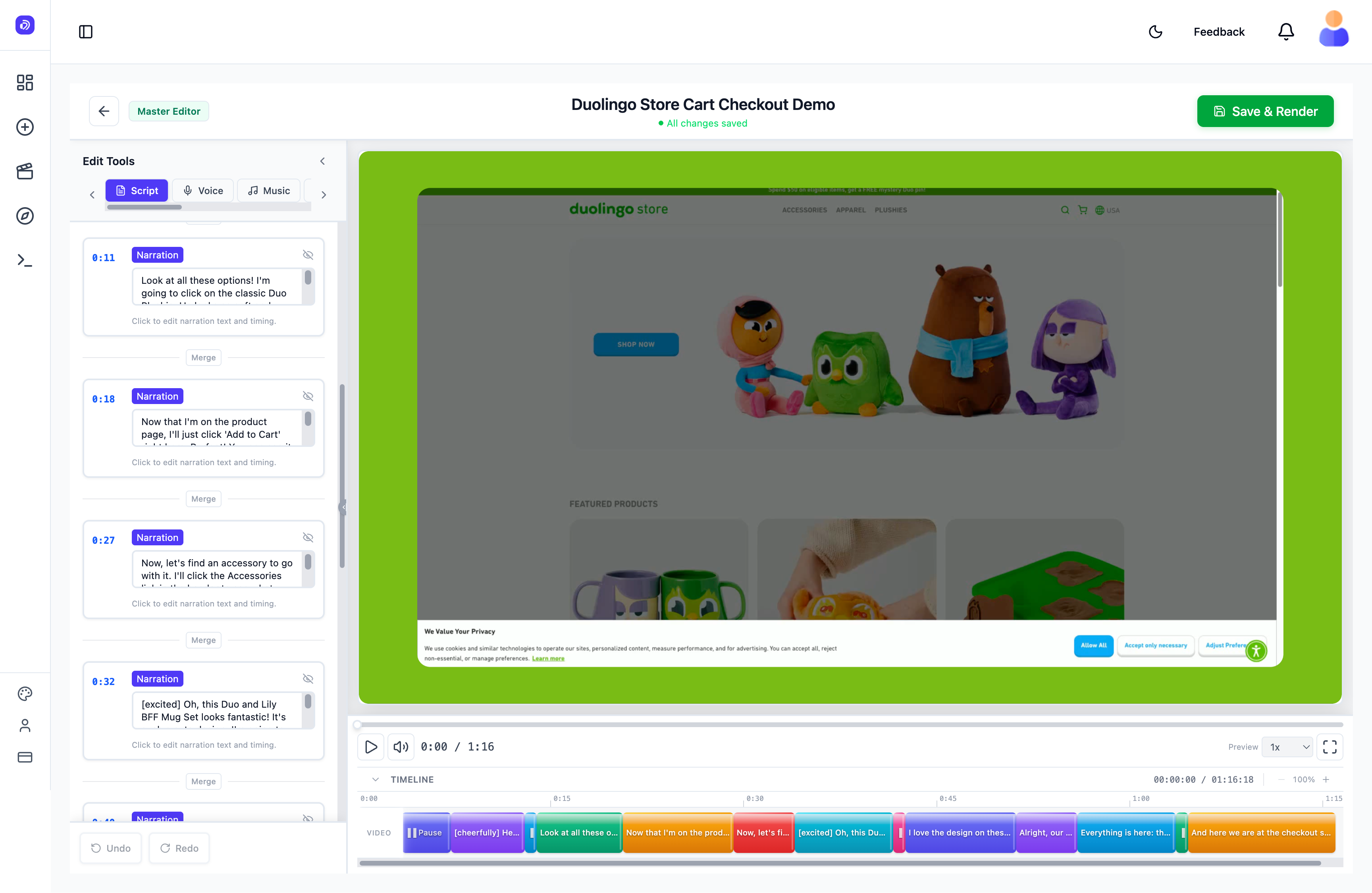
Demosmith generates the script automatically. Rewrite any narration block, change the voice, or adjust timing before rendering.
Here is what this looks like in practice. Instead of writing a 300-word feature walkthrough script, you type something like:
"Show how a new user creates their first project. Start
from the dashboard, click New Project, fill in the name
and description, pick a template, customize the colors,
and publish. Emphasize how fast the whole process is."
The AI takes that prompt, navigates your product, and generates a narrated script that matches each step of the actual UI flow. You can review and edit the script before the final video renders, so you still have full control over the messaging. For tips on writing prompts that produce better output, see our Demosmith prompt guide.
This changes the equation in three ways:
- No blank page problem. You never stare at an empty document wondering where to start. The AI gives you a first draft in seconds.
- No scripting skills needed. Product managers, sales reps, and customer success teams can create demo videos without being good writers.
- Script and video stay in sync. Because the AI writes the narration based on the actual UI it recorded, the voiceover always matches what is happening on screen. No more "as you can see here" while the viewer is looking at the wrong screen.
Demosmith also generates voiceover in 31 languages, which means you can create localized demo scripts without hiring translators or voice actors. One prompt, one generation, and you have a polished demo with narration in French, German, Japanese, or any of the other supported languages. The output is a downloadable MP4 plus a shareable link, ready in under 10 minutes. Plans start at $40/month for Starter, $99/month for Pro, and $250/month for Business. There is a free trial with no credit card required.
Five Demo Script Mistakes That Kill Engagement
Even with a template, it is easy to fall into patterns that lose viewers. Here are the five most common script mistakes and how to fix them.
1. Starting with Your Company Name
Nobody cares about your company name in the first 10 seconds. They care about their problem. "Welcome to Acme Corp, the leading platform for..." is the fastest way to lose a viewer. Lead with the problem. Introduce your company after you have earned their attention.
Fix: Replace company introductions with problem statements. Your company name can appear on screen as a logo. The script should focus on the viewer, not on you.
2. Listing Every Feature
A demo video is not a feature page. Trying to cover everything results in covering nothing. Viewers remember three things from a video. Pick the three that matter most for this audience and ignore the rest.
Fix: Before writing, choose three features maximum. If stakeholders push to add more, create separate demo videos for each additional feature. This also gives you more content for your library.
3. Using Jargon Your Audience Does Not Know
Internal shorthand, technical acronyms, and industry jargon alienate viewers who are not deep in your category. "Our DAG-based orchestration engine enables idempotent pipeline execution" means nothing to a marketing manager evaluating workflow tools.
Fix: Write the script as if the viewer has never heard of your product category. Use the words your customers use when they describe their problem, not the words your engineering team uses when they describe the solution.
4. Forgetting the CTA
A surprising number of demo videos end with "so yeah, that is how it works" and no clear next step. The viewer watched your entire demo, they are interested, and you gave them nowhere to go. That is leaving revenue on the table.
Fix: Every script ends with one clear CTA. Not two, not three. One. "Start your free trial," "Book a demo," or "Watch the next video." Make it specific and make it easy.
5. Writing a Blog Post Instead of a Script
Written language and spoken language are different. Long sentences with multiple clauses, formal vocabulary, and dense paragraphs work on a blog. They fall apart when spoken aloud. If your script reads like documentation, it will sound like documentation.
Fix: Read your script out loud. Every time you stumble, shorten the sentence. Every time you run out of breath, add a period. Every time a phrase sounds stiff, rewrite it the way you would actually say it to a colleague. If you need more guidance on the full production process, from script through final cut, check out our guide on creating SaaS demo videos without screen recording.
Write Your First Demo Script in 15 Minutes
You do not need to be a copywriter to write a good demo script. You need a template, a timer, and a willingness to cut anything that does not serve the viewer. Here is the process:
- Pick the template that matches your use case. Homepage demo for first impressions. Feature walkthrough for depth. Sales outreach for prospecting. Onboarding for new users.
- Fill in the brackets. Replace every [BRACKET] with your specific product, problem, and benefit. Do not overthink it. Get words on the page.
- Read it aloud and time yourself. If you are hitting your target duration (60 seconds, 90 seconds, 2 minutes), you are in good shape. If you are over, cut the weakest section.
- Cut ruthlessly. Your first draft will be too long. That is normal. Remove any sentence that does not introduce the problem, show the solution, or drive toward the CTA.
- Record or generate. Use the script for a manual recording, or paste the flow description into an AI demo video generator and let it handle the rest.
The best demo video script is the one that exists. A good script recorded today will always outperform a perfect script that never ships. Pick a template, fill it in, and publish.
Key Takeaways
- Script first, tools second. No camera, microphone, or editing software can fix a weak script. Write the words before you pick the tools.
- 130-150 words per minute is the target for natural-sounding narration. Use this to calculate your script length for any video duration.
- The three-act framework (Problem, Solution, Result) works for every demo video type, from 30-second social clips to 3-minute walkthroughs.
- One problem per video. If your script covers two problems, split it into two videos. Clarity wins over comprehensiveness.
- AI removes the blank page problem. Tools like Demosmith generate scripts automatically from a plain-English prompt, so you can go from idea to finished demo in minutes instead of hours.
- Read every script out loud. If you stumble, your voiceover will stumble. Rewrite until it sounds like a conversation, not a document.