
You have spent months building your product. You have lined up your launch community, written the tagline, polished the screenshots, and picked the perfect day. Then you realize you still need a video. And it is 11 PM the night before launch.
This is not a rare scenario. It happens constantly, because most founders treat the launch video as an afterthought. That is a mistake. 53% of products that win "Product of the Day" on Product Hunt include a demo video. Products with video consistently rank higher in the feed, earn more upvotes, and generate more comments than those without one. Your launch page has seconds to grab attention. Video communicates value faster than any combination of screenshots and text ever will.
This guide covers everything you need to know about creating a Product Hunt launch video: what separates the best from the forgettable, the exact structure to follow, three different ways to create one (including a method that takes 10 minutes), and the mistakes that will tank your upvotes.
Why Your Product Hunt Launch Needs a Demo Video
Product Hunt is a visual platform. When someone lands on your launch page, they scan the thumbnail, glance at the tagline, and look for a video. If there is one, they watch it. If there is not, they move on to the next product.
The numbers support this. Research from Popsters analyzing thousands of Product Hunt launches found that projects with video were consistently ranked higher and received more engagement than projects without video. A tight launch video can add 10 to 20% more upvotes on day one, according to launch analytics from Flowjam.
There are a few reasons video works so well on Product Hunt specifically:
- The audience is time-constrained. Product Hunt visitors are evaluating dozens of products in a single session. They will not read a wall of text, but they will watch a 60-second video.
- The feed autoplays. Product Hunt videos autoplay silently in the feed, which means your product is demonstrating itself before anyone even clicks through to your page.
- Video builds trust. Showing a real product in action signals that your product actually works. Screenshots can be mocked up. Video is harder to fake.
- It replaces the live demo. Most Product Hunt visitors will never sign up for your product during launch day. The video is their only way to experience your product without creating an account.
If you are launching on Product Hunt without a demo video, you are competing with one hand tied behind your back.
What the Best Product Hunt Launch Videos Have in Common
After studying dozens of Product of the Day and Product of the Week winners, a few patterns stand out. The best launch videos share five traits.
They Start with the Pain Point, Not the Logo
You have roughly 3 seconds before a viewer decides to keep watching or scroll away. The worst thing you can do with those 3 seconds is show a logo animation. The best launch videos open with the problem. "Tired of spending 4 hours editing a single demo video?" or "Your sales team sends 50 cold emails a day with zero product context." Lead with the pain your audience already feels, and they will stick around to see the solution.
They Show the Product in Action
Product Hunt visitors are technical, curious, and skeptical. They do not want to see a pitch deck with stock photos. They want to see the product doing the thing you claim it does. Real UI, real interactions, real output. The most successful launches treat their video as a live demo, not a commercial. If you are unsure what separates an AI demo agent from a traditional screen recorder, the difference becomes obvious when you see the output side by side.
They Focus on 3 Features Max
A common instinct is to cram every feature into the launch video. After all, you built them all, and they are all great. But trying to show everything ends up showing nothing. The best PH videos pick 2 to 3 features that represent the core value proposition and demonstrate those thoroughly. Save the feature tour for your documentation.
They Stay Under 90 Seconds
Completion rates drop sharply after 60 seconds. Data from Vidyard shows that at least half of viewers will watch a video to the end only if it stays under 60 seconds. For Product Hunt, the sweet spot is 60 to 90 seconds. That is enough time to establish the problem, show the solution, and land a clear call to action. Anything over 2 minutes and you are losing the majority of your audience before they reach the ending.
They Always Include Subtitles
Many Product Hunt users browse during commutes, in meetings, or in coffee shops. They are watching on mute. If your video relies entirely on voiceover to convey meaning, you are losing every silent viewer. Burned-in captions are not optional. They are a requirement. Product Hunt videos autoplay silently in the feed, so the first few seconds need to work with zero audio.
The Perfect Product Hunt Video Structure (60-90 Seconds)
Here is the beat-by-beat structure that the best launch videos follow. Think of it as a template you can adapt to any product.
Seconds 0-5: Hook with the pain point. Open with a single sentence that names the problem your product solves. Make the viewer nod and think, "That is exactly my problem." No logos, no intro animation, no "Hi, I'm the founder of..."
Seconds 5-15: Introduce the product. One sentence. Name the product, say what it does. "Demosmith is an AI demo agent that turns any product URL into a polished demo video in 10 minutes." That is it. Move on.
Seconds 15-60: Show the product solving the problem. This is the core of your video. Walk through the primary workflow, the single most impressive thing your product does. Show real interactions, real data, real output. This section should feel like a live demo, not a slideshow.
Seconds 60-75: Show the result. What does the finished output look like? If your product generates something (a report, a video, a design), show the final artifact. If your product saves time or money, show the dashboard or summary that proves it.
Seconds 75-90: Call to action. Keep it simple. "Try it free at demosmith.ai" or "Give us an upvote if this would save you time." Do not try to close a sale. You are asking for attention and curiosity, not a purchase.
This structure works because it mirrors how the Product Hunt audience thinks. They arrive skeptical. They need to see the problem validated, they want proof the product works, and they need a clear next step. Give them that in 90 seconds and you will hold their attention through the final frame.
Three Ways to Create Your Launch Video
There are three realistic approaches to creating a Product Hunt launch video, each with different tradeoffs in time, cost, and quality.
Option 1: Record It Yourself (Loom, OBS)
The most common approach. Open Loom or OBS, record your screen while narrating, edit the footage, and export. This works well if you want authentic founder energy in the video. Viewers on Product Hunt do appreciate seeing the real person behind the product.
The downside: it takes 2 to 4 hours with re-takes, and the quality depends entirely on your comfort level on camera and your editing skills. Shaky cursor movements, background noise, notification pop-ups, and awkward pacing are all common problems. You can learn more about the full production process in our guide on how to make a product demo video.
Option 2: Hire a Freelancer or Agency
If budget is not a constraint, hiring a video production freelancer or agency will get you a polished result. Expect to pay $2,000 to $10,000 depending on complexity, and plan for 1 to 4 weeks of turnaround time.
The risk: if anything goes wrong with the timeline, you miss your launch window entirely. Product Hunt launches are time-sensitive. You cannot push yours back two weeks because the agency needs another round of revisions. And if you need to update the video after launch (because you shipped a UI change the day before), you are paying for another round.
Option 3: Use AI Demo Generation (Demosmith)
The third option is using an AI demo video generator like Demosmith. Paste your product URL, describe the flow you want to show in plain English, and the AI navigates your product, records the screen, edits the footage, generates a voiceover with subtitles, and delivers a finished MP4 in under 10 minutes.
This approach is purpose-built for last-minute launches. No scheduling, no re-takes, no editing software. And if your product UI changes the night before launch, you can regenerate the video in the time it takes to make coffee.
| DIY (Loom/OBS) | Freelancer/Agency | AI (Demosmith) | |
|---|---|---|---|
| Time | 2-4 hours | 1-4 weeks | Under 10 minutes |
| Cost | Free (your time) | $2,000-$10,000 | From $40/mo |
| Quality | Varies widely | High (professional) | High (consistent) |
| Flexibility | Re-record from scratch | Slow revision cycles | Regenerate instantly |
Creating Your Product Hunt Video with AI (Step by Step)
Here is the exact process for creating a launch-ready Product Hunt video using Demosmith, from start to finish.
Step 1: Pick Your Hero Flow
Your launch video should show the single most impressive thing your product does. Not three things. Not a full tour. One flow that makes a viewer think, "I need to try this."
Ask yourself: if a potential user could only see one workflow in my product, which one would convince them to sign up? That is your hero flow. For most products, it is the core creation or output moment: the report being generated, the design being exported, the automation being triggered. If you are a solo founder building demos for the first time, start with whatever your users tell you impressed them most during beta.
Step 2: Write the Prompt
Describe the flow in plain English. Be specific about what the AI should click, type, and navigate to. A strong prompt for a Product Hunt video looks like this:
Show how a user creates their first automated report.
Start on the dashboard. Click "New Report." Select the
"Monthly Revenue" template. The AI should fill in sample
company data (not test@test.com). Preview the report,
then click "Export as PDF." End on the finished PDF
preview. Keep the tone energetic and concise. This is
for a Product Hunt launch, so emphasize speed and ease.
For more examples and prompt patterns, see our dedicated guide to prompting Demosmith.
Step 3: Generate
Paste your product URL into Demosmith, enter your prompt, and hit generate. The AI agent launches a cloud browser, navigates your product autonomously, records the screen with smooth cursor tracking, auto-edits the footage with cuts and zooms, generates a natural voiceover with captions, and renders the final video.
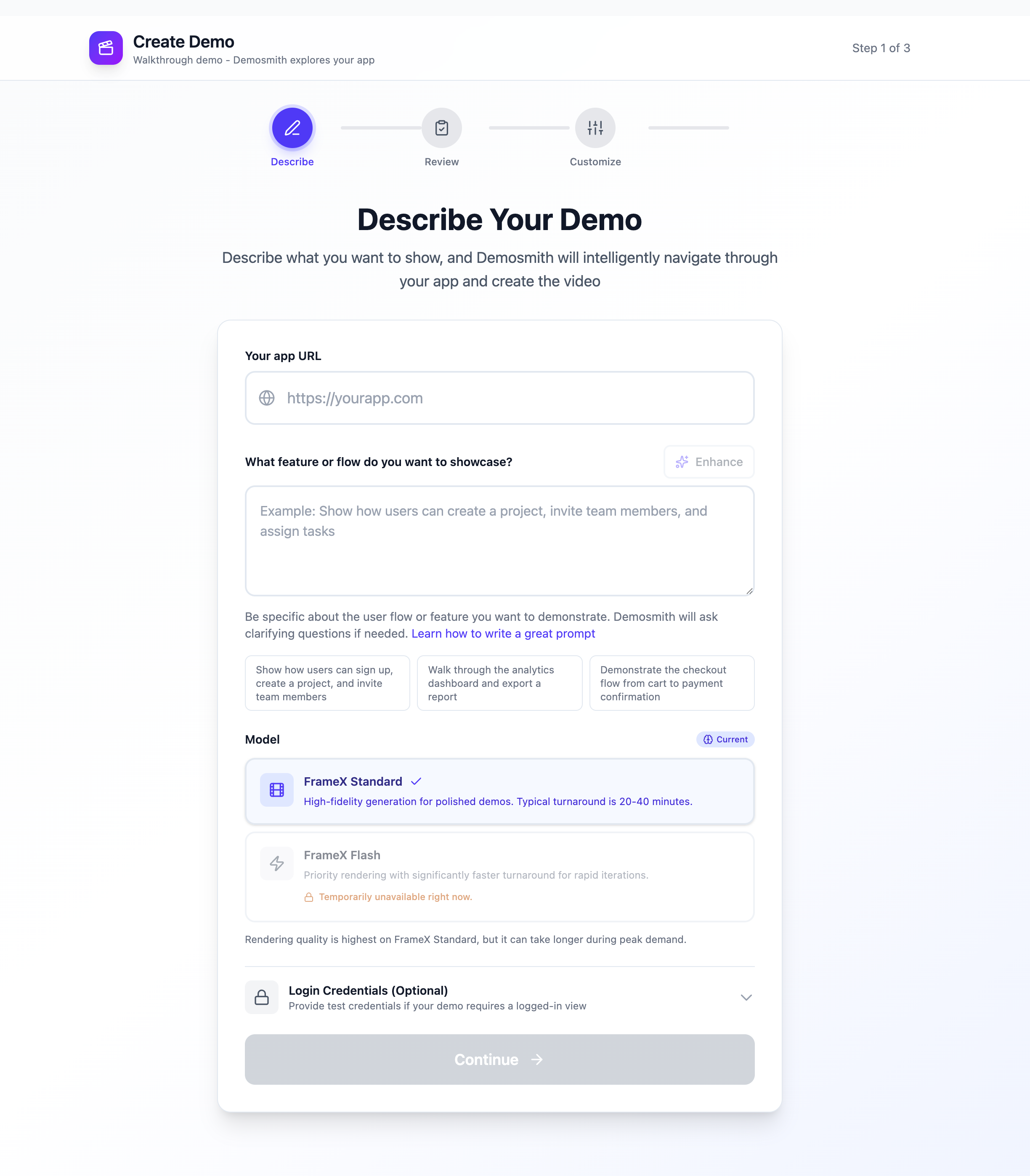
Describe your hero flow, choose a rendering model, and Demosmith generates your launch video.
The entire process takes under 10 minutes. You get a downloadable MP4 and a shareable link.
Step 4: Review and Trim
Watch the generated video and trim it to 60 to 90 seconds. Cut anything that does not directly serve the "problem to solution" narrative. If the AI captured a loading screen or a transition that drags, remove it. Every second needs to earn its place.
Step 5: Add to Your Launch Page
Upload the MP4 to your Product Hunt launch page. Product Hunt accepts direct video uploads and YouTube embeds. If you are also embedding the video on your own site, Demosmith provides an embed code you can drop into any page. Make sure the first frame of your video is visually compelling, since that frame becomes the thumbnail in the Product Hunt feed.
Product Hunt Video Mistakes That Kill Upvotes
These are the mistakes that consistently separate videos that drive upvotes from videos that get ignored.
Showing the Settings Page
Nobody browsing Product Hunt cares about your billing settings, your notification preferences, or your account management page. Yet founders include these screens in launch videos all the time, usually because they are trying to show "how comprehensive" the product is. Show the value, not the plumbing. Your settings page is not going to make anyone click the upvote button.
Moving the Cursor Too Fast
When you record a demo manually, your muscle memory takes over and the cursor zips across the screen. Viewers cannot follow it. They get disoriented, miss important interactions, and tune out. The best Product Hunt videos have deliberate, smooth cursor movements that guide the viewer's eye. This is one area where AI-generated demos have a clear advantage: the cursor always moves at a consistent, watchable pace.
Using Monotone Narration
If the person narrating sounds bored, the viewer will be bored. A flat, monotone voiceover drains energy from even the most impressive product. You need variation in pace and emphasis. If you are recording yourself, pretend you are explaining your product to a friend who just asked, "Wait, what does it actually do?" If you are using AI voiceover, pick a voice with natural cadence and energy.
Making It Longer Than 2 Minutes
The Product Hunt community has a short attention span. They are evaluating 20 to 30 products on any given launch day. A 3-minute video feels like a commitment. A 90-second video feels like a quick look. Keep it tight. If you cannot explain your product's core value in 90 seconds, you have a messaging problem, not a video length problem.
No Subtitles
This deserves repeating because it is that common of a mistake. Many people browse Product Hunt on mobile during commutes, in meetings, or in public spaces. They are watching on mute. If your video has no subtitles, they see your product moving on screen with zero context about what is happening or why it matters. Burned-in captions are mandatory. Demosmith adds them automatically in any of 29 supported languages.
Using Your Demo Video After Product Hunt
Your Product Hunt launch lasts 24 hours. Your demo video should last much longer. The video you create for launch day is a marketing asset that works across every channel.
Homepage and landing pages. Your launch video is already a polished product demo. Embed it on your website above the fold. Visitors who watch a demo on a landing page convert at significantly higher rates than those who do not.
LinkedIn and Twitter/X. Cut a 15 to 30 second clip from the most visually compelling moment in your demo. Post it natively on LinkedIn and Twitter. Short demo clips consistently outperform text-only posts for engagement.
Cold email outreach. A demo video in a cold email changes the dynamic entirely. Instead of asking a prospect to imagine what your product does, you show them. Teams using demo videos in cold outreach report significantly higher response rates.
Investor updates. If you are fundraising, your launch video doubles as a product demo for investors. Include it in your deck or follow-up emails. It shows traction and polish without requiring a live demo.
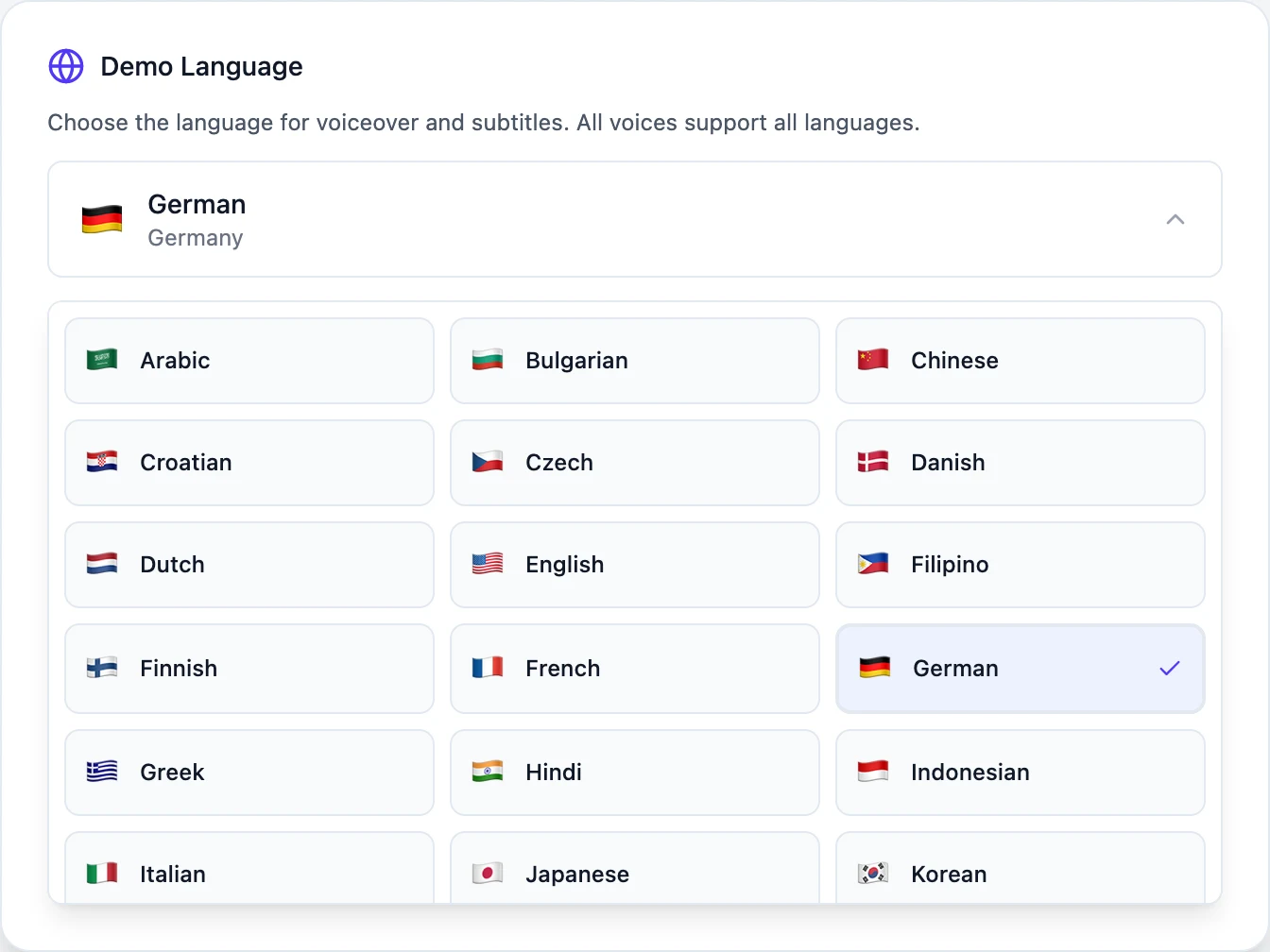
Multiple languages. If your product targets international markets, regenerate the video with voiceover and captions in different languages. Demosmith supports 31 languages, so you can create a French version for European prospects or a Japanese version for the APAC market without re-recording anything.
If you built your product using AI-assisted coding or a vibe coding workflow, our guide on creating demos for vibe-coded products covers how to showcase products that were built fast and shipped fast.
Launch with Confidence
Your Product Hunt launch video is often the deciding factor between an upvote and a scroll-past. The difference between a product that finishes in the top 5 and one that gets buried is not always the product itself. It is how well the product is presented in the first 60 seconds of the viewer's attention.
With AI demo tools, there is no excuse to launch without a video. You do not need a production team, a $5,000 budget, or a week of lead time. You need a URL, a clear description of your hero flow, and 10 minutes.
The best Product Hunt video is not the one with the highest production value. It is the one that makes a viewer stop scrolling and think, "I need to try this."
Key Takeaways
- 53% of Product of the Day winners include a demo video. Products with video rank higher and earn more engagement.
- Keep your launch video between 60 and 90 seconds. Completion rates drop sharply past that threshold.
- Structure your video as: pain point, product intro, product in action, result, call to action.
- Always include burned-in subtitles. Product Hunt videos autoplay silently, and many users watch on mute.
- Focus on your single most impressive workflow. Trying to show every feature shows nothing.
- Your launch video is a reusable asset. Repurpose it for your homepage, social posts, cold emails, and investor updates.
Ready to create your Product Hunt launch video? Try Demosmith free and generate a polished demo in under 10 minutes. No credit card required.