Every guide on making a product demo video starts the same way. "Open your screen recorder. Write a script. Edit in your video tool of choice. Add captions, a voiceover, and some branded motion graphics." It reads like a list of steps you might follow if you had a screen recorder you knew how to use, three to five free hours, a Premiere Pro licence, and a designer on standby for the thumbnail.
Most founders have none of these. Most small marketing teams have one person doing six jobs. And that is who this guide is actually for.
This is not about cutting corners to produce something mediocre. It is about understanding what actually blocks teams without dedicated resources, what the four most common workarounds look like in practice, how much DIY demo production really costs when you add it up, and what the cleanest possible path to a polished video looks like in 2026.
Why Demo Video Creation Is Painful Without a Team
The blockers are not exotic. They show up in every small team that has tried to produce a demo video and abandoned the effort halfway through.
Time. A well-produced two-minute demo video takes six to twelve hours of actual work when you account for scripting, recording, re-recording because the first take had a notification popup, editing, adding captions, sourcing a voiceover, and assembling everything into a file you can share. That is assuming everything goes right. It rarely does.
Tools. Screen recording is just the beginning. You also need a video editor (CapCut, Camtasia, DaVinci Resolve), a voiceover tool (ElevenLabs, Murf), and something to handle branding if you care about how the output looks. Each tool has a learning curve. Each one is a separate cost.
Skills. Editing video is a craft. Knowing where to cut, how long a pause should last, which zoom to apply and when, how to match audio to motion: these are things people learn over years. Asking a founder or a product marketer to pick them up in a weekend produces demos that look exactly like what they are: made by someone who does not edit video.
The result is that most resource-light teams either skip the demo entirely, produce something they are quietly embarrassed by, or outsource it once and then do not update it when the product changes.
What Founders Typically Try (And Where Each Falls Short)
There are four common workarounds. Each solves part of the problem and creates a different one.
Loom or a Screen Recorder
Loom is the default for most founders who decide to make a demo video themselves. It is fast to start, free to try, and produces something you can share in ten minutes. The problem is the output. Loom recordings almost always look like Loom recordings: a browser window with a cursor moving around, often at inconsistent speed, with dead air where the presenter is thinking, and the presenter's desktop visible in the corners. Prospects notice. It signals "we made this in an afternoon" even when you did not mean it to.
Screen recordings also do not age well. Every product update means the recording shows something that no longer exists. Updating it means doing the whole thing again.
Hiring a Freelancer
A freelance video producer solves the skills problem. The result will look polished. The trade-offs are cost, speed, and scale. Freelancers typically charge $500 to $1,500 per video and take one to two weeks from brief to delivery. For a one-time hero demo that will sit on your homepage for a year, that calculation might work. For a team that ships product updates monthly and needs demos for five different use cases and three different customer segments, it does not scale.
You also lose control of the production timeline. Every update requires going back through the same brief-to-delivery cycle.
Using Figma Mockups
This approach gets more creative. If the product is not ready, or if the real UI is too messy to film confidently, some founders have recorded walkthroughs of Figma prototypes. There is even a Reddit thread titled "How I created a demo video without a working product" that documents exactly this.
The limitation is obvious: it does not show your real product. Experienced buyers notice the difference between a prototype walkthrough and a live product. It works for pre-launch positioning, but it introduces a trust gap the moment the product is real and your demo still is not.
Interactive Demo Tools (Supademo, Arcade)
Interactive demo platforms capture your product's UI and let prospects click through a guided tour. They are a legitimate tool for certain use cases, particularly in-product onboarding and self-serve evaluation. But they do not produce video. You cannot share an interactive demo in a cold email, post it to LinkedIn, or embed it in a YouTube pre-roll. If you need video output, an interactive demo tool is not the answer. The two formats serve different jobs, as we cover in our guide on interactive demos vs video demos.
The True Cost of DIY Demo Video Production
The cost of doing it yourself is rarely just the tool subscriptions. Here is what it actually adds up to when you build the full stack.
- Screen recorder (Loom Pro, Cleanshot): $10 to $50 per month
- Video editor (CapCut, Camtasia): $20 to $50 per month, or $300 as a one-time purchase
- Script writing: 2 to 4 hours of your time
- Recording and re-recording: 1 to 2 hours
- Editing: 2 to 4 hours, or $500 to a freelancer
- Thumbnail or branded intro: $0 on Canva, or $100 to $200 for a designer
- Voiceover (ElevenLabs, Murf): $20 to $50 per month
Total per video: $800 to $3,000 in money and 6 to 12 hours of time. For a team producing one demo per quarter, that is manageable. For a team that needs demos for five features, three personas, and two languages, it becomes a full-time job nobody actually has.
Agency pricing is worse. Explainer video agencies charge $5,000 to $15,000 per video. Agencies specialising in product demos quote $2,500 to $10,000. Video production subscriptions through services like Superside run $800 to $2,400 per month. These numbers show up regularly in founder communities, including on Reddit's r/SaaS where the question "how did you make the demo video on your landing page?" gets asked by bootstrapped founders who cannot justify the expense.
The real cost of DIY demo production goes beyond the tools. It is the six to twelve hours per video that a founder or marketer spends on production instead of everything else they are supposed to be doing.
What "Without a Design Team" Looks Like With Demosmith
Demosmith is an AI demo agent. The distinction matters. It is not a screen recorder you use to capture yourself. It is not an interactive demo builder you drive by hand through a capture extension. It is an agent that navigates your product autonomously, in a cloud browser, and produces a finished video automatically. Since September 2026, the same recording also compiles into an interactive demo.
The workflow has three steps.
- Paste your product URL. Demosmith loads your live product in a cloud browser. Nothing is installed. No Chrome extension, no desktop app.
- Describe the flow you want to show. In plain English: "Show a user logging in, creating a new project, and inviting a teammate." The AI interprets this and navigates your product accordingly.
- Collect the finished video. The agent captures the workflow, applies auto-editing (transitions, dynamic zoom, pacing), adds AI voiceover in your chosen language, overlays captions, and applies your brand kit. Average time from URL to finished MP4: under 10 minutes.
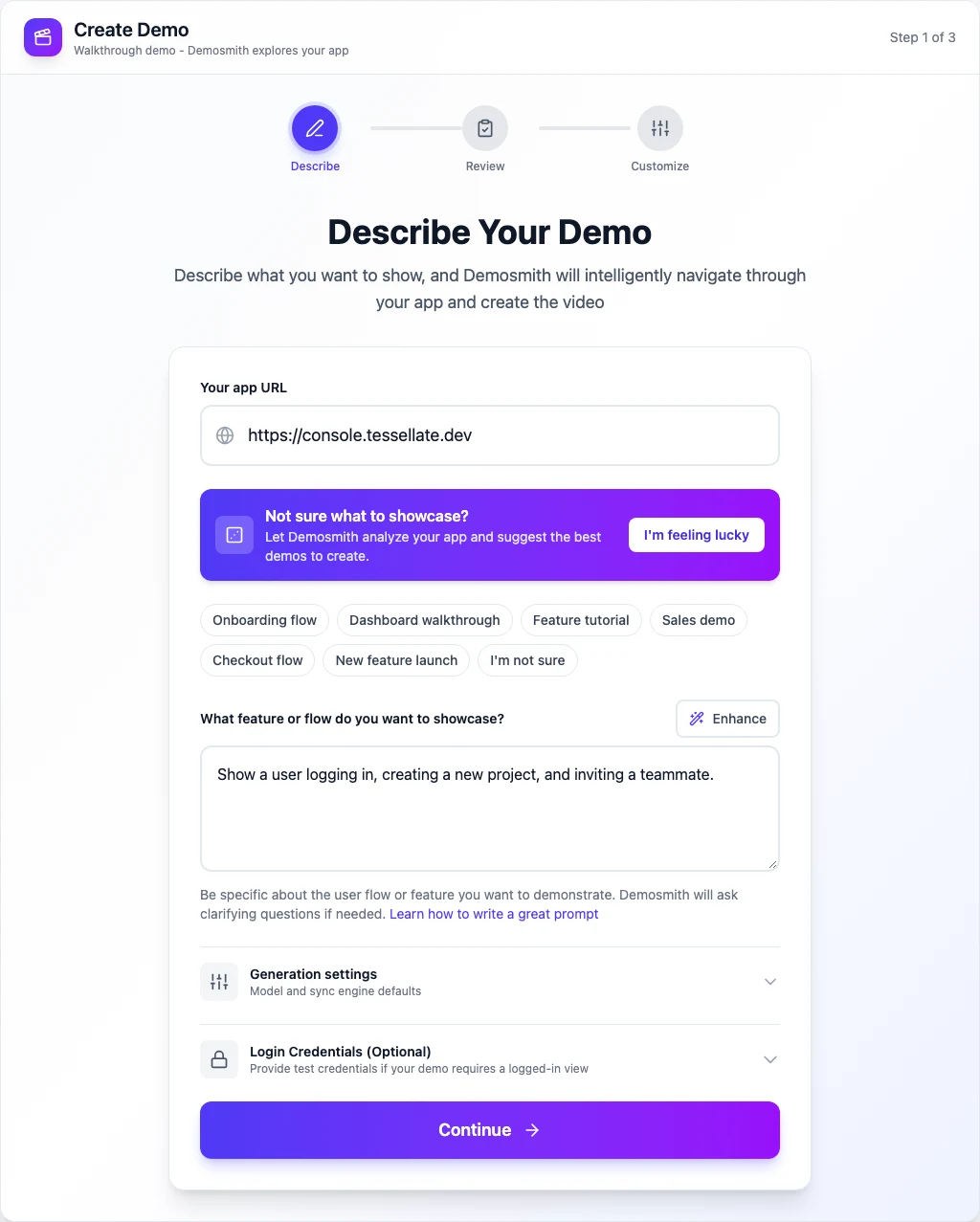
There is no script to write. No footage to edit. No designer needed for the thumbnail. The full production pipeline runs without you touching it. This is what it means to create a SaaS demo video without recording.
For teams that want more control, Demosmith's output is a standard MP4 you can take into any editor. But most users find they do not need to. The auto-edited output is polished enough for landing pages and marketing campaigns, sales outreach, and social content.
Pricing starts at $40 per month for the Starter plan, $99 per month for Pro, and $250 per month for Business. There is a free tier available without a credit card. If you are evaluating this alongside other AI-powered options, a comparison of the best AI demo video generators covers the full field.
What the Output Actually Looks Like
The finished video includes several elements that would each require a separate tool or decision if you were producing manually.
AI voiceover in 31 languages. The script is generated automatically based on what the AI observes during navigation. You can edit it before generation if you want to, or accept the generated version. The voice is indistinguishable from professional human narration. For teams selling to international buyers, switching to French, German, Spanish, or Japanese is a single setting change, not a re-recording session.
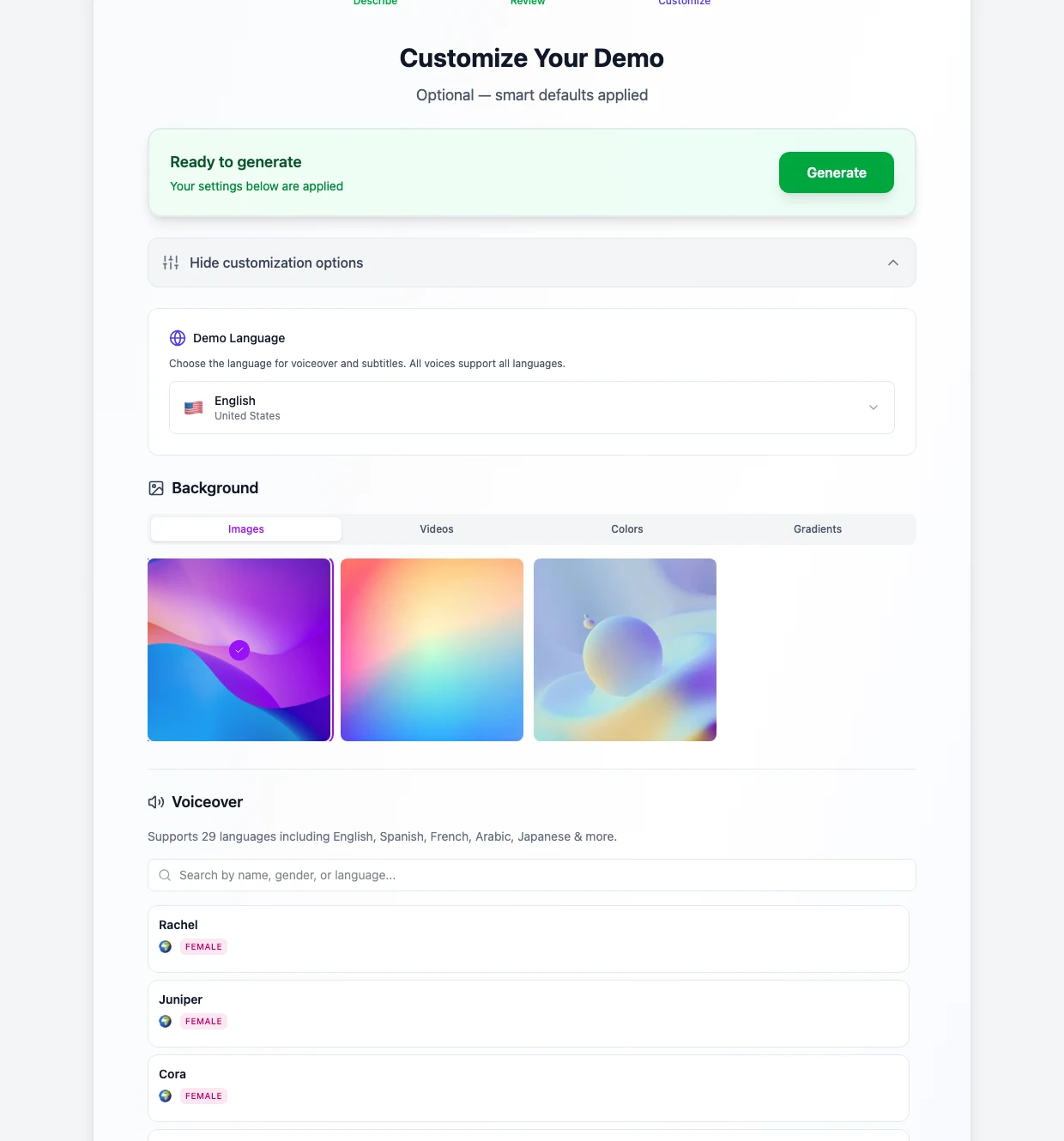
Auto-zoom and dynamic editing. The agent applies zoom effects to highlight the most important interactions, cuts dead space, and paces the video to match the natural rhythm of a polished product walkthrough. The editing decisions are made based on what is happening on screen, not a static template.
Captions. Captions are generated automatically and synced to the voiceover. They are on by default because most social video is watched without sound.
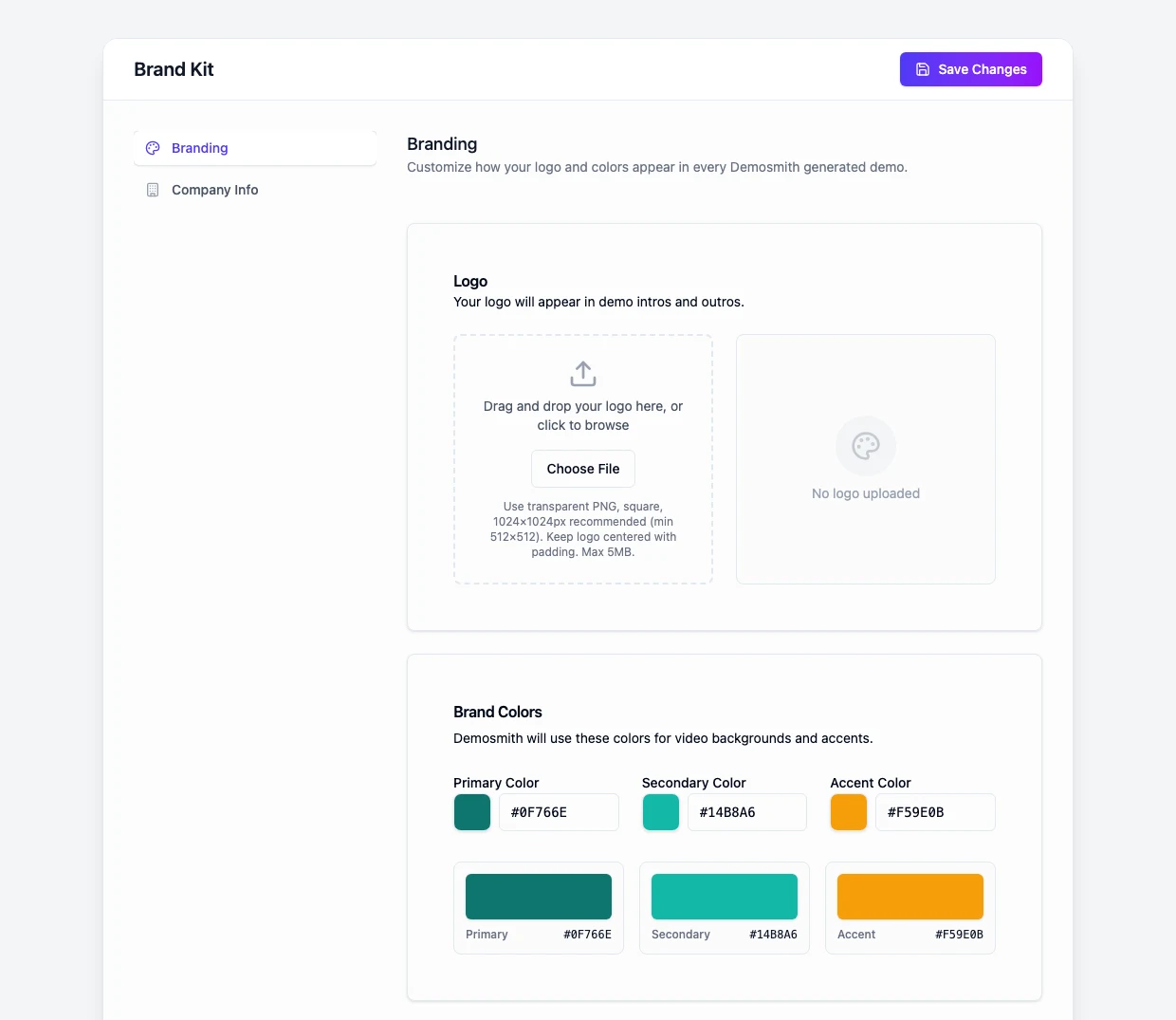
Brand kit application. Upload your logo, select your brand colours, and the output includes branded elements without any manual Canva work. The result looks like something a design team produced, because the system is doing what a design team would do.
The output is a downloadable MP4 and a shareable link. It works in cold email, on LinkedIn, embedded on landing pages, in help docs, and in sales decks. For a practical look at how to deploy demo videos across these channels, our guide on demo videos in cold email outreach covers the mechanics in detail.
Demosmith is not the right tool for every situation. It now compiles interactive demos from its own recordings of your product (September 2026), but they are guided walkthroughs of captured screens rather than in-app tours, so teams that need true in-app guided walkthroughs will still want an interactive demo platform alongside it. Complex flows involving third-party authentication or deeply nested navigation may need a second pass. And it does not give you frame-by-frame editing control the way Premiere Pro does. For the vast majority of founders and small marketing teams who need polished video output without a production overhead, those trade-offs are worth it.
If you want the full picture of how this fits into a broader demo strategy, the solo founder's guide to product demos covers everything from the first demo to scaling across multiple use cases and channels.
Frequently Asked Questions
How much does a product demo video cost to make?
It depends on how you make it. Agency-produced demo videos range from $2,500 to $15,000 per video. Freelancers typically charge $500 to $1,500. DIY with a screen recorder, editor, and voiceover tool adds up to $800 to $3,000 per video once you factor in your time. With an AI demo agent like Demosmith, the cost is your subscription ($40 to $99 per month) and the video is done in under 10 minutes.
Can I make a product demo video without screen recording?
Yes. AI demo agents like Demosmith navigate your product autonomously in a cloud browser, capture the workflow, and produce a finished MP4 without you ever touching a screen recorder. You paste your URL, describe the flow you want to show, and the video is generated automatically. This is covered in detail in our guide on how to create a SaaS demo video without recording.
How do I make a demo video if I don't have a designer?
You do not need one. Demosmith applies your brand kit automatically, generates AI voiceover, adds captions, and handles transitions and zoom effects as part of the generation process. The output is a polished MP4 that looks like it was produced by an agency, with no design input required.
How long does it take to create a product demo video?
Manual production takes 6 to 12 hours per video once you account for scripting, recording, editing, and voiceover. Hiring a freelancer takes one to two weeks from brief to delivery. With Demosmith, the average is under 10 minutes from URL to finished video.
What is the cheapest way to make a professional SaaS demo video?
An AI demo agent is the most cost-effective option that still produces a genuinely polished result. Demosmith starts at $40 per month and produces unlimited videos. Compared to freelancers ($500 to $1,500 per video) or agencies ($2,500 to $15,000), the economics are not close. If your budget is truly zero, Figma mockup walkthroughs recorded on Loom are a workaround, but they do not show your real product.
Key Takeaways
- Most demo video production guides assume tools, time, and skills that most founders and small teams do not have
- The four common workarounds (screen recording, freelancers, Figma mockups, interactive demos) each solve part of the problem and introduce a different one
- DIY demo production costs $800 to $3,000 per video and 6 to 12 hours of time when you account for the full stack of tools and effort
- AI demo agents like Demosmith navigate your product autonomously and produce a finished MP4 in under 10 minutes, with no screen recording, editing, or designer required
- The output includes AI voiceover in 31 languages, auto-zoom, captions, and brand kit application, all generated without manual input
- Demosmith also compiles interactive demos from the same recordings (September 2026), though they are walkthroughs of captured screens; teams that need true in-app guided tours may still want a dedicated platform