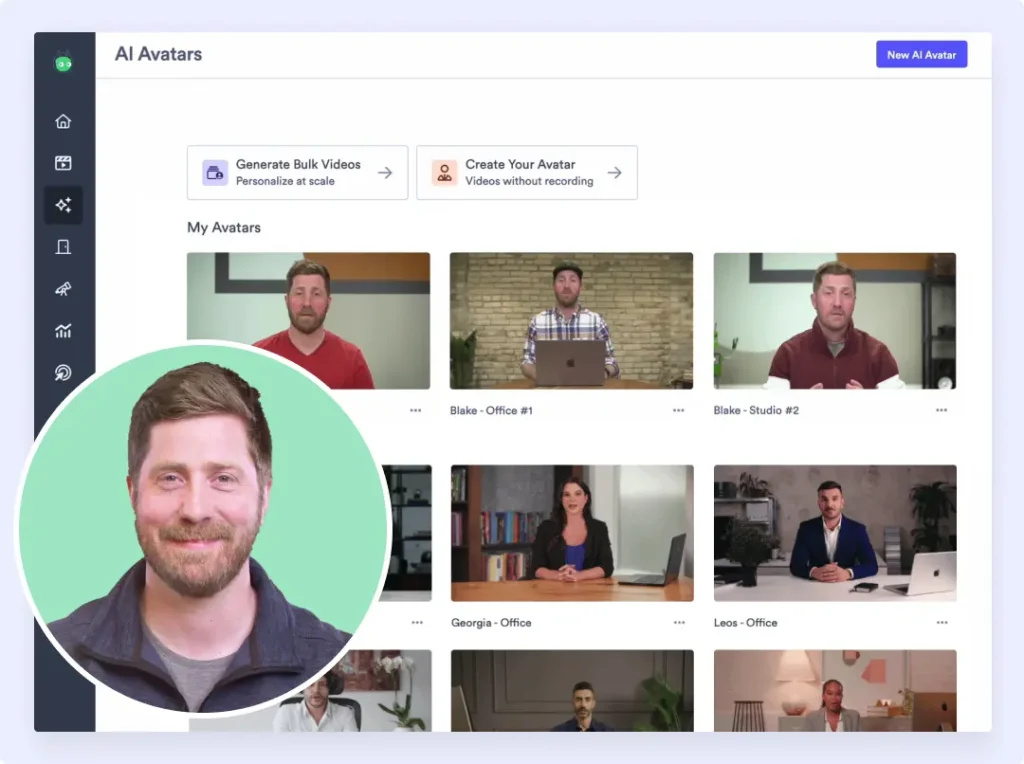
Vidyard in 2026: What You Need to Know
Vidyard has been in the video-for-sales space since 2011. That is a long time. In an industry where most competitors launched after 2019, Vidyard has the advantage of name recognition, a deep integration ecosystem, and a mature analytics layer that sales teams genuinely rely on.
In 2026, Vidyard made its biggest product push in years. The new Video Sales Agent creates personalised videos automatically from buyer signals. AI Avatars let reps generate talking-head videos without recording a single take. These are meaningful additions that move Vidyard beyond basic screen recording into AI-assisted video creation.
The question is whether the pricing keeps up with the value. Vidyard's Starter tier runs about $59 per user per month, the Teams tier is custom and quote-based, and the Video Agent add-on adds about $24 per seat per month on top. For a growing sales team, the per-seat total climbs fast. And the free tier caps you at five videos per month plus a limited number of AI videos and avatars, which is barely enough to evaluate the product.
This review covers what Vidyard does well, where it falls short, what it costs, and who it actually serves in 2026. We also look at alternatives worth considering depending on your use case.
What Is Vidyard?
Vidyard is a video platform built for B2B sales teams. Founded in 2011 in Waterloo, Ontario, it started as a video hosting and analytics tool and has evolved into a full video sales platform. The core promise: help sales reps use video to book more meetings and close more deals.
The product sits at the intersection of screen recording, video hosting, personalisation, and analytics. You record a video (or generate one with AI Avatars), share it with a prospect, and Vidyard tracks who watched, how much they watched, and when they dropped off. That tracking data feeds into your CRM so reps can follow up at the right moment.
Vidyard competes in a crowded category. Loom dominates async video messaging. Hippo Video, Sendspark, and BombBomb all chase the video-for-sales angle. What sets Vidyard apart is the depth of its CRM integrations (HubSpot, Salesloft, Apollo, Outreach) and its analytics layer, which remains one of the most detailed in the category. With 800+ reviews on G2 and a 4.5 out of 5 rating, it has a strong reputation among sales-focused users.
Vidyard Features Worth Knowing
Screen and Webcam Recording
Vidyard's Chrome extension lets you record your screen, your webcam, or a combination of the two. The workflow is standard for this category: click the extension, choose your recording mode, hit record, talk through your demo or sales pitch, and stop when you are done. Vidyard hosts the video and generates a shareable link.
The recording experience is functional but not exceptional. Multiple G2 reviews mention the Chrome extension crashing mid-recording or failing to capture audio. These are not universal complaints, but they appear frequently enough to flag. If you rely on the extension for daily prospecting, stability matters more than any other feature.
Video Hosting and Sharing
Every video you create in Vidyard gets hosted on their platform with a shareable link. You can embed videos on websites, drop them into emails, or include them in sales sequences. Vidyard's video pages are clean, load quickly, and include CTAs that you can customise per video.
The hosting layer is where Vidyard's maturity shows. Video libraries, folders, team sharing permissions, and bulk management tools are all well developed. For teams producing hundreds of sales videos per month, the organisational tooling saves real time.
AI Avatars
This is Vidyard's headline feature for 2026. You record 90 seconds of footage of yourself, and Vidyard trains an AI avatar that can generate talking-head videos in your likeness. The avatar speaks in over 25 languages, reads from a script you provide, and produces a video without you sitting in front of a camera.
The use case is clear: a sales rep records one training clip, then generates hundreds of personalised videos using their avatar. Each prospect gets a video that looks like the rep recorded it just for them. At scale, this removes the bottleneck of individual recording sessions.
The quality varies. Some users report that the lip sync feels unnatural, and the avatar's expressions can look stiff compared to a real recording. It works well enough for one-to-one sales outreach where the personal touch matters more than production polish. It is less suited for marketing content where visual quality is scrutinised.
Video Sales Agent
The Video Sales Agent is Vidyard's newest addition. It monitors buyer behaviour (page visits, content downloads, email opens) and automatically creates personalised video messages triggered by those actions. The idea is that your prospect visits your pricing page, and the Video Sales Agent sends them a tailored video follow-up without a rep lifting a finger.
This is an ambitious feature that sits at the intersection of video, automation, and intent data. Early adopters report mixed results. The concept is strong, but the execution depends heavily on how well your CRM data and intent signals are configured. Garbage in, garbage out applies here.
Analytics and Viewer Tracking
Vidyard's analytics are its strongest differentiator and have been since the early days. You can see exactly who watched your video, how long they watched, where they dropped off, and whether they re-watched specific sections. This data syncs to HubSpot, Salesforce, and other CRMs, giving reps actionable signals for follow-up.
For sales teams that live and die by engagement data, this is genuinely valuable. Knowing that a prospect watched 80% of your demo video is a stronger buying signal than knowing they opened your email. Vidyard turns video from a content format into a lead qualification tool.
CRM and Sales Tool Integrations
Vidyard integrates natively with HubSpot, Salesloft, Apollo, Outreach, Salesforce, and dozens of other sales tools. You can record and send videos directly from these platforms without switching tabs. The Zapier integration, expanded in 2026, connects Vidyard to hundreds of additional tools for custom workflows.
The integration depth is a genuine competitive advantage. If your sales stack includes HubSpot or Salesloft, Vidyard fits into existing workflows with minimal friction. The AI Avatars and Video Sales Agent features are accessible directly inside these platforms, which reduces adoption barriers for reps.
Bulk Personalisation
Vidyard allows you to create personalised videos at scale by merging prospect data (name, company, title) into video templates. Combined with AI Avatars, this means a rep can generate 50 personalised videos in the time it would take to record five manually. The feature works best for high-volume outbound campaigns where personalisation drives reply rates.
Vidyard Pricing in 2026
Vidyard uses a per-seat pricing model. This is the single biggest factor in evaluating whether Vidyard fits your budget. Here is the breakdown.
| Plan | Price | What You Get |
|---|---|---|
| Free | $0 | 5 videos per month, basic recording, limited analytics |
| Starter | $59/user/mo | Unlimited videos, video pages, viewer notifications, CTA overlays |
| Teams | Custom/quote-based | AI Avatars, Video Sales Agent, full analytics, CRM sync, bulk personalisation |
| Enterprise | Custom | SSO, advanced security, dedicated support, custom integrations |
The per-seat model scales with team size. At about $59 per user per month on Starter, a team of 5 pays roughly $295 per month, a team of 15 pays roughly $885 per month, and a team of 25 pays roughly $1,475 per month, before the Video Agent add-on or a quote-based Teams contract. For large sales organisations, Vidyard becomes one of the more expensive tools in the stack.
The free plan is worth mentioning because it is barely functional. Five videos per month plus a limited number of AI videos and avatars is not enough to evaluate the product seriously, let alone use it for prospecting. Most teams will need to commit to a paid plan within the first week to get any real value from the platform.
Compared to flat-rate tools, the per-seat model penalises growth. Every new hire on the sales team adds another seat at about $59 per month, plus about $24 per seat for the Video Agent add-on. Tools like Demosmith, which use flat pricing starting at $40 per month regardless of team size, become significantly cheaper as headcount grows.
What Users Like About Vidyard
- Analytics depth. Viewer tracking is consistently cited as Vidyard's best feature. Knowing who watched, when, and for how long gives sales teams real intelligence to act on. Multiple G2 reviewers call this the primary reason they chose Vidyard over competitors.
- CRM integrations. The native connections to HubSpot, Salesloft, and Apollo work well. Reps can record and send videos without leaving their sales tools. This reduces friction and increases adoption across teams.
- AI Avatars for scale. Teams that adopted AI Avatars in 2026 report significant time savings on personalised outreach. Instead of recording individual videos, reps generate avatar-based videos from scripts and prospect data.
- Established platform. Vidyard has been around since 2011. The platform is mature, the video hosting is reliable, and the organisational tools (folders, libraries, team permissions) are well built. You are not betting on a startup that might pivot next quarter.
- Personalisation at scale. Bulk personalisation combined with AI Avatars lets sales teams produce high volumes of tailored videos without proportional increases in effort. For outbound-heavy teams, this is a meaningful productivity gain.
What Users Complain About
- Chrome extension reliability. This is the most frequent complaint on G2. The extension crashes during recording, fails to capture audio, or produces corrupted files. For a tool where recording is the core action, extension stability is a fundamental requirement that Vidyard has not fully solved.
- Per-seat pricing adds up fast. At about $59 per user per month on Starter, plus a quote-based Teams tier and the Video Agent add-on, costs escalate quickly. Several reviewers note that Vidyard became their most expensive sales tool, and justifying the per-seat cost for reps who only send a few videos per week is difficult.
- Limited video editing. Vidyard's editing capabilities are basic. You can trim, but there are no transitions, no zoom effects, no multi-track editing. Teams that need polished output end up exporting to external editors, which defeats the purpose of an all-in-one platform.
- Free plan is too restrictive. Five videos per month is not enough to evaluate the product properly. Multiple reviewers describe upgrading just to test whether the tool would work for their team, only to find it was not the right fit after committing to a paid plan.
- Single-channel focus. Vidyard is built for sales video. If you need product demos for your website, training videos, or marketing content, Vidyard's toolset does not extend naturally to those use cases. You end up needing a second video tool for non-sales content.
- Sharing and accessibility issues. Some reviewers report that video links occasionally fail to load for recipients, or that videos play inconsistently across devices and browsers. When you are sending a video to a prospect, a broken link is worse than no video at all.
Who Should Use Vidyard
Vidyard is purpose-built for B2B sales teams that use video as a core part of their outreach workflow. If your reps send personalised video messages to prospects daily, and your sales stack includes HubSpot or Salesloft, Vidyard slots into that workflow better than any competitor. The analytics layer gives your team data that most video tools simply do not provide.
The sweet spot is a mid-size sales team (5 to 15 reps) running high-volume outbound campaigns where personalisation drives reply rates. The AI Avatars and bulk personalisation features deliver the most value at this scale. Below 5 reps, the per-seat cost is manageable but you may not need the AI features. Above 25 reps, the per-seat total plus add-ons starts to rival enterprise software budgets.
Vidyard is not the right choice for product marketing teams that need polished demo videos, for support teams building knowledge bases, or for companies that need multilingual video content at scale. It solves one problem well: helping sales reps use video to book meetings. If that is your problem, it deserves serious evaluation. If it is not, keep looking.
Vidyard Alternatives to Consider
Vidyard is strong in its niche, but it is not the only option. Depending on your use case, one of these alternatives may be a better fit.
Demosmith
If your goal is polished product demo videos rather than sales prospecting videos, Demosmith takes a fundamentally different approach. It is an AI Demo Agent and AI demo video generator: you provide a product URL and a text description, and it autonomously navigates your product, records the flow, and produces a finished MP4 with voiceover, transitions, zoom effects, and captions. No recording. No editing. Output arrives in under 10 minutes.
Demosmith supports AI voiceover in 29 languages, uses flat pricing (Starter $40/mo, Pro $99/mo, Business $250/mo), and offers a free trial with no credit card required. For teams that need demo videos for websites, sales decks, or multilingual markets, it fills a gap that Vidyard does not address, and you can browse real SaaS demo video examples to see the output first. See our full Demosmith vs Vidyard comparison for a detailed breakdown.
Vidyard and Demosmith each produce video, but the video is different. Vidyard centres on you recording yourself, or an avatar reading a script, for outreach. Demosmith's agent records your actual product. Here is how they line up.
| Capability | Vidyard | Demosmith |
|---|---|---|
| Primary output | Recorded sales video and AI avatar clips | Narrated MP4 product demo |
| How the demo is built | You record screen or webcam, or an avatar reads a script | AI agent navigates and records your product |
| Autonomous product capture | Manual recording | Fully autonomous |
| AI voiceover and captions | AI avatars, add-on | Built in, 29 languages |
| Pricing model | Per seat, about $59/seat plus add-ons | Flat, from $40/mo |
| Best for | Async, personalised sales outreach | Demo videos for sales, onboarding, launches |
Loom
Loom covers async video messaging at a lower price point. If your team needs quick screen recordings for internal communication, bug reports, or lightweight sales outreach, Loom's free plan is more generous and the paid tiers start lower than Vidyard's. It lacks Vidyard's analytics depth and CRM integrations, but for teams that do not need granular viewer tracking, Loom is a capable alternative.
Hippo Video
Hippo Video competes directly with Vidyard in the video-for-sales category. It offers similar features (screen recording, personalisation, analytics, CRM integrations) at a lower price point. The trade-off is a less polished interface and a smaller integration ecosystem. For budget-conscious sales teams, it is worth evaluating.
Sendspark
Sendspark focuses on personalised video outreach with AI-generated videos and dynamic personalisation. It is lighter than Vidyard, with simpler pricing and faster onboarding. Teams that want video personalisation without the full Vidyard platform may find Sendspark covers enough of the use case at a fraction of the cost.
Our Verdict
Vidyard is a strong sales video platform with genuine competitive advantages in analytics, CRM integration, and AI-powered personalisation. The 2026 additions (AI Avatars, Video Sales Agent) are meaningful and address real pain points for sales teams doing high-volume outbound. If video prospecting is central to your sales motion, Vidyard remains one of the better options in the category.
The pricing is the sticking point. Per-seat costs from about $59 per user per month, a quote-based Teams tier, and the Video Agent add-on make Vidyard expensive for growing teams. The free plan is too restrictive to serve as a real evaluation period. And the Chrome extension reliability issues, which have persisted across multiple product cycles, undermine the core recording experience. These are not dealbreakers for every team, but they are real trade-offs that deserve honest consideration.
Vidyard does video for sales well. It does not do product demos, marketing videos, or multilingual content. Know which job you are hiring it for before you commit to the per-seat cost.
Key Takeaways
- Vidyard is a mature video-for-sales platform with best-in-class analytics and CRM integrations. For sales teams running video outreach, it is a serious contender.
- AI Avatars and the Video Sales Agent are the headline 2026 features. They reduce the manual effort of personalised video creation, though quality and configuration require investment.
- Per-seat pricing starts at about $59 per user per month and scales with team size. The Teams tier is custom and quote-based, and the Video Agent add-on runs about $24 per seat per month on top.
- The free plan (5 videos per month plus a limited number of AI videos and avatars) is too restrictive for meaningful evaluation. Most teams will need to pay before they can properly assess the product.
- Video editing is minimal. If you need polished output with transitions, zoom effects, or professional post-production, you will need an external editor or a different tool entirely.
- For product demo videos, multilingual content, or marketing use cases, Vidyard is not the right fit. Consider purpose-built alternatives for those needs.
Disclosure: Demosmith is one of the alternatives mentioned in this review. We build an AI Demo Agent that generates product demo videos autonomously. We have done our best to provide an honest, balanced assessment of Vidyard based on publicly available information, G2 reviews, and direct product evaluation. Where we reference Demosmith, we do so transparently as an alternative with a different approach to video creation.
