Screen Studio, Tella, FocuSee or Descript: The Quick Answer
Short version: pick Screen Studio if you record on a Mac and want the most polished look for the least effort. Pick Tella if you need Windows support and share links with view analytics. Pick FocuSee for auto-zoom on Windows or a one-time price. Pick Descript if you edit by transcript or need dubbing.
All four are good screen recorders for product demos, and every one of them still needs you to record. This guide compares them for that job, meaning SaaS walkthroughs and launch clips. We look at price, auto-zoom, voiceover, captions, sharing and team features, then run the head-to-heads people search for and finish with a pick-by-job list.
Near the end there is a short section for people who would rather not record at all. That is where our own product, Demosmith, an AI demo agent, fits. We say plainly what it cannot do, starting with this: it does not edit or polish recordings made with any of these tools.
Screen Studio vs Tella vs FocuSee vs Descript at a Glance
Prices come from each vendor's own pricing page, checked on October 12, 2026. Yearly billing cuts every one of these prices sharply, so we show the monthly and yearly figures side by side.
| Feature | Screen Studio | Tella | FocuSee | Descript |
|---|---|---|---|---|
| Platforms | Mac only | Mac app, Windows app, Chrome extension, browser | Windows and Mac | Mac, Windows, browser |
| Price, billed monthly | $29/mo (one plan) | Pro $26, Premium $39 per seat | Standard $19.99, Advanced $24.99 | Hobbyist $24, Creator $35, Business $65 |
| Price, billed yearly | $9/mo ($108/yr) | Pro $13, Premium $19 per seat a month | $49.99/yr or $79.99/yr; $199.99 one-time | $16, $24 or $50 a month |
| Free plan or trial | No free plan listed | 7-day Pro trial, no card | Trial exports one video | Free plan, 60 media minutes a month |
| Auto-zoom on clicks | Yes, plus cursor smoothing and motion blur | Yes, plus Auto Layouts | Yes, on clicks and typing | Zooms added by hand |
| AI voiceover | Type a script to add a voice | None listed | AI avatars on credits | Stock AI voices and voice clones |
| Captions and languages | Captions transcribed on your Mac | Transcription in 106 languages | Auto subtitles in 9 languages; 55+ with AI credits | Transcription in 25 languages; dubbing in 30+ on Business |
| How you edit | Timeline plus transcript; filler and pause removal | Timeline plus transcript; AI mistake finder | Timeline; AI smart cut on credits | Edit the transcript like a doc; full multitrack editor |
| Sharing and analytics | Share links with timestamped comments; no viewer analytics listed | Hosted pages, embeds, CTA buttons, view analytics | Share links with password control; 5 GB cloud | Share pages with an embeddable player |
| Team features | Shared presets and projects | Per-seat workspace, shared playlists | Licences for 1, 3 or 5 computers | Up to 3 or 5 seats; Brand Studio on Business |
| Best for | Polished Mac demos and iPhone app demos | Sales and success videos you need to track | Windows users and one-time buyers | Talk-heavy videos, rewrites and dubbing |
Screen Studio: The Most Polished Look on a Mac
Screen Studio is a Mac screen recorder built on one idea: a raw take should come out looking edited. It notes where you click while you record, then zooms in on those moments. It smooths the cursor path, adds motion blur to fast moves and lets you change the cursor's size and style after the take.
What It Does Well
It frames your webcam beside the screen or cuts you out of your background, and one recording can switch layouts as the story moves. Captions are transcribed on your Mac. You can edit by transcript, deleting a sentence to cut it, and clear filler words and long pauses in one pass. One take can become a wide demo, a square post and a vertical story, with the zooms and captions re-aimed for each shape.
Plug in an iPhone or iPad over USB and Screen Studio records it inside a matching device frame, which makes it one of the easiest ways to demo a mobile app. You can also type a script and have it generate a voiceover. Share links let viewers comment on the exact second they mean, and saved presets keep a team's videos looking the same. One r/SaaS user put the appeal simply: "that auto zoom feature really does make everything feel way more professional."
Where It Falls Short for Product Demos
It runs on macOS only, and its FAQ says there are no near-future plans for Windows. There is one plan with every feature, at $29 a month or $9 a month billed yearly. One-time licences are no longer sold, and the price drew grumbles on r/macapps, where one user noted the only choices are $108 a year or $29 a month. Its site lists no viewer analytics for share links, so you cannot see how far anyone watched.
Who It Fits
Founders and product marketers on a Mac who record their own launch videos, tutorials and social clips, and who care more about how the result looks than about tracking it.
Tella: Record, Share and Track Views
Tella records your screen and camera from a Mac app, a Windows app, a Chrome extension or the browser. Its strength is what happens after you stop recording. The video lives on a hosted page you can embed, put on your own domain (Premium) and track.
What It Does Well
Auto Zoom and Auto Layouts come on every plan. You edit on a timeline or through the transcript, and an AI mistake finder helps you spot errors, while silence and filler removal tidy up the rest. Transcription covers 106 languages, with styled subtitles.
Analytics show total views, unique viewers, watch time and engagement, with 30 days of history on Pro and all of it on Premium. Add CTA buttons, shared playlists and a per-seat team workspace, and Tella starts to look like a small video platform for sales and customer success teams.
Where It Falls Short for Product Demos
There is no forever-free plan. You get a 7-day trial of Pro with no card, then pay per seat: Pro is $26 a month or $13 billed yearly, and Premium is $39 or $19. Viewers are free, but everyone who records or edits needs a seat. We found no AI voiceover on its pricing or home page, so the narration is your own voice. One r/software user liked its layouts but found them a little templated.
Who It Fits
Sales, customer success and product teams who send recorded walkthroughs to buyers and customers, and who want to know whether anyone watched.
FocuSee: Auto-Zoom on Windows, With a One-Time Price
FocuSee, from iMobie, does much of what Screen Studio does, on Windows as well as Mac. It zooms in on clicks and typing by itself, adds 3D motion and spotlight effects, and lets you restyle the cursor.
What It Does Well
Price and platform are its two big advantages. Standard costs $19.99 a month or $49.99 a year, the lowest yearly price of the four. Advanced costs $24.99 a month or $79.99 a year, and adds 300 AI credits a month and up to three computers. You can also buy Advanced once for $199.99: lifetime use of version 2 on up to five computers, plus 1,000 AI credits valid for a year.
Auto subtitles cover 9 languages, and AI subtitles cover 55+ for credits. AI avatars, noise reduction, voice enhancement and smart cuts for fillers and silences also draw on credits. The free trial lets you export one video before you pay, and refunds run 60 days on yearly and one-time plans, 7 days on monthly.
Where It Falls Short for Product Demos
The AI features run on credits, so the headline price is not the whole price if you lean on them. The one-time licence covers version 2 only, and the next major version costs extra. In a July 2025 r/macapps thread, users reported audio drifting out of sync after a few minutes. The founder replied, and a later update said it was partly fixed, so test a long recording on your own machine during the trial. We found no shared team workspace, only licences that cover more computers.
Who It Fits
Windows users who want Screen Studio-style polish, and anyone who would rather pay once than keep a subscription.
Descript: Edit the Video Like a Document
Descript is less a screen recorder than a full editor that happens to record. It transcribes everything, and you edit the video by editing the text: delete a sentence and the clip goes with it. Behind the transcript sits a multitrack editor and an AI co-editor called Underlord.
What It Does Well
It has the strongest audio and voice tools of the four. Studio Sound cleans up a poor microphone, filler words can be removed automatically, and AI speech lets you fix a fluffed line by typing it, in a clone of your own voice or a stock AI voice.
Transcription covers 25 languages, and the Business plan adds translation and dubbing in 30+ languages. Seats scale to three on Creator and five on Business, which also adds team-wide Brand Studio. It is the only one of the four with a free plan: 60 media minutes a month and 100 one-time AI credits.
Where It Falls Short for Product Demos
Descript does not zoom on your clicks for you. Its pricing and screen recording pages list no automatic click zoom, and its help docs describe adding zooms by hand with keyframes. For a click-heavy SaaS walkthrough, that means more manual work than the other three. Every plan caps media hours and AI credits. Paid plans are Hobbyist at $24 a month ($16 billed yearly), Creator at $35 ($24) and Business at $65 ($50). One r/podcasting user loved the script-based editing but wished the app ran faster.
Who It Fits
Teams whose demos are mostly talk: webinars, founder updates, narration-heavy tutorials, and anything that needs dubbing into other languages.
Head-to-Head: The Matchups People Search For
Screen Studio vs Tella
Screen Studio wins on how the video looks. Tella wins on what happens after you share it. Screen Studio's zooms, cursor smoothing and motion blur give a more finished feel, and it records iPhones and iPads. Tella runs on Windows and in the browser, and its analytics show how many people watched and for how long. On yearly billing, Screen Studio costs $108 a year against $156 per seat for Tella Pro. Pick Screen Studio for videos you post publicly. Pick Tella for videos you send to specific people and follow up on.
Screen Studio vs FocuSee
These two are the closest match. Each zooms on clicks by itself and restyles the cursor after recording. Screen Studio is Mac only, with one plan at $29 a month or $108 a year, and its AI voiceover and captions come included. FocuSee runs on Windows and Mac, starts at $49.99 a year, sells a one-time licence and puts its AI extras behind credits. On a Mac with the budget, choose Screen Studio. On Windows, or when every dollar counts, choose FocuSee.
Tella vs Descript
These two solve different problems. Tella is a recorder and sharing platform with light editing. Descript is a full editor with recording built in. Tella has auto-zoom, hosted pages and view analytics. Descript has transcript editing, AI voices, voice cloning and dubbing. If you record a walkthrough, trim it and send it, Tella gets you there faster. If you record, then rewrite, re-voice and translate, Descript does more. Descript also has a free plan, where Tella has only a trial.
Which Screen Recorder to Pick, by Job
- You work on Windows. FocuSee for auto-zoom polish, or Tella if you also need hosting and analytics. Screen Studio is not an option.
- Your sales team needs view analytics. Tella, with views, unique viewers, watch time and CTA buttons on hosted pages.
- You make YouTube tutorials or social clips. Screen Studio on a Mac, for its framing, captions and vertical formats. Descript if the video is mostly you talking.
- You need other languages. Descript, which transcribes 25 languages and dubs into 30+ on Business. Tella transcribes 106 languages, but we found no dubbing on its pricing page.
- You are on a tight budget. FocuSee Standard at $49.99 a year, or Descript's free plan if 60 media minutes a month is enough.
- You demo an iPhone or iPad app. Screen Studio, which records the device over USB and frames it for you.
What All Four Still Need From You
Every tool here makes a recording look better. None of them makes the recording. You still need a clean account with believable demo data, a take without wrong clicks, and your own voice or a script. Auto-zoom hides a lot, but it cannot rescue a flow you fumbled.
The bigger cost arrives later. When the product changes, the video goes stale and somebody records it again. A renamed button or a moved menu is enough. With a library of 20 onboarding videos, re-recording becomes a standing job rather than a one-off. Our guide to AI video generators versus screen recording goes deeper into that trade-off.
Two kinds of tools try to shrink that work. One still asks you to record, then hands the editing to AI. The other skips the recording.
Record, Then Let AI Edit: Trainn
Trainn is a customer-education platform rather than a recorder. You record a workflow once, and its AI agent edits it, voices it (Trainn lists 100+ voice styles and languages) and lets you swap individual clips when the UI changes instead of re-recording the whole video. Around the video it builds guides, a knowledge hub, an academy with courses and in-app tutorials, with translation into 30+ languages.
The pricing reflects that scope. Creator costs $19 a month for one user and 15 videos and guides. Team plans start at $2,400 a year (Launch), then $10,000 (Scale) and $39,900 (Enterprise). For a solo creator it competes with the four recorders above. For a support or training team, it is a platform purchase.
Clueso and Guidde take a similar record-then-AI-edit approach. Our Clueso alternatives guide covers how that group compares.
If You Would Rather Not Record at All
This is where Demosmith fits, and it works differently from everything above. It does not import, edit or polish a screen recording. If you already have footage from Screen Studio, Tella, FocuSee or Descript, Demosmith cannot do anything with it. It replaces the recording step instead.
You give it your product's URL and describe the flow in a sentence or two. An AI agent opens your live web app in a cloud browser, clicks through the flow, fills in forms and records the session. If it reaches a two-factor screen or a sign-in prompt, it pauses and asks you for the code or detail, up to three questions per run. The example below asks it to create a report called Q3 regional revenue in a fictional analytics app.
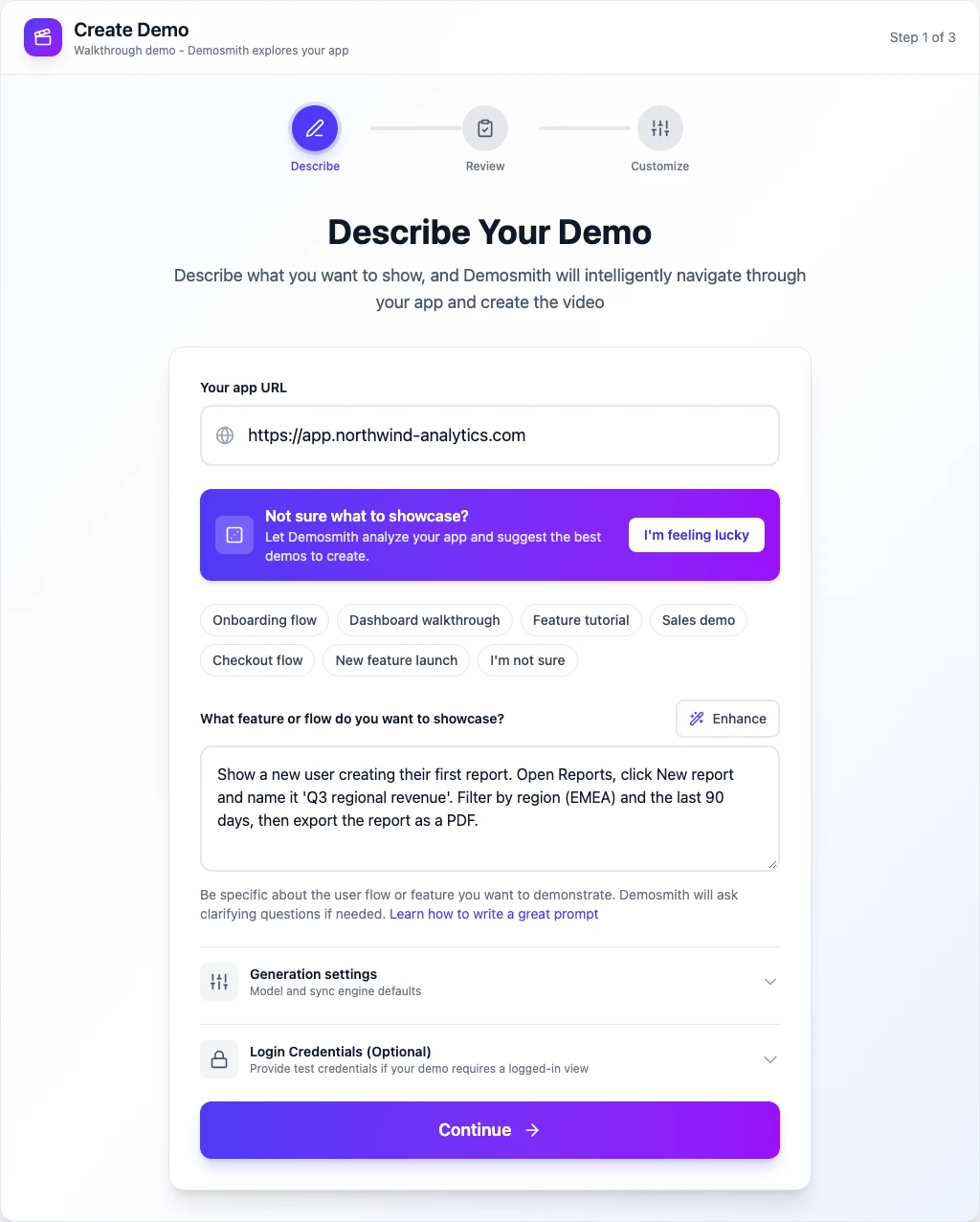
One run gives you an edited MP4 with voiceover, captions, zooms on the clicks that matter and your brand kit. The same run also becomes a click-through interactive demo with step-by-step analytics, and Docusmith can export it as a Markdown, HTML, plain-text or PDF guide. Voiceover and captions come in 31 languages. On every paid plan you can add an AI presenter who talks viewers through the video from a corner, in 28 languages.
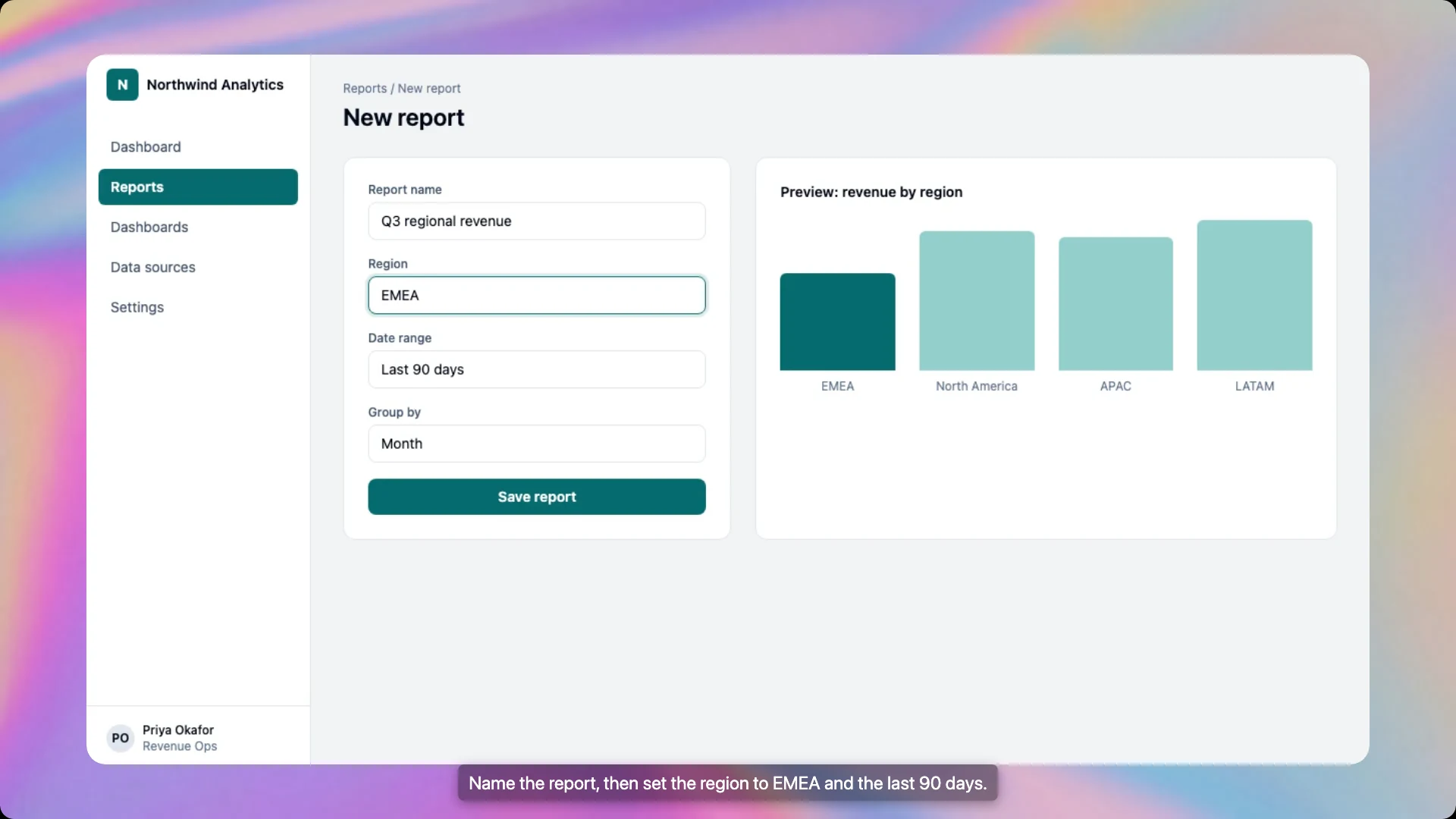
When the UI changes, you create a new demo from the same URL and prompt rather than recording the flow again by hand.
What Demosmith Cannot Do
- Web apps only. It needs a live web app at a public URL. It cannot record desktop software, native mobile apps or localhost.
- No uploads. You cannot bring your own footage for it to edit or polish.
- Less frame-level control. You can change the script, voice, music, zooms and subtitles, and adjust zooms, pauses and speed on a timeline. A dedicated editor such as Descript still gives you finer control over every frame.
- Some blockers need a person. Captchas and locked accounts stop the agent.
- It costs more than any of the four. Starter is $40 a month ($33 billed yearly) with 20 AI minutes and 10 demos. Pro is $99 ($83) and Business $250 ($208). There is a 3-day trial with one demo and no card, and no free plan.
If you make a handful of videos a year and enjoy recording them, one of the four recorders above is the better buy. If you keep a library of demos that has to follow a fast-moving web app, skipping the recording can be worth more than polishing it. Our roundup of AI demo video generators compares Demosmith with other tools in that category.
The Bottom Line
No single screen recorder is best for every product demo, but each situation has a clear pick. Screen Studio makes a Mac recording look finished with the least work. If you are on a Mac and cannot decide, start there. Tella is the choice when you need to know whether anyone watched. FocuSee brings auto-zoom to Windows at the lowest yearly price. Descript is the editor for talk-heavy videos and dubbing.
Any of them will make your recording look better. None of them removes the recording, or the next one after your UI changes.
A screen recorder polishes your take. An agent means there is no take to polish.
Key Takeaways
- Screen Studio is the most polished option for product demos on a Mac, at $29 a month or $9 a month billed yearly, but it does not run on Windows.
- Tella runs on Windows, Mac and in the browser, and adds hosted pages with view analytics, from $13 per seat a month billed yearly.
- FocuSee brings click-based auto-zoom to Windows and is the cheapest of the four at $49.99 a year, with a $199.99 one-time licence.
- Descript is a transcript-based editor with AI voices, dubbing and a free plan, but it has no automatic click zoom.
- All four still need you to record, and to record again when the UI changes.
- Demosmith skips recording for web apps: an agent drives the live product from a URL. It cannot edit or polish a recording you already have.