Why Product Walkthrough Videos Matter More Than Ever
A product walkthrough video shows someone using your product from start to finish. It captures the clicks, the transitions, and the results. Unlike a feature list or a screenshot gallery, a walkthrough lets the viewer experience the product in motion. They see the flow, hear the explanation, and understand the value in a way that static content cannot match.
Buyers now expect this. Wyzowl's 2026 data shows that 85% of people have been convinced to buy after watching a video. Landing pages with video see 86% higher conversion rates. Onboarding teams use walkthroughs to cut time-to-first-value. Sales teams attach them to outbound emails so prospects can evaluate the product without booking a call. Support teams embed them in help centres to answer repeat questions in 60 seconds instead of 500 words. Walkthroughs earn their place across every team's demos, from marketing to customer success.
The demand is clear. The production pipeline is not. The old way of making walkthrough videos, recording your screen, editing the footage, recording voiceover, syncing captions, takes 4 to 8 hours per video. Most teams need walkthroughs across marketing, sales, onboarding, and support. Multiply the time per video by the number of videos you need, and the math collapses. Teams end up with zero walkthroughs or a handful of stale ones that show a UI the product no longer matches.
This guide covers what makes an effective product walkthrough, how the traditional process works (and where it breaks down), and how AI demo agents have changed the creation process entirely. By the end, you will know which approach fits your team and how to execute it.
What Makes a Good Product Walkthrough Video
Not all walkthroughs are equal. The ones that convert, educate, and hold attention share a few specific qualities. Understanding these before you start producing saves time and avoids the most common mistakes.
Clear Flow
A walkthrough should follow a single, logical path through the product. Jumping between unrelated features confuses the viewer. Each step should lead naturally to the next. Think of it as a narrative: start with a problem or goal, walk through the actions that solve it, and end with the outcome. If you cannot describe your walkthrough in one sentence, it is trying to show too much.
Proper Pacing
Pacing is the difference between a walkthrough that feels smooth and one that feels exhausting. Dead air kills engagement. Long loading screens, slow transitions, and unnecessary pauses give the viewer a reason to close the tab. Aim for a pace that feels brisk without rushing. Each frame should show progress. If nothing meaningful changes for more than two seconds, cut it.
Dynamic Zoom
Screen recordings captured at full resolution make key details hard to see, especially on mobile. Dynamic zoom draws the viewer's attention to the specific button, field, or result that matters at each step. A 1.5x to 2x zoom on important interactions signals "pay attention here" without disorienting the viewer. Without zoom, a walkthrough becomes a blurry demo where the viewer cannot follow what is happening.
Voiceover That Explains, Not Reads
A good voiceover narrates what the product is doing and why it matters. It does not narrate every button label or menu item the viewer can already see. "Click Settings, then click Billing, then click Update" is not helpful narration. "Here is where you update your billing details so the next invoice goes to the right team" gives the viewer context and purpose.
Captions for Silent Viewing
A large share of video views happen with sound off, especially on LinkedIn and in open-plan offices. Captions ensure your walkthrough communicates regardless of audio. They also improve accessibility and help non-native speakers follow along. If you are using AI generation, captions come built in. If you are recording manually, add them in post-production. Always.
Concise Length
The best walkthrough videos are short. Under 60 seconds for landing pages. Under 3 minutes for sales outreach. Under 5 minutes for onboarding and training. Completion rates drop sharply after the 2-minute mark. Every second of your walkthrough should earn its place. If a section does not move the narrative forward, cut it.
The Traditional Product Walkthrough Process (And Why It Takes 4-8 Hours)
If you have built a product walkthrough the conventional way, these steps will feel familiar. They also explain why most teams produce so few of them.
- Script writing (30-60 minutes): Map the flow you want to show, decide what to say at each step, and write the narration. Most teams iterate on the script two or three times before it feels right.
- Environment setup (15-30 minutes): Prepare a clean demo environment with realistic data. Close tabs, disable notifications, and set your browser to a fixed window size.
- Screen recording (30-90 minutes): Record your walkthrough while narrating. One misclick, one notification, one hesitation, and you start over. Most people record four to seven takes.
- Video editing (60-120 minutes): Cut mistakes, add zoom effects, smooth transitions, and tighten the pacing. This step requires actual editing skills and software.
- Voiceover recording (30-60 minutes): Record narration separately for better audio quality, then sync it to the edited footage.
- Captions and branding (30-60 minutes): Add captions, intro cards, outro CTAs, and brand elements.
- Export and review (15-30 minutes): Render the final video, watch it end to end, catch issues, and re-edit if needed.
Total: 4 to 8 hours for a single walkthrough. That assumes you already have video editing experience. For a deeper breakdown of the costs involved, see our analysis of the true cost of product demo videos.
Now multiply that by the number of walkthroughs your team needs. Landing page demo, sales follow-up video, onboarding sequence, feature spotlight, help centre clips. Five to ten videos at 4 to 8 hours each is an entire sprint of production work. That is before any UI updates force you to re-record everything.
How AI Changes Product Walkthrough Creation
AI tools have split walkthrough creation into three distinct approaches. Each trades off control, speed, and effort differently.
AI Scripting + Manual Recording
Use ChatGPT or another language model to write the script and plan the flow, then record and edit manually. This cuts the scripting time but leaves the most expensive steps (recording, editing, voiceover) untouched. You save 30 to 60 minutes on the front end and still spend 3 to 7 hours on everything else. For teams that want to keep full manual control but speed up planning, using ChatGPT for product demo video planning can help with scripting and storyboarding.
AI Avatar Tools
Platforms like Synthesia and HeyGen generate presenter-led videos with AI avatars. They work well for talking-head content but not for product walkthroughs. You still need to provide screen recordings of your product for the avatar to present over. The avatar reads a script on camera but does not navigate your product or capture footage.
AI Demo Agents
Tools like Demosmith take a product URL and a plain-language description of the flow, then handle everything: navigation, recording, editing, voiceover, and captions. The AI launches a cloud browser, clicks through your product with realistic cursor movements, edits the footage with zooms and transitions, generates narration, and exports a finished MP4. Total time: under 10 minutes.
This is a fundamentally different model. Instead of speeding up one step in the manual process, the AI replaces the entire pipeline. For a broader look at tools in this category, see our guide to the best AI demo video generators in 2026.
Step 1: Define Your Walkthrough Flow
Before you touch any tool, define what the walkthrough should show. This step takes 10 minutes and saves hours of rework later.
Map the User Journey
Start from the viewer's goal. What should they understand after watching? Work backwards from that outcome to determine which screens and actions the walkthrough needs to cover. A walkthrough for a prospect evaluating your product looks different from one built for a new customer learning the interface.
Pick 3-5 Key Actions
Most products have dozens of possible flows. Choose three to five actions that demonstrate the core value. Resist the urge to show everything. A tight, focused walkthrough outperforms a comprehensive one every time. Viewers who want to see more can watch a second video.
Focus on the Aha Moment
Every product has a moment where the value clicks for the user. It might be seeing the first report generated, watching a task move from "to do" to "done," or receiving the first automated notification. Build your walkthrough around that moment. Make it the climax. Everything before it should build anticipation, and everything after should reinforce the takeaway.
Step 2: Choose Your AI Approach
The right approach depends on four factors: how fast you need the video, how polished it needs to be, what your budget allows, and how often the walkthrough will need updating.
- Speed: If you need a walkthrough today, an AI demo agent is the only option that delivers in under 10 minutes. AI scripting plus manual recording takes hours. AI avatar tools take a day or more once you account for screen recording preparation.
- Quality: Manual recording with a skilled editor produces the highest frame-by-frame control. AI demo agents produce consistently polished output with zoom, transitions, and voiceover, but offer less granular control than Premiere Pro or Final Cut.
- Budget: Manual recording costs your time (4-8 hours per video). AI scripting plus manual recording also costs your time, just slightly less of it. AI demo agents run $40 to $250 per month for unlimited generation.
- Update frequency: If your product ships UI changes weekly or monthly, choose a method that makes regeneration cheap. Re-recording manually every quarter is unsustainable. AI demo agents let you regenerate in minutes with the same prompt.
For most teams, the decision comes down to whether they need one video or a library. A single, high-stakes walkthrough for the homepage might justify manual production. A full set of walkthroughs across marketing, sales, and support demands AI generation.
Step 3: Generate Your Walkthrough Video with an AI Demo Agent
If you choose the AI route, here is how the process works end to end using Demosmith.
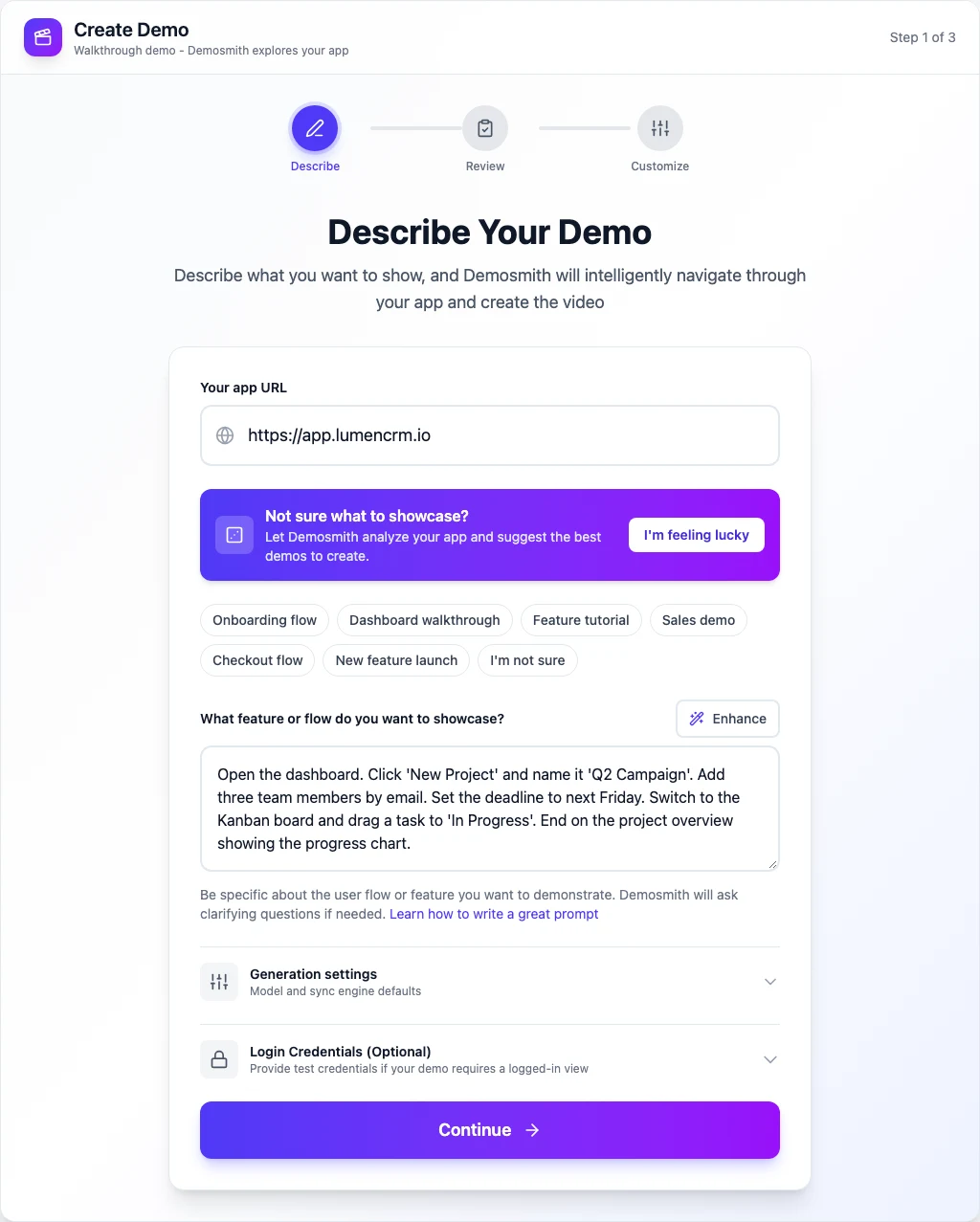
Paste Your Product URL
Enter the URL where your walkthrough begins. This can be a login page, a dashboard, or any accessible screen. Demosmith launches a cloud browser and loads your product in a clean, controlled environment.
Describe the Flow in Plain Language
Write out what you want to show, the way you would brief a colleague. For example:
"Open the dashboard. Click 'New Project' and name it 'Q2 Campaign.'
Add three team members by email. Set the deadline to next Friday.
Switch to the Kanban board and drag a task to 'In Progress.'
End on the project overview showing the progress chart."
The more specific you are about the actions and the order, the more accurate the output. You can also provide login credentials if the walkthrough starts behind authentication.
The AI Handles Everything Else
Demosmith's AI agent navigates your product, clicking buttons, filling forms with realistic data (not "test@test.com"), and scrolling through pages. It captures high-resolution footage of each step with deliberate, smooth cursor movements. No stray notifications. No accidental clicks. No re-takes.
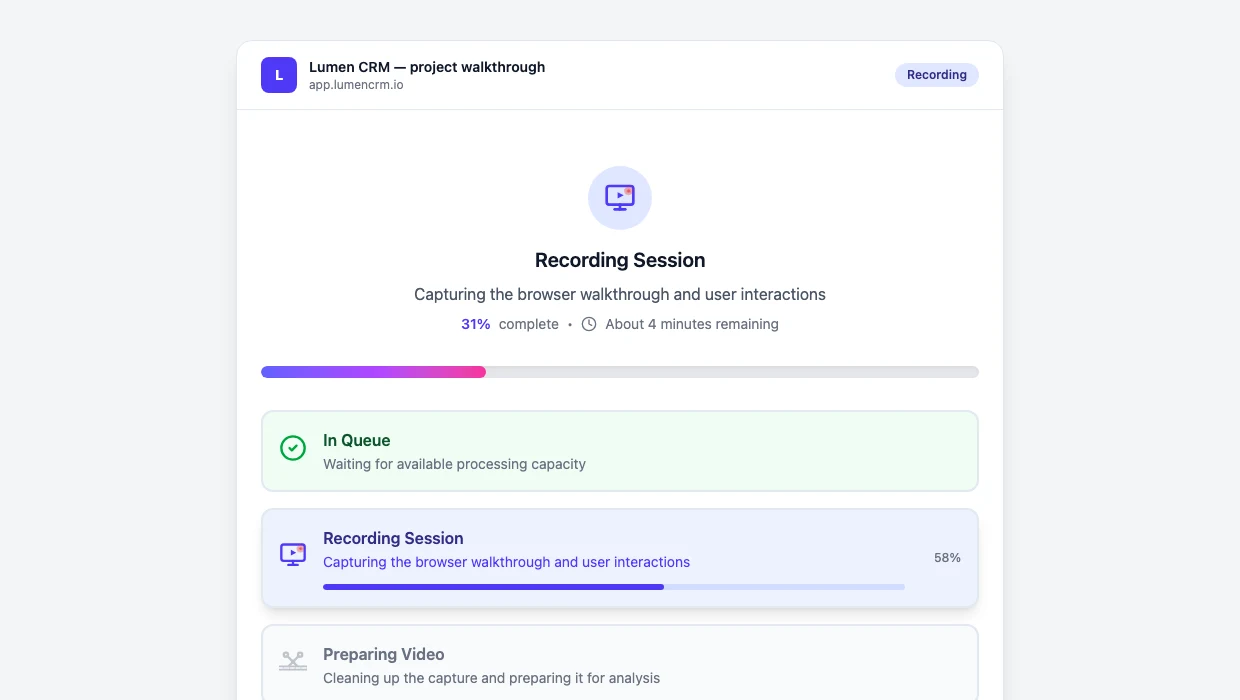
After capturing the raw footage, the AI processes it:
- Auto-editing: Trims dead space, adds zoom effects on key interactions, and smooths transitions
- Script generation: Writes narration based on what is happening on screen
- Voiceover: Generates natural-sounding AI narration
- Captions: Adds synchronised subtitles to the video
- Localization: Voiceover and captions available in 31 languages out of the box
The output is a downloadable MP4 and a shareable link. Ready to embed, email, or post.
A product walkthrough that used to take 4 to 8 hours of manual work now takes under 10 minutes. The bottleneck is no longer production capacity. It is deciding which flows to show first.
Keeping Your Walkthrough Videos Up to Date
This is the part most teams ignore, and it costs them. A walkthrough that shows an outdated UI does more harm than no walkthrough at all. When a prospect sees features that no longer exist or a layout that changed three months ago, they lose trust in the product before they even sign up.
The problem compounds over time. Every UI update, every redesigned settings page, every new onboarding flow makes your existing walkthroughs less accurate. Teams cannot justify spending another 4 to 8 hours re-recording every time a button moves, so the walkthroughs stay stale. Weeks become months. The gap between the product and the videos keeps growing.
With AI demo generation, updating a walkthrough means re-running the same prompt. Paste the URL, use the same flow description, and get a fresh video that reflects the current UI. Your walkthrough library stays current without anyone sitting down to record.
For a systematic approach to this problem, read our guide on how to keep your demo videos evergreen.
Manual vs AI-Assisted vs Autonomous: How They Compare
| Step | Manual Recording | AI Scripting + Manual | AI Demo Agent (Demosmith) |
|---|---|---|---|
| Script Writing | 30-60 min manual | AI-generated in seconds | Automatic (from your description) |
| Screen Recording | 30-90 min, 4-7 takes | 30-90 min, 4-7 takes | Autonomous, one pass |
| Video Editing | 60-120 min in editor | 60-120 min in editor | Automatic zooms, cuts, transitions |
| Voiceover | 30-60 min recording | 30-60 min recording | AI-generated, natural quality |
| Captions | Manual or separate tool | Manual or separate tool | Automatic, synchronised |
| Multi-language | Re-record per language | Re-record per language | 31 languages built in |
| Time to Finished Video | 4-8 hours | 3-7 hours | Under 10 minutes |
| Cost | Free (your time) | Free (your time, slightly less) | Starting at $40/mo |
| Update Speed | Full re-shoot (4-8 hours) | Full re-shoot (3-7 hours) | Regenerate in minutes |
| Technical Skill Required | High (editing software) | High (editing software) | None |
Conclusion: Product Walkthroughs Were Always Essential. Now They're Also Easy.
The teams that win are not the ones with the best editing skills. They are the ones that can produce a polished walkthrough the same week a feature ships, not three months later.
Product walkthrough videos drive conversions, shorten sales cycles, accelerate onboarding, and reduce support load. The value has never been in question. The bottleneck has always been production. When a single walkthrough takes 4 to 8 hours to produce, teams make fewer of them. The ones they do make go stale as the product evolves.
AI demo agents remove that bottleneck. You define the flow, paste a URL, and receive a finished walkthrough with voiceover, captions, and zoom effects in under 10 minutes. The same process that used to consume a full day now fits between meetings. That changes the economics of walkthrough production entirely.
Key Takeaways
- Define the flow before you produce. A walkthrough built around a clear 3-to-5-step flow outperforms one that tries to show everything. Invest 10 minutes in planning and save hours in production.
- Good walkthroughs share specific qualities. Clear flow, tight pacing, dynamic zoom, voiceover that explains rather than reads, captions for silent viewing, and concise length. These are the elements that separate effective walkthroughs from forgettable ones.
- The traditional process costs 4 to 8 hours per video. Script, record, edit, narrate, caption, export. Each step requires time and skill. It does not scale.
- AI demo agents produce finished walkthroughs in under 10 minutes. Paste a URL, describe the flow, and receive a polished MP4 with voiceover in 31 languages and automatic captions. No recording, no editing, no re-takes.
- Keeping walkthroughs current matters as much as creating them. Stale walkthroughs damage trust. Choose a method that makes regeneration trivial so your videos stay current as your product evolves.
- Start with one walkthrough. Pick the flow that drives the most value for your team. Create it, measure the impact, and build from there. Try Demosmith free and have your first walkthrough ready in under 10 minutes.
Frequently Asked Questions
What is an AI product walkthrough video?
An AI product walkthrough video is generated by an AI agent that navigates your product autonomously, captures footage, edits it with zooms and transitions, adds voiceover, and exports a finished MP4. You provide a URL and a description of the flow. The AI handles recording, editing, narration, and captions without any manual screen capture.
How long does it take to create a product walkthrough video with AI?
With an AI demo agent like Demosmith, the entire process takes under 10 minutes from pasting your URL to receiving a finished, downloadable MP4. That includes autonomous navigation, auto-editing, voiceover generation, and caption sync.
Can AI walkthrough videos include voiceover in multiple languages?
Yes. Demosmith generates AI voiceover and captions in 31 languages. You can produce the same walkthrough for different markets without re-recording anything. Switch the language, regenerate the voiceover, and export.
How do I keep my product walkthrough video up to date when my UI changes?
With AI demo generation, you regenerate the video using the same URL and flow description. The AI re-navigates your updated product and produces a fresh walkthrough in under 10 minutes. No re-recording, no re-editing.