Demosmith vs Vidocu: Same Agent Idea, Different Finish Line
For years, every product video started the same way. Someone opened a screen recorder, clicked through the flow, fumbled a click, and started again. Vidocu and Demosmith belong to a small, new group of tools where an AI agent does that clicking for you. You describe the flow in plain English, the agent opens your product in a real browser, and it records itself working through it.
What happens after the recording is where the two split. Vidocu calls itself an AI knowledge platform. Its agent is one way to feed a pipeline that ends in help articles, SOPs, step screenshots, training quizzes and a hosted help centre. Demosmith is an AI demo agent. Its run ends in an edited, narrated demo video, an interactive demo built from the same capture, and a document export when you need one.
Vidocu has also published its own comparison of the two tools. Much of it is fair, and we say so below. A few points about Demosmith are out of date, mainly two-factor logins, our language count and the interactive demo it leaves out. This page sets those straight and is just as plain about where Vidocu is the better pick.
At a Glance: Demosmith vs Vidocu
Vidocu prices below are from its pricing page, checked on October 12, 2026.
| Feature | Vidocu | Demosmith |
|---|---|---|
| Built for | Help articles, SOPs and training from one recording | Polished demo videos for marketing, sales and onboarding |
| How capture works | AI Recorder drives a browser from a written brief, or you upload footage you already have | An AI agent drives your live web app from a URL and a prompt |
| Inputs | Web apps, plus uploaded video, PDFs and slide decks | Live web apps only |
| Finished demo video | Yes, with editors for video, subtitles and voice | Yes: voiceover, captions, zooms and your brand kit |
| Interactive demo | No | Yes, from the same run |
| Written docs | Articles, SOPs, screenshots, quizzes, hosted help centre ($100/mo add-on) | Docusmith export: Markdown, HTML, plain text or PDF (no hosting) |
| Two-factor logins | Pauses for a one-time code, or you sign in yourself | The agent pauses mid-run and asks you |
| On-screen presenter | Business plan and up | Six AI presenters on every paid plan, speaking 28 languages |
| Languages | 70+, per Vidocu's site | 31 |
| API, webhooks, MCP | Yes, on every plan | Not yet |
| Free option | Free plan (no AI Recorder) | 3-day trial, one demo, no card |
| Starting price | $19/mo ($13/mo billed yearly) | $40/mo ($33/mo billed yearly) |
What Vidocu Does
Vidocu comes from Common Ninja, a company that makes no-code website widgets. It started as an internal tool before Common Ninja turned it into a product. Its pitch is "upload once, use everywhere": one recording becomes a video, a written guide, screenshots and training material. Here is what it does well.
The AI Recorder
Vidocu's AI Recorder went live in August 2026. You write a brief, give it a start URL, and the agent performs the task in a real browser while it records. It can use a desktop or mobile viewport, stops and explains itself when it gets stuck, and saves sessions so you can re-run a flow later. It costs 50 credits per finished minute, and failed runs are free.
Any Footage You Already Have
This is Vidocu's biggest practical advantage. You can upload a Loom, a Zoom recording, a phone video, a PDF or a slide deck and get the same treatment as an agent run. Teams with a back catalogue of recordings, or products that live on desktop or mobile, can use Vidocu today.
Documentation First
Every run can become a help article with step screenshots, an SOP, subtitles, a quiz or a short course. The Knowledge Center add-on ($100 a month) hosts it all on your own domain. A feature called Pulse goes further: it scans your product and docs, flags articles that have gone stale and drafts updates. Pulse and the Knowledge Center can publish straight to Zendesk, Intercom, Notion and other help desks.
API, Webhooks and MCP
Vidocu ships a REST API with signed webhooks on every plan, free included, and a hosted MCP server, so you can start a recording from a script or a chat assistant. If your team wants video generation inside a pipeline, Vidocu has that now and Demosmith does not.
Languages, Avatars and Seats
Vidocu's site lists 70+ languages for translation and voiceover. Its Business plan ($149 a month, or $100 billed yearly) adds AI avatars, right-to-left languages and four seats. Enterprise adds avatars made from your own face.
Pricing
A free plan gives you 200 one-time credits, roughly four minutes of AI video, without the AI Recorder. Paid plans are Starter at $19 a month (about 8 minutes of AI video), Pro at $49 (about 30 minutes) and Business at $149 (about 80 minutes), with a third off on yearly billing. Translation and voiceover draw on the same credits.
Vidocu is young and its review footprint is small: four reviews on Trustpilot and one on G2 at the time of writing. The early reviews are warm, especially about support. One Trustpilot reviewer wrote, "When I reported minor issues, they were resolved within hours."
What Demosmith Does
Demosmith does one job: it turns a product URL and a sentence into a demo your buyers will watch. You paste the URL, describe the flow ("sign up, create a project, invite a teammate"), and the agent navigates the live product in a cloud browser, fills forms with realistic data, records the session and edits it.
A Finished Demo Video
The video comes back cut, zoomed on the clicks that matter, captioned and voiced, with your brand kit applied. You can change the script, voice, music and zooms in the editor, or take the raw recording into a timeline of your own. It downloads as an MP4 and shares as a link or an embed.
An Interactive Demo From the Same Run
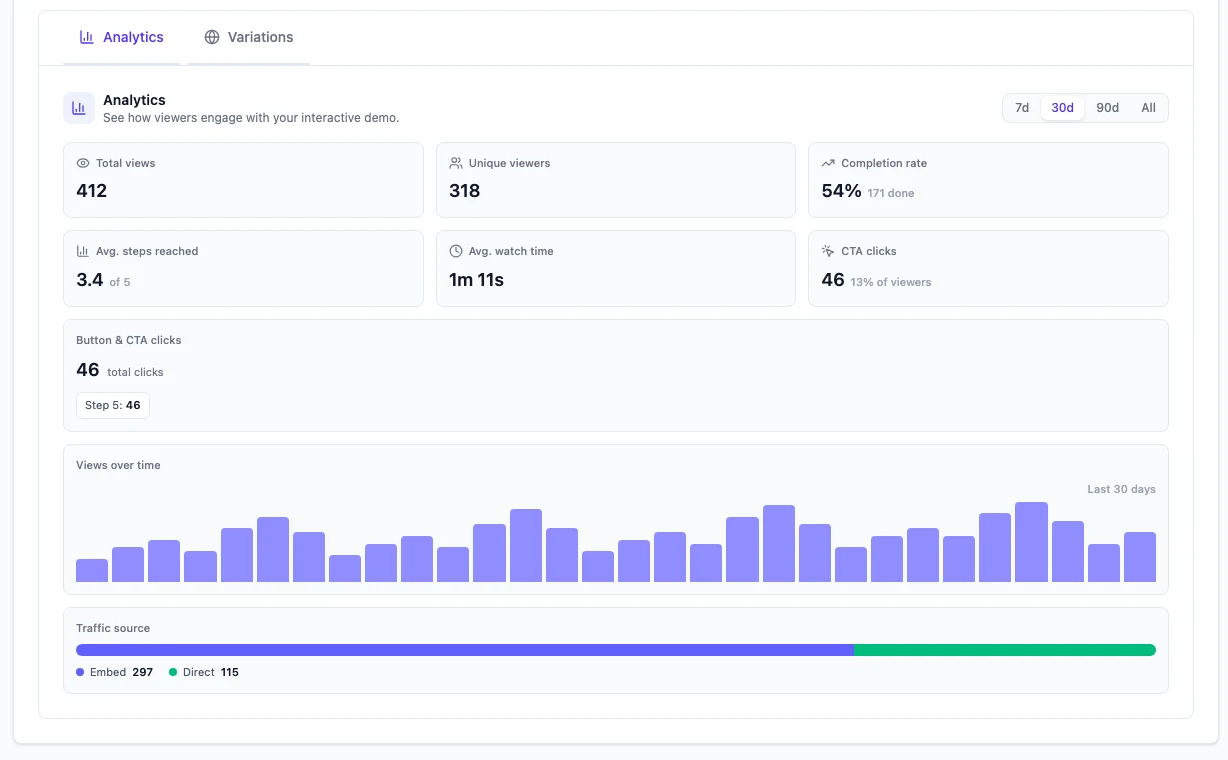
The same capture also becomes a click-through interactive demo, so you do not record twice for a website tour and a video. Each interactive demo has its own analytics: views, completion rate, a step-by-step drop-off funnel and CTA clicks. Vidocu's comparison page does not mention this output at all.
Logins and Two-Factor Codes
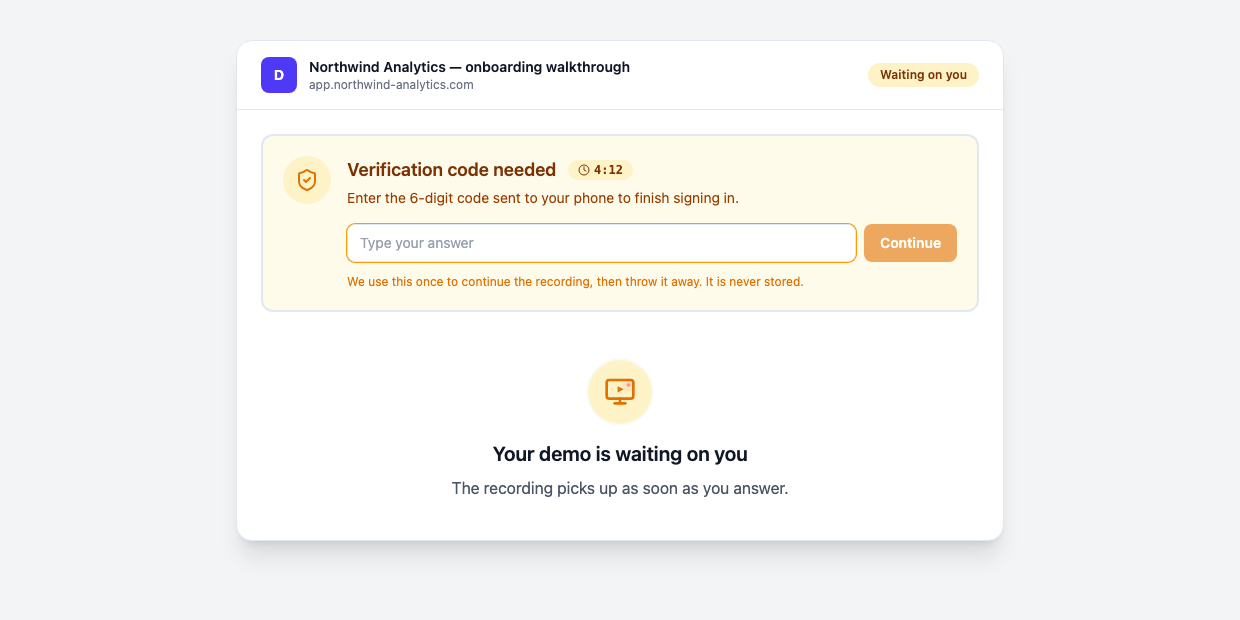
Vidocu says Demosmith handles logins "via staging URLs and test accounts". That used to be true. It is not any more. When a flow hits a two-factor screen, a sign-in prompt or a choice only you can make, the agent pauses and asks you mid-run. A countdown shows how long it will wait, and the agent uses each code once and never stores it. Captchas and locked accounts still need a person.
An AI Presenter
Demosmith now offers an AI presenter who narrates the demo from a corner of the video. You choose from six presenters and set the corner and the size, and the presenter speaks 28 languages. It comes with every paid plan from Starter up.
31 Languages and Docs When You Need Them
Voiceover and captions come in 31 languages, and a language version re-voices the same recording instead of starting over. When you need written steps, Docusmith turns a finished demo into Markdown, HTML, plain text or a PDF, with screenshots from the run placed in the document.
Pricing
Starter is $40 a month with 20 AI minutes and 10 demos. Pro is $99 with 50 AI minutes and 50 demos. Business is $250 with 150 AI minutes and unlimited demos. Yearly billing brings those to $33, $83 and $208 a month. The trial runs for three days with one demo and no credit card.
Key Differences Between Demosmith and Vidocu
What You Get at the End
This is the real choice. A Vidocu run is raw material for a documentation library: articles, SOPs, screenshots and quizzes, with a video among them. A Demosmith run is a finished piece of marketing: the video a prospect watches on your landing page, plus the interactive version they click through. Ask what you will do with the output on Monday morning, and the answer usually picks the tool.
What Goes In
Vidocu takes almost anything: an agent run, an old Loom, a PDF, a deck. Demosmith takes one thing, a live web app reachable by URL, and records it fresh every time. If your product is a desktop or mobile app, or you have a library of recordings you want to reuse, Vidocu wins this one outright.
Logins, Codes and Blockers
This one is close to even. Vidocu's agent pauses for a one-time code, and you can also sign in yourself and save the session. Demosmith's agent pauses and asks for codes, sign-in details, a choice between paths or a go-ahead before a step it cannot undo, with up to three questions per run. Captchas still stop Demosmith, and Vidocu's agent stops and explains itself when something blocks it.
Who Presents the Video
Vidocu keeps avatars for its Business plan ($149 a month). Demosmith includes six AI presenters from its $40 Starter plan, so if you want a presenter on a starter budget, Demosmith costs far less. For another agent-based tool with a presenter, see our Demosmith vs Glimeo comparison.
Automation
Vidocu has a REST API, webhooks and an MCP server on every plan. Demosmith has none of these yet, and our FAQ lists an API as on the roadmap. Every Demosmith demo starts in the app. For most marketing teams that is fine. For a platform team that wants demos generated on every release, it is a deal-breaker for now.
How Each Charges
Vidocu meters credits shared across recording, translation, voiceover and articles. Demosmith meters AI minutes and demos per month. Vidocu is cheaper to start, at $19 a month, with a free plan below that. The two meters do not line up neatly, so compare on the output you need. One thing to factor in: publishing the interactive demo from a Demosmith run does not use AI minutes.
When Vidocu Is the Better Choice
- Your deliverable is documentation. Help articles, SOPs, onboarding courses with quizzes, and a help centre on your own domain.
- You already have recordings. Vidocu turns old Looms, PDFs and decks into fresh material. Demosmith cannot take uploads.
- Your product is not a web app. Desktop and mobile apps work in Vidocu through uploaded footage.
- You need an API. Webhooks and an MCP server let engineers wire video into a release pipeline.
- You need more languages or your own face. 70+ languages, and custom-face avatars on Enterprise.
- You want to start free. The free plan and the $19 Starter make it cheap to try.
When Demosmith Is the Better Choice
- Your deliverable is a demo that sells. A cut, voiced, branded video for a landing page, a sales email or a launch post.
- You want a website tour too. The interactive demo comes from the same run, with step-level analytics.
- You want a presenter without the Business price. Six AI presenters come with every paid plan.
- You sell in several markets. One capture, re-voiced in 31 languages.
- Your flows sit behind real logins. The agent asks for the code instead of failing at the two-factor screen.
If you are weighing other tools in this space, our roundup of the best AI demo video generators covers the wider field.
For the jobs Demosmith does not cover at all, such as uploads, an API or one video per prospect, see our guide to Demosmith alternatives.
The Bottom Line
Vidocu and Demosmith start from the same idea: an AI agent should do the clicking. Vidocu builds a knowledge platform on top of it, and it does that well. If your team writes help centres and training, or has years of recordings to reuse, it is the stronger tool, and its API puts it ahead for engineering teams.
Demosmith builds the demo itself. If the output has to persuade a buyer, on a landing page, in an inbox or in a launch post, Demosmith gives you the finished video and the interactive tour in one go, with a presenter on every paid plan.
Vidocu records your product so you can document it. Demosmith records your product so you can sell it.
Key Takeaways
- Vidocu and Demosmith each use an AI agent to drive a real browser and record a flow, so neither needs you at the screen recorder.
- Vidocu turns runs and uploaded footage into documentation: articles, SOPs, quizzes and a hosted help centre. Demosmith turns a live web app into a finished demo video and an interactive demo.
- Vidocu has an API, webhooks, MCP, uploads and a free plan. Demosmith does not offer any of these today.
- Demosmith asks for two-factor codes as it goes, supports 31 languages and includes an AI presenter from its $40 Starter plan.
- Pick by output: docs and training point to Vidocu, demos that sell point to Demosmith.