Demosmith vs Glimeo: Same Agent, and Now Each Has a Face
Glimeo and Demosmith start from the same idea. You give the tool a product URL and a short brief, an AI agent opens your product in a cloud browser and clicks through the flow, and you get back a narrated demo video. Nobody sits at a screen recorder. Glimeo's own comparison calls the two the closest pair in this category. We agree.
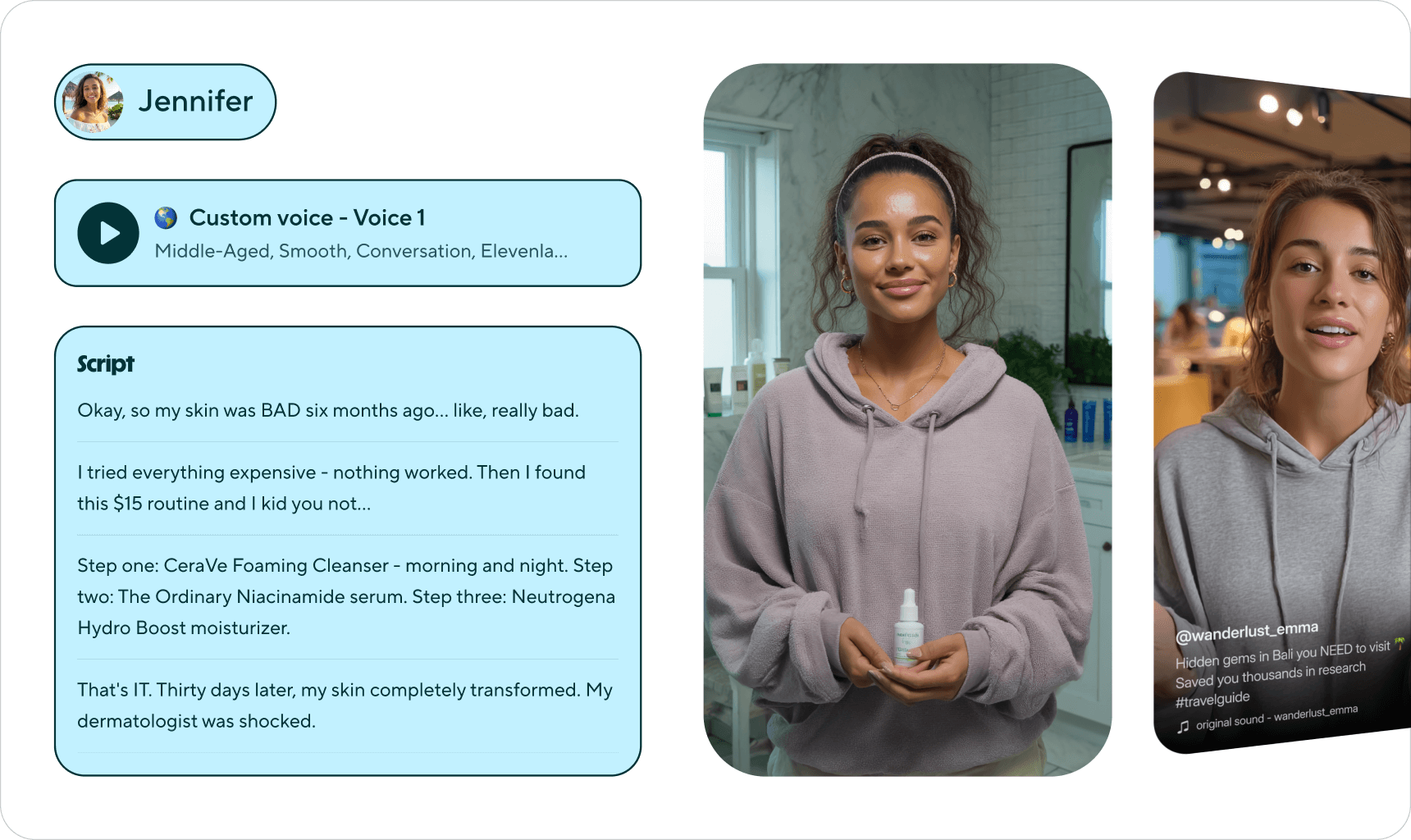
For a while, the easy way to tell them apart was the face. Glimeo puts a lip-synced presenter beside the product, and Demosmith videos had voiceover and captions only. That changed in October 2026, when Demosmith added an AI presenter of its own. Each tool now offers a lip-synced presenter, so the choice comes down to other things: what the presenter can look like, which languages it speaks, where you are allowed to buy, and what else one run gives you.
This page compares the two on those points. Glimeo wins several of them outright, and we say which. If you are new to this kind of tool, start with what an AI demo agent is and how it differs from a screen recorder.
At a Glance: Demosmith vs Glimeo
Glimeo details below come from glimeo.ai and its pricing page, checked on October 12, 2026.
| Feature | Glimeo | Demosmith |
|---|---|---|
| Built for | Presenter-led demo videos for sales, launches and tutorials | Demo videos, plus an interactive demo and docs from the same run |
| How capture works | An agent scouts your product, you approve a storyboard, it rehearses, then records | An agent drives your live web app from a URL and a prompt |
| Review before recording | Approve scenes, script and presenter, in the app or on WhatsApp | A Demo Overview shows the planned walkthrough first |
| AI presenter | On paid plans, plus one made from your photo on Pro and Business | Six AI presenters on every paid plan, speaking 28 languages |
| Presenter allowance | 5, 10 or 20 presenter demos a month, by plan | No separate cap: any demo on a paid plan can have one |
| Narration languages | English, more planned | 31 |
| Interactive demo | No, video only | Yes, from the same run, with step analytics |
| Written docs | No | Docusmith: Markdown, HTML, plain text or PDF |
| Logins | Saves one login per product for later demos | Test credentials per demo; the agent asks for 2FA codes mid-run |
| Fix one scene | Re-record a single scene and splice it in | No; edit script, voice and zooms, or start a new demo |
| Export shapes | Landscape, vertical and square | Landscape |
| EU and EEA customers | Creation and purchases blocked | Available |
| API or webhooks | None published | Not yet |
| Free option | One free voiceover demo, watermarked | 3-day trial, one demo, no card |
| Starting price | $29/mo ($290 a year) | $40/mo ($33/mo billed yearly) |
What Glimeo Does
Glimeo comes from CloudAxis Labs, a Wyoming company, and launched in July 2026. It calls its finished video a "glim": the real product on screen, a presenter who tells the story, and zooms, click cues and captions already in the file. Here is what it does well.
A Storyboard You Sign Off First
Glimeo explores your product first and drafts a storyboard of scenes. You can edit, reorder or delete scenes, check the script and choose the presenter, and nothing records until you approve. If you opt in, Glimeo messages you on WhatsApp when the storyboard is ready, and you approve by replying YES with a six-character code. Passwords never go over WhatsApp.
A Rehearsal Before the Take
Before the real recording, Glimeo runs a full dry run with checks, so a bad click fails in rehearsal instead of ruining the take. Once the rehearsal passes, it records a clean take in a fresh session. Scouting, the storyboard and the rehearsal do not count against your plan.
A Presenter, Including One Made From Your Photo
Every paid plan includes a lip-synced presenter. On Pro and Business, Glimeo can also build a presenter from a picture you upload, so your own face can front the video. Presenter demos are capped: 5 of Starter's 15 demos, 10 of Pro's 50 (2 from your picture) and 20 of Business's 100 (5 from your picture). The free demo is voiceover only.
Saved Logins and One-Scene Fixes
Log in to a product once and Glimeo stores that login, encrypted, so later demos of the same product sign in for you. Glimeo notes that a two-factor prompt or a CAPTCHA can still need you in its Live View. After recording, you can ask for changes in plain English, or re-record one scene and splice it in instead of redoing the whole video.
Every Export Shape
One approved project exports as a landscape MP4, a vertical cut for Shorts and a square cut for social feeds. If the same demo is going to YouTube, LinkedIn and Instagram, you skip a second edit.
Pricing
The free plan gives you one voiceover demo of up to a minute, watermarked and hosted for 14 days. Starter is $29 a month for up to 15 demos, Pro is $79 for 50 and Business is $199 for 100. Yearly billing is 12 months for the price of 10: $290, $790 and $1,990. Demos run up to 2 minutes on Starter, 3 on Pro and 6 on Business (when available). A redo you ask for counts as another demo, and failures on Glimeo's side are free.
Glimeo is young. Its terms describe it as a launch beta, and we found no public reviews of it on G2, Trustpilot or Reddit at the time of writing.
What Demosmith Does
Demosmith turns a product URL and a sentence into a finished demo. You paste the URL, describe the flow ("sign up, create a project, invite a teammate") and check the Demo Overview, which lays out the planned walkthrough before anything records. The agent then drives the live product in a cloud browser, fills forms with realistic data, records the session and edits it.
A Finished Demo Video
The video comes back cut, zoomed on the clicks that matter, captioned and voiced, with your brand kit applied. In the editor you can change the script, voice, music and zooms, or take the raw recording into a timeline of your own. It downloads as an MP4 and shares as a link or an embed.
An AI Presenter on Every Paid Plan
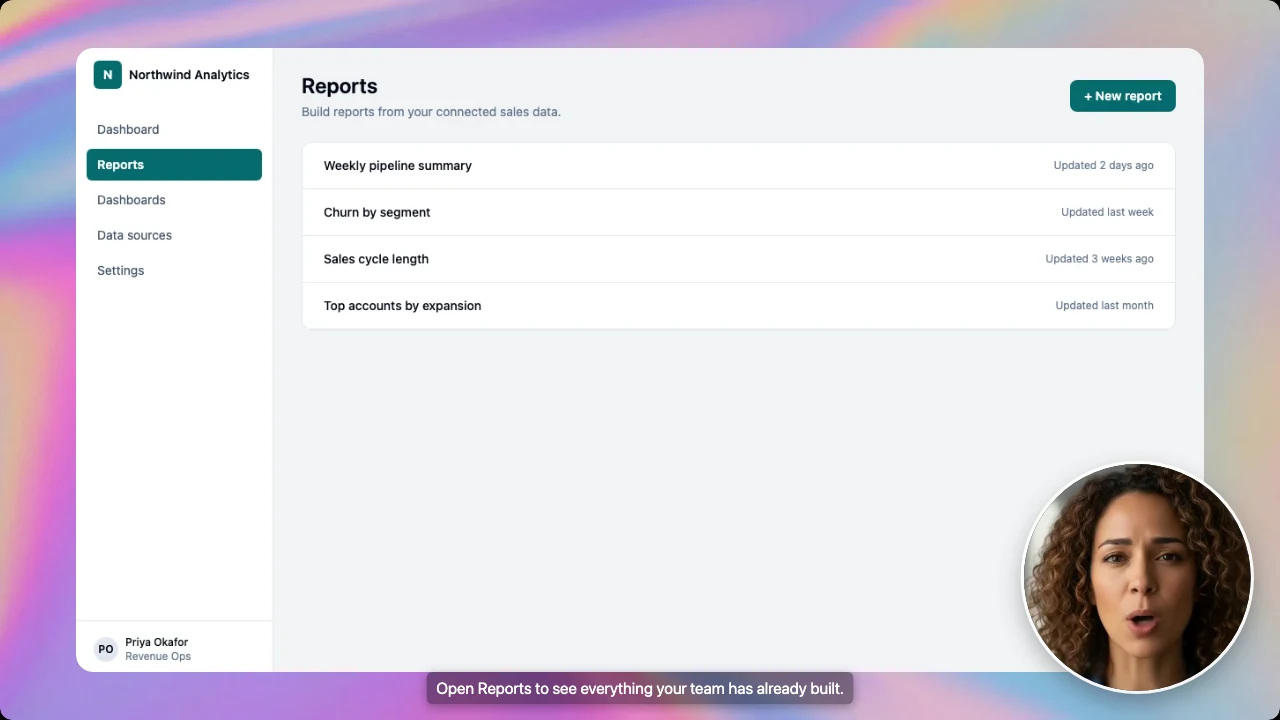
Demosmith's AI presenter narrates the demo from a small circle in the corner. You choose from six presenters, pick one of the four corners and a small, medium or large size, and you can move or resize it later in the editor. It comes with every paid plan from Starter up, though not with the trial.
31 Languages, With a Presenter Who Speaks 28
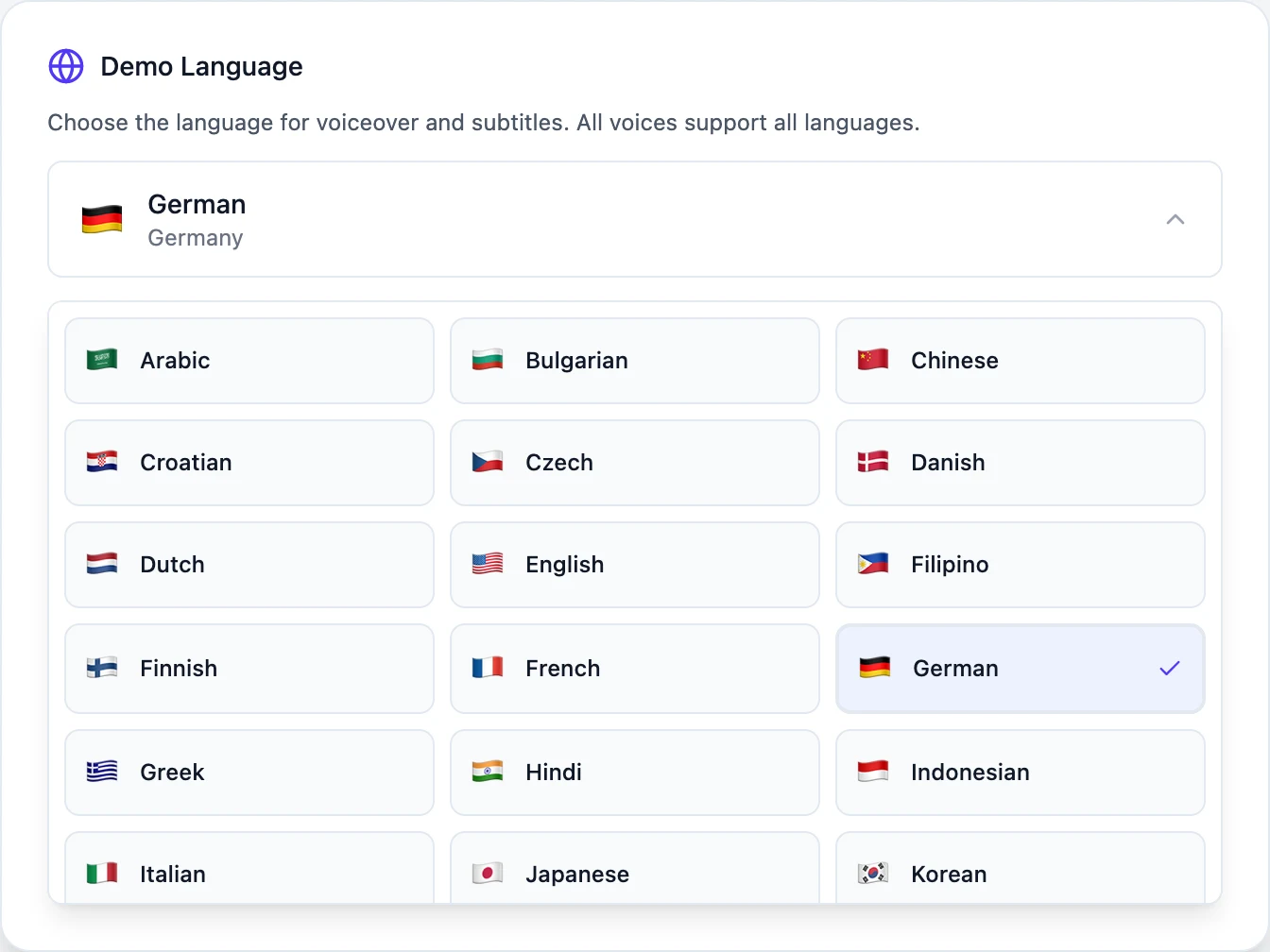
Voiceover and captions come in 31 languages, and captions can use a different language from the narration. A language version re-voices the same recording instead of starting over. The AI presenter speaks 28 languages, including English, Spanish, French, German and Portuguese.
An Interactive Demo and Docs From the Same Run
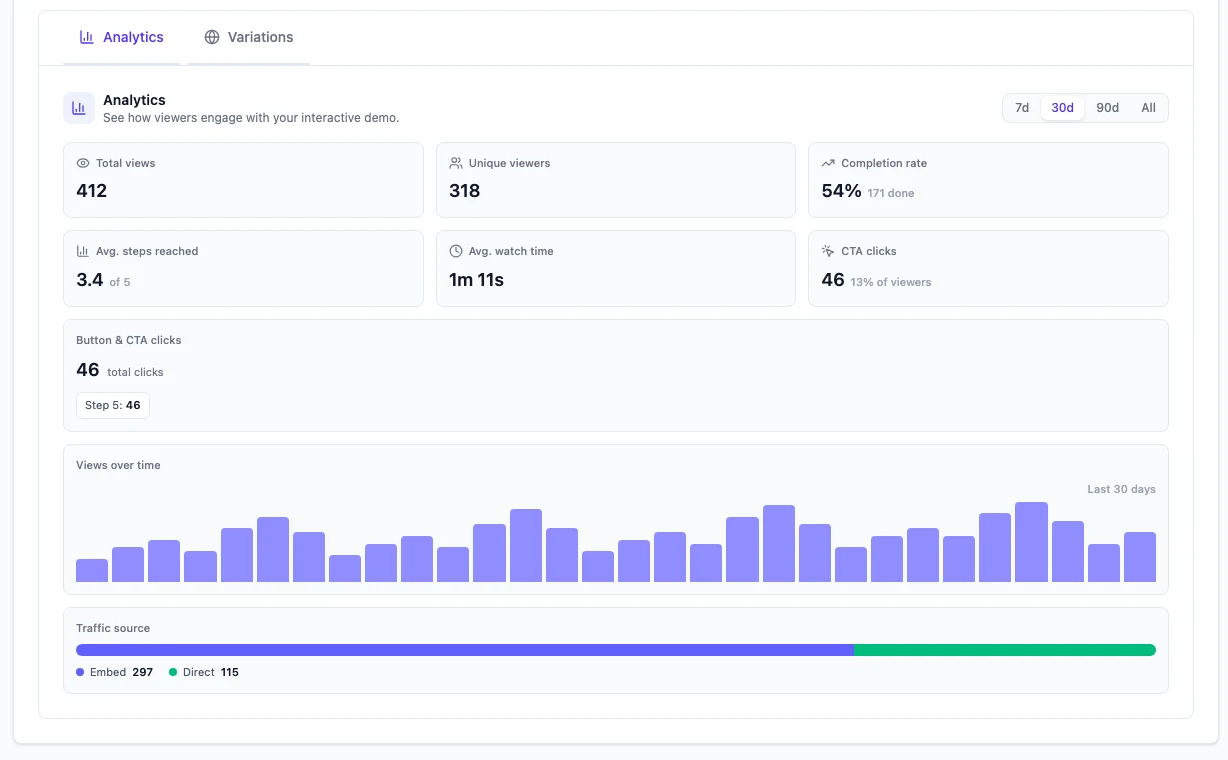
The same capture also becomes a click-through interactive demo, so a website tour does not need a second recording. Each interactive demo has its own analytics: views, completion rate, a step-by-step drop-off funnel and CTA clicks. When you need written steps, Docusmith turns a finished demo into Markdown, HTML, plain text or a PDF, with screenshots from the run placed in the document.
Logins and Two-Factor Codes
For flows behind a login, you add test credentials, which are encrypted and used only during the run. When the agent reaches a two-factor screen, a sign-in prompt or a choice only you can make, it pauses and asks you mid-run, up to three times per run. It uses each code once and never stores it. Captchas and locked accounts still need a person.
Pricing
Starter is $40 a month with 20 AI minutes and 10 demos. Pro is $99 with 50 AI minutes and 50 demos. Business is $250 with 150 AI minutes and unlimited demos. Yearly billing brings those to $33, $83 and $208 a month. The trial runs for three days with one demo and no credit card. There is no free plan.
What It Does Not Do
Demosmith has no API, webhooks or MCP, cannot take an upload of your own footage, and records web apps only. Videos export in landscape. There is no single-scene re-record: to capture a changed flow, you create a new demo with the same URL and prompt.
Key Differences Between Demosmith and Glimeo
Who Presents the Demo
Each tool now offers a lip-synced presenter. Demosmith gives you six AI presenters to choose from on every paid plan, and you place the presenter in any corner at the size that suits the screen, so the product keeps the frame.
The allowances differ too. Glimeo sets a fixed number of presenter demos per plan (5, 10 or 20 a month), and the rest of your allowance is voiceover. Demosmith has no separate presenter cap: any demo on a paid plan can have one.
Languages
This is the widest gap, and it is not close. Glimeo has published English as its only narration language so far, with more planned. Demosmith's presenter speaks 28 languages, against Glimeo's English only. Glimeo's own comparison still credits Demosmith with 29 languages; the count is now 31.
If you sell to buyers in Germany, Brazil or Korea, Demosmith covers each market from one recording. Our guide to multilingual product demos shows how teams roll that out.
Where You Can Buy
Glimeo does not offer new accounts, video creation or purchases to customers in the EU or EEA. It checks your network country and billing country, and its availability page says a network in an excluded country can block new work even while you travel. The UK and Switzerland are outside the block. Demosmith is available to teams in the EU and EEA. For a European team, that settles the question before any other row in the table.
What One Run Gives You
A Glimeo project ends in a video, which you can export in three shapes. A Demosmith run ends in a video, an interactive demo with step analytics and, when you want it, a document. If your website needs a click-through tour and your help centre needs written steps, Demosmith gets them from the capture you already made. If all you need is one video for an email or a launch post, a single output is no drawback.
Control Before and After the Take
Glimeo gives you more control around the recording. You edit the storyboard scene by scene, sign it off from your phone, and fix one bad scene later without re-recording the rest. It also remembers each product's login. Demosmith shows a Demo Overview before the run and asks you questions during it, but a changed flow means a new demo, and its editors work on the script, voice, zooms and timeline rather than on single scenes. Vertical and square exports are Glimeo only.
Price
Glimeo is cheaper to start: $29 a month for up to 15 demos, against Demosmith's $40 for 10. It also has a free one-off demo, where Demosmith has a three-day trial. The meters differ, though. Glimeo counts demos and caps presenter demos within them. Demosmith counts demos and AI minutes, and its Business plan includes unlimited demos, against Glimeo's 100. Neither tool publishes an API today.
When Glimeo Is the Better Choice
- Budget is the first filter. $29 a month, and a free demo to try first.
- You want to sign off every scene. Storyboard approval in the app or on WhatsApp, a rehearsal before the take, and one-scene re-records after it.
- You post on social. Landscape, vertical and square exports from one project.
- You demo the same few products again and again. Saved logins sign in for you on the next demo.
- Your audience speaks English. Then Glimeo's language list is no limit.
When Demosmith Is the Better Choice
- You sell in more than one language. 31 narration languages from one recording.
- You want the presenter to speak your buyer's language. The AI presenter speaks 28 languages, from the Starter plan up.
- Your team or your buyers are in the EU or EEA. Glimeo blocks creation and purchases there.
- You need a website tour and docs too. An interactive demo with step analytics, and a Docusmith export, from the same run.
- Your flows sit behind two-factor logins. The agent pauses, asks you for the code mid-run, then carries on.
If you are weighing other tools in this space, our roundup of the best AI demo video generators covers the wider field.
The Bottom Line
Few tools in this category are as close as these two. Each sends an agent into your real product, and each can now put a lip-synced presenter on the result. Glimeo is the better studio for one English video: you approve every scene, fix one scene at a time and export for every feed, from $29 a month.
Demosmith is the better pick when the demo has to travel: into 31 languages, into the EU, onto your website as an interactive tour and into your docs, all from one run.
Glimeo polishes one English video. Demosmith takes one run into 31 languages, a website tour and your docs.
Key Takeaways
- Each tool sends an AI agent through your live product from a URL and a brief, and each now offers a lip-synced AI presenter.
- Glimeo includes 5 to 20 presenter demos a month, by plan. Demosmith offers six AI presenters on every paid plan.
- Glimeo has published English only. Demosmith's presenter speaks 28 languages, against Glimeo's English only.
- Glimeo blocks creation and purchases in the EU and EEA. Demosmith is available there.
- Glimeo wins on entry price, a free demo, WhatsApp sign-off, saved logins, one-scene re-records and vertical or square export.
- Demosmith adds an interactive demo with step analytics and Docusmith docs from the same run.