What We Found
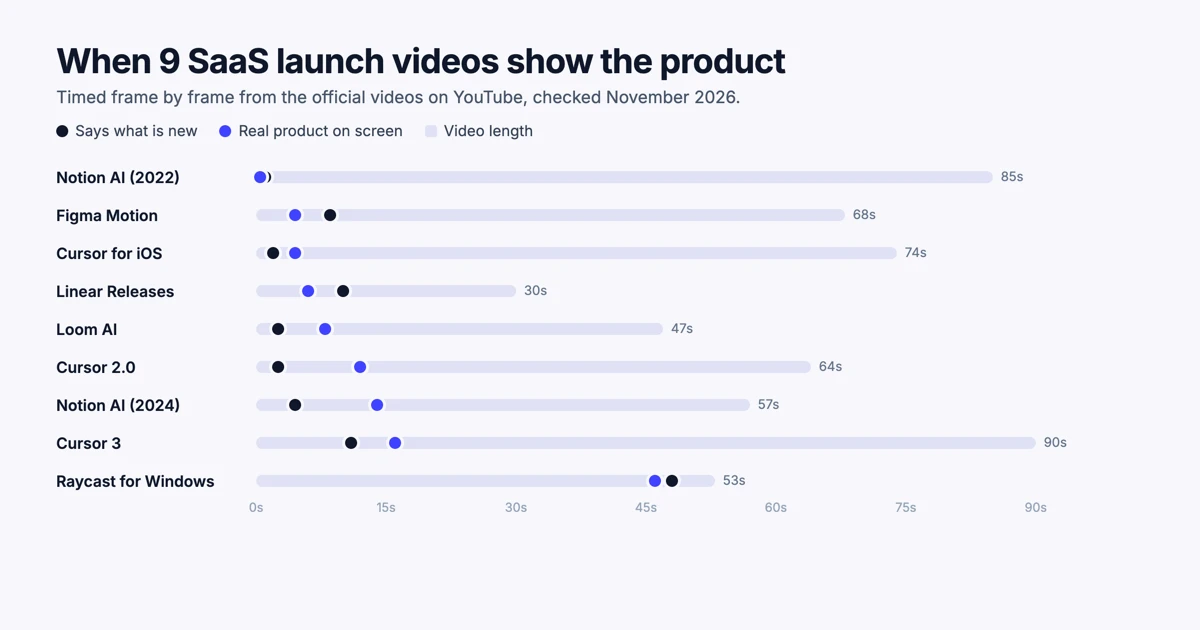
We watched nine product launch videos from Notion, Cursor, Linear, Loom, Figma and Raycast, frame by frame, and timed every beat. The median video put the real product on screen at 8 seconds, and eight of the nine showed it within 16 seconds. Five of the nine had no voiceover at all, including the two with the most views. Only two of the six endings we could see asked the viewer to do anything.
Most lists of SaaS product launch video examples tell you which videos are good. This one tells you what happens in them, second by second, so you can borrow the structure as well as the look. Every number below comes from the official videos on each company's YouTube channel, checked on November 4, 2026.
We make Demosmith, which turns a link to your product into demo videos and launch films, so we study launch videos closely. Near the end, we show how a Demosmith product film follows the same pattern these nine videos share, and how to make one without a production team.
How We Timed Them
We picked official launch videos under 90 seconds, so each one is the kind of video a SaaS team actually ships on launch day. For each video we:
- Captured a frame every 2 seconds and noted when the video first said what was new, when the real product first appeared and how it ended.
- Read the timed transcript where the video had speech, which gives exact seconds for anything said out loud.
- Checked YouTube's chapter markers and "most replayed" data where the video had them. That data shows which seconds viewers watched again.
Times from frames are accurate to about 2 seconds. Our capture stopped at around the 60-second mark on the longer videos, so for Cursor 3, Notion AI (2022), Cursor 2.0 and Figma Motion, the last part comes from the transcript and chapters, or we say we could not see it. View counts are from the same day and include any paid promotion, so we use them to show reach, not to prove what works.
The Nine Launches at a Glance
| Launch | Length | Voice | New stated | Product shown | Ending | Views |
|---|---|---|---|---|---|---|
| Notion AI (2022) | 85s | Narrator | 1s | 0.5s | Waitlist | 298K |
| Figma Motion | 68s | Music only | 8.5s | 4.5s | Not captured | 44K |
| Cursor for iOS | 74s | Engineer | 2s | 4.5s | Asks you to try it | 44K |
| Linear Releases | 30s | Music only | 10s | 6s (stylised) | Now available, logo | 11K |
| Loom AI | 47s | Music only | 2.5s | 8s | Tagline, logo | 11K |
| Cursor 2.0 | 64s | Music only | 2.5s | 12s | Not captured | 9.5M |
| Notion AI (2024) | 57s | Music only | 4.5s | 14s | Try it free | 8.2M |
| Cursor 3 | 90s | Founders | 11s | 16s | Vision statement | 3.1M |
| Raycast for Windows | 53s | Story narration | 48s | 46s | Now on Windows, logo | 13K |
Across the nine, the median length is 64 seconds and the median time to say what is new is 4.5 seconds.
Each Launch, Broken Down
Notion AI (2022): the demo starts in the first second
A narrator introduces Notion AI in the first second, over a Notion page, and the video never leaves the product. It walks through five jobs, each marked as a YouTube chapter: drafting a blog post, brainstorming at 25 seconds, fixing grammar at 39, translating at 48 and writing help at 57. Each job gets about 9 to 14 seconds. The most replayed moments are the opening seconds and a joke near the end, where the narrator reacts to a bold AI suggestion. Watch it on YouTube.
Figma Motion: product first, name second
Figma shows its new timeline inside the real editor at 4.5 seconds, then cuts to a bold title card with the feature's name at 8.5 seconds. The rest is a fast tour of the product: easing curves, animation presets, an AI prompt that animates type, comments and motion tokens, all shown working in the interface with no voiceover. Watch it on YouTube.
Cursor for iOS: one person, three uses
An engineer on a sofa says what is new in the first 2 seconds, and the phone is on screen at 4.5. The video is built around three ways he uses the app, cutting between him talking and close-ups of the phone. It ends with him asking viewers to try it and send feedback. It feels like a colleague showing you a tool they like, which is exactly why it works. Watch it on YouTube.
Linear Releases: 30 seconds, mostly metaphor
Linear opens on 10 seconds of abstract lines merging into a single release, then a short title card about planning and tracking releases. A stylised version of the product follows, not the real interface, and the feature name types itself out before the logo. It is the shortest video here and the most like a brand film. Watch it on YouTube.
Loom AI: one caption per feature
Loom names the launch at 2.5 seconds, states the promise at 4.5 and shows the recorder at 8. From there, each AI feature gets its own caption and about 5 seconds on screen: titles, summaries, chapters, tasks and filler-word removal, then a card about language support. A tagline lands at 36 seconds and the logo holds for the last 7. Watch it on YouTube.
Cursor 2.0: proof before product
Cursor names the release in the first second and announces its own model at 2.5 seconds. Before showing the editor, it puts the proof first: a benchmark chart at around 7 seconds. The real product appears at 12 seconds and stays on screen as one continuous task, broken up by two short captions. It has no voiceover and about 9.5 million views. Its most replayed section is the first 9 seconds. Watch it on YouTube.
Notion AI (2024): a headline every 10 seconds
The newer Notion AI video states its promise at 4.5 seconds and shows the real product at 14. It then moves through four features, each opened by a large headline card at 12.5, 22.5, 32.5 and 42.5 seconds, so a new idea arrives every 10 seconds. Of the endings we could see, it is the only one with an on-screen call to action, asking viewers to try Notion AI for free, before a tagline and the logo. It has about 8.2 million views and no voiceover. Watch it on YouTube.
Cursor 3: the founders tell you why
The two co-founders open on camera with a belief about where coding is going, and only name the release at 11 seconds. The product appears at 16 seconds, and the video alternates between them talking and the interface. It closes on their vision for the product rather than on a feature. YouTube's replay data shows viewers rewatching the opening and the first look at the product. Watch it on YouTube.
Raycast for Windows: story first, product last
Raycast's video is a narrated letter to the Windows Start button, told over 40 seconds of nostalgic Windows footage. The product only appears at 46 seconds, followed by its name and the news that it is now on Windows. It is the clear outlier here, and it works as a story for people who already know Raycast. A newcomer learns what it is with only a few seconds to go. Watch it on YouTube.
What the Best Launch Videos Have in Common
The product is on screen within seconds
The median time to the real product was 8 seconds, and eight of nine showed it within 16. Only Raycast held it back, and that video is a story aimed at existing fans. If your launch video is for people who have not seen your product, show it early.
What is new comes first
Eight of the nine said what was new within 11 seconds, and the median was 4.5. YouTube's replay data points the same way: where a video had it, the most replayed stretch included the opening seconds. The first 10 seconds are the part people watch most closely.
One idea per beat
The feature tours keep a steady rhythm. Loom gives each feature about 5 seconds and its own caption. Notion's 2024 video opens a new feature every 10 seconds with a headline card. Notion's 2022 video spends about 9 to 14 seconds per task. Nobody shows two features at once.
A voice is optional
Five of the nine have no voiceover, only music and on-screen text, including the two videos with the most views. That matters on social feeds, where a video has to make sense with the sound off. If you skip the voice, the captions and title cards have to carry the story.
Most forget to ask for anything
Of the six endings we could see or read, only two asked the viewer to do something: Notion's 2024 video asks you to try it free, and the Cursor for iOS engineer asks you to try the app. The rest end on a logo, a tagline or a vision statement. A launch video is the moment people are most curious. Tell them where to go next.
The pattern across nine launches: say what is new in the first 5 seconds, show the real product by 10, give each feature its own beat, and end by telling people what to do.
A Product Launch Video Template, Timed From the Data
A 45 to 60 second structure, built from what these nine videos have in common:
| Time | Beat | What to put on screen |
|---|---|---|
| 0 to 5s | What is new | The name of the launch and the one-line promise, in large text. |
| 5 to 10s | The product | Your real interface doing the new thing, not a mock-up. |
| 10 to 45s | Three or four features | One feature per beat, 5 to 10 seconds each, each with its own caption. |
| 45 to 52s | Proof or payoff | A result, a number or the finished work the feature produced. |
| Last 5 to 8s | What to do next | Where to try it, then your logo. |
This is also the structure a Demosmith product film follows: a title, then your real screens one moment at a time, then a closing line. More on that below.
Make a vertical or square cut as well for social feeds. Our LinkedIn video size guide covers which shape to post where. If the launch is a single feature rather than a new product, our guide to feature announcement videos covers the smaller version, and launching on Product Hunt has its own rules, covered in our Product Hunt launch video guide.
How to Make a Launch Video Like These With Demosmith
Most of the videos above look like the work of designers and motion artists, and a film crew shot the two Cursor videos. You do not need either to follow the same pattern. Demosmith makes the video from a link to your product.
Its AI demo agent opens your product, clicks through the flow you describe and records a narrated demo. From that demo, Demosmith makes a product film: a 16:9 launch film, usually under a minute, with music and motion titles over your real screens. Set against the five patterns above, it covers each one:
| What the best launches do | What a Demosmith product film does |
|---|---|
| Say what is new first | Opens on a title card, and you can rewrite the opening title. |
| Show the real product early | Uses the real screens Demosmith recorded in your product, not a mock-up. |
| One idea per beat | Moves through 3 to 7 moments in your product, each with its own caption. |
| Work without a voice | Music and motion titles carry the film. There is no voiceover, so it plays with the sound off. |
| End with an ask | Ends on a closing line you choose, such as asking viewers to try it. |
To make one, open a finished demo, choose a style and click Create product film. Each style comes with its own intro, outro, music and closing line, and you can change any of them first.
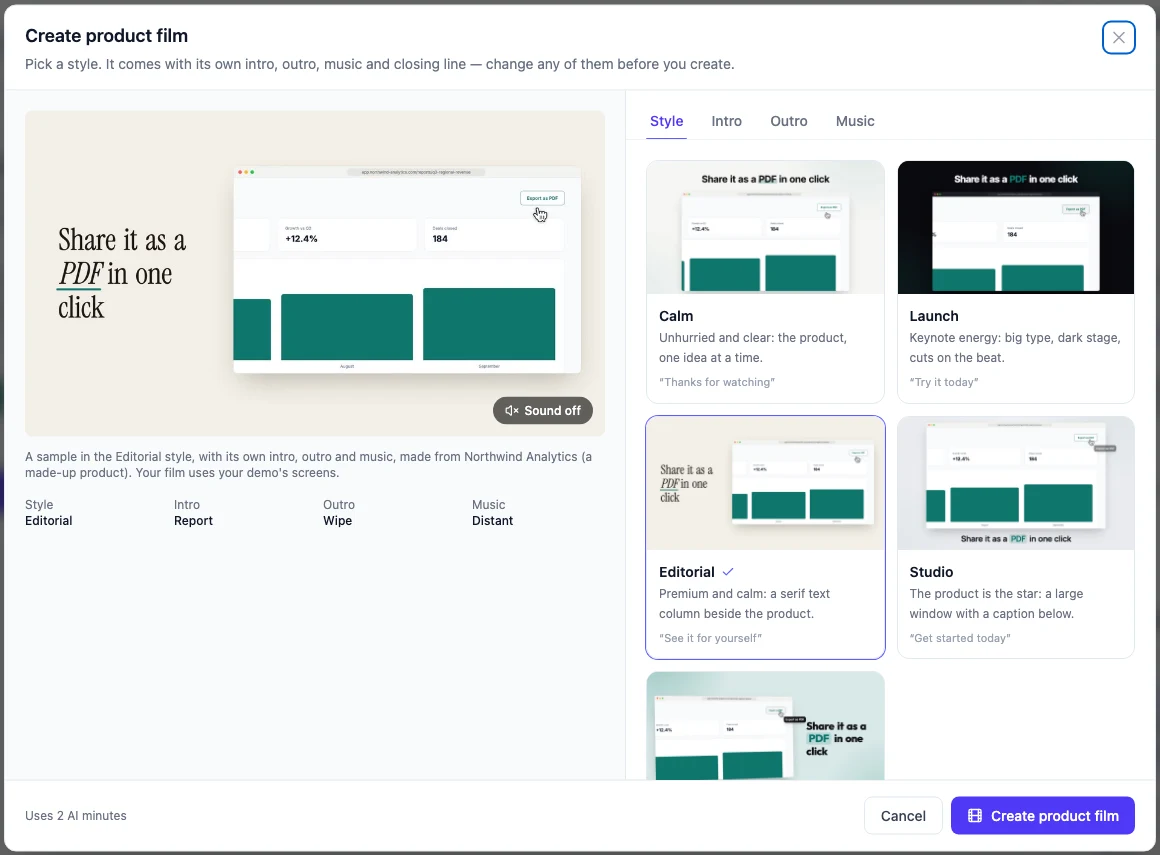
You can share the finished film with a link, embed it on your site or download it as an MP4 for YouTube and your launch post. If the product changes before launch day, make a new demo and a new film from it.
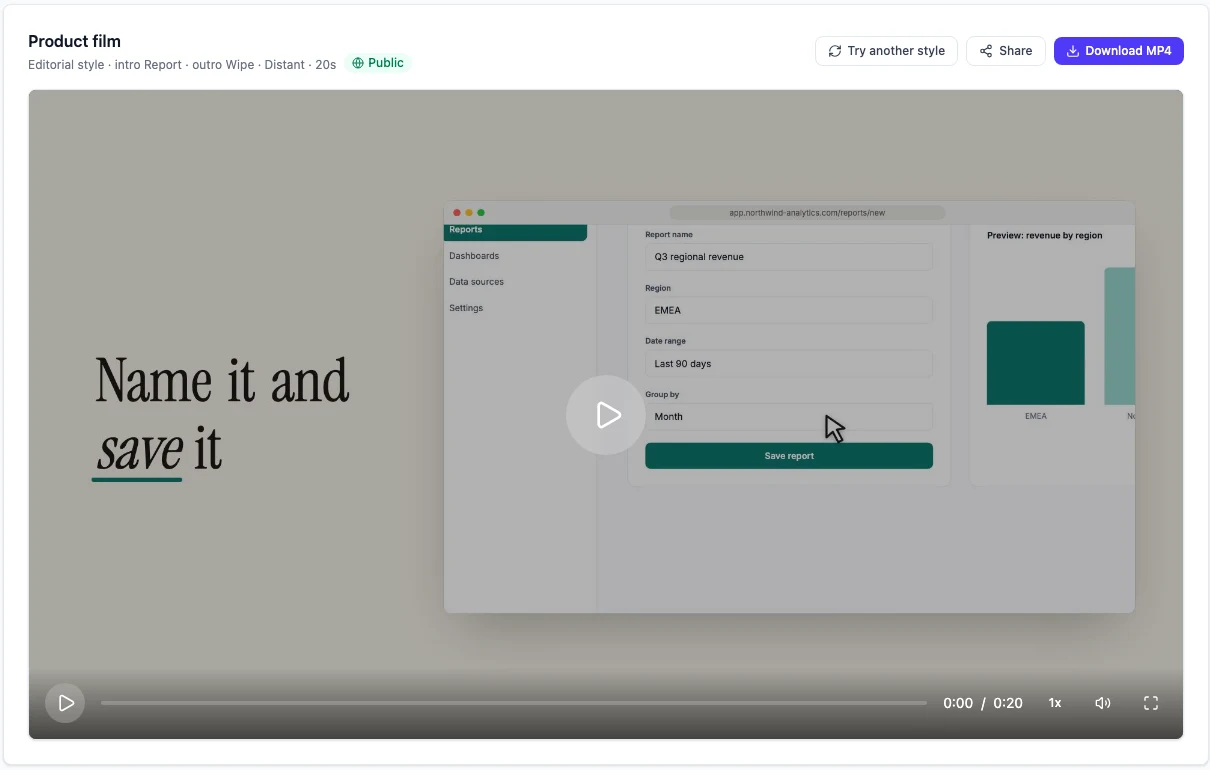
The same demo can also become social clips in vertical, square and landscape, for the cuts you post after launch day. Product films use 2 AI minutes each, and films and social clips come with every paid plan, starting at $40 a month. The product films page shows a sample film in each style.
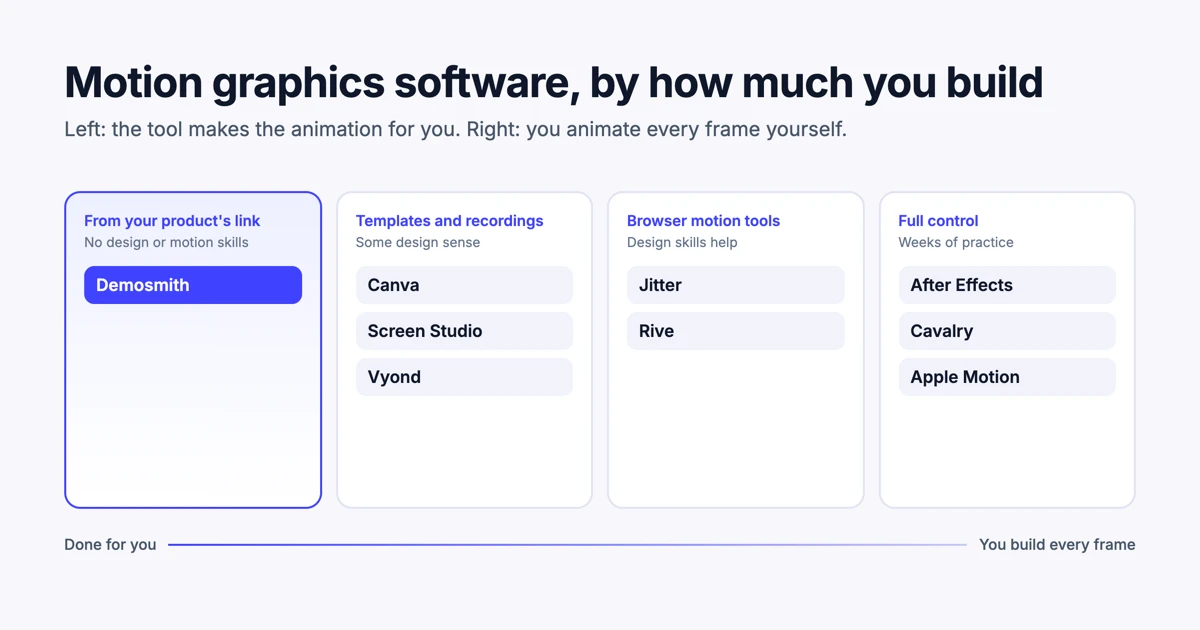
What a product film will not do: it does not add a voiceover, and it does not film people. For a founder-led video like Cursor 3, you still need a camera. If you would rather build the motion yourself, our guide to motion graphics software for marketers compares the tools, from Canva to After Effects.
Conclusion
The nine launches here look very different, from a founder interview to a 30-second brand film. Underneath, most of them follow the same timing: what is new in the first few seconds, the product on screen by about 10, one feature per beat and a clear ending. The two that break the pattern, Raycast and Linear, do it on purpose for audiences that already know them.
Before you storyboard your own, watch three of these with a stopwatch. You will see the rhythm faster than any template can show you. If you want that rhythm without storyboarding or editing at all, make a Demosmith product film from a demo of your product. For the wider market of tools that make product video for you, see the best AI demo video generators in 2026.
Key Takeaways
- Across nine official SaaS launch videos, the median length was 64 seconds.
- The median video showed the real product at 8 seconds, and eight of nine showed it within 16.
- The median time to say what is new was 4.5 seconds, and replay data shows viewers rewatch the opening.
- Five of nine had no voiceover, including the two most-viewed, so captions carried the story.
- Feature tours give each feature its own beat of about 5 to 10 seconds.
- Only two of the six endings we could see asked the viewer to do anything. Yours should.
- A Demosmith product film follows this pattern from a link to your product: a title, your real screens with one caption per moment, music, and a closing line you choose.
Want a launch film of your own product without a production team? Start with Demosmith, make a demo, then turn it into a product film.