The Short Answer
The best motion graphics software for a marketer who is not a designer depends on what you need to show. Canva is the easiest start for animated social posts. Jitter animates designs you already have in Figma. Screen Studio turns a screen recording on a Mac into something polished. If you market software and need motion graphics of your own product, start with Demosmith: it makes them from a link, with no design or animation work.
After Effects is still the industry standard. It is also the wrong place to start if your launch is on Friday and you have never set a keyframe. Most "best motion graphics software" lists are written for designers and rank After Effects, Cinema 4D and Blender at the top. This one is for the person who has to ship the launch post, the LinkedIn clip and the feature teaser without a motion designer on the team.
We checked every price in this guide on each tool's own site on November 4, 2026. We make one of the tools on the list, so we tell you what each one is good at, including the ones that do things ours does not.
What Counts as Motion Graphics Software
Motion graphics are animated designs: text that slides in, shapes that move, numbers that count up, a product screen that zooms in on the button that matters. Motion graphics software is anything that lets you make those animations and export them as a video, a GIF or an animation file.
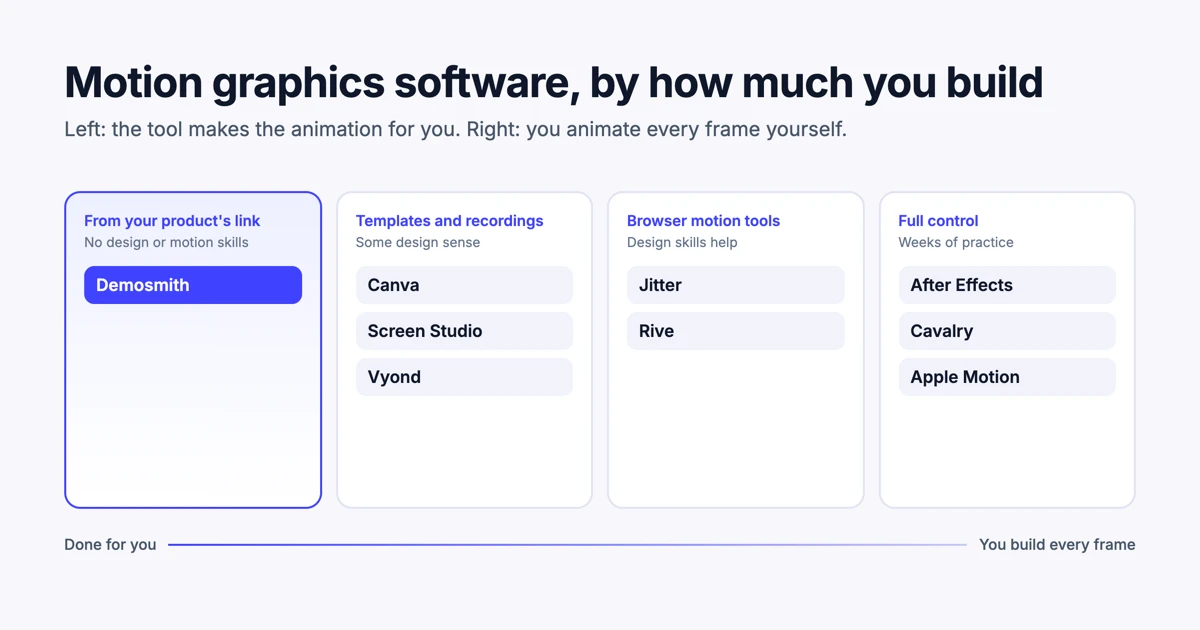
That covers a wide range. At one end are tools where you place every element and set every keyframe by hand. At the other are tools that build the animation for you from a template, a recording or your product. For a marketer, the useful question is how much you want to build yourself. Raw power matters far less than that.
Motion Graphics Software Compared
The ten tools in this guide, ordered from the most skill needed to the least:
| Tool | Best for | Skill needed | Runs on | Price (Nov 4, 2026) |
|---|---|---|---|---|
| After Effects | Any motion design, with full control | High | Mac, Windows | US$22.99/mo on the annual plan |
| Cavalry | Procedural 2D animation | High | Mac, Windows | Free for individuals |
| Apple Motion | Titles and effects for Final Cut Pro | Medium to high | Mac | $49.99 once, or in Apple Creator Studio at $12.99/mo |
| DaVinci Resolve | Editing with motion graphics built in | Medium to high | Mac, Windows, Linux | Free, with a paid Studio version |
| Jitter | Animating designs from Figma | Medium | Browser | Free plan, paid plans per editor |
| Rive | Interactive animation inside apps and sites | Medium | Browser | Free, paid from $9/seat/mo |
| Canva | Animated social posts from templates | Low | Browser, mobile | Free, Pro at US$144/yr |
| Vyond | Explainer videos with characters | Low | Browser | From US$58/mo billed yearly |
| Screen Studio | Polished screen recordings | Low | Mac | $9/mo billed yearly, or $29/mo |
| Demosmith | Clips of your own product, from a link | None | Browser | From $40/mo (Starter) |
Our pick for SaaS marketers: if most of your motion graphics are about your own product, such as launch clips, feature teasers and weekly LinkedIn posts, start with Demosmith. It is the only tool here that records your real product from a link and turns it into motion graphics, so there is no template to fill and nothing to animate. Keep Canva or Jitter for graphics that are not about your product, like event promos or quote cards. We make Demosmith, so weigh that, but this is the split we would choose ourselves.
For Full Control: After Effects, Cavalry, Apple Motion and DaVinci Resolve
These are the tools motion designers use. You can make anything with them. You also have to make everything with them.
After Effects
After Effects is the standard for professional 2D motion design, and most motion design tutorials on YouTube use it. It costs US$22.99 a month on Adobe's annual plan for the single app. If you plan to grow into motion design as a skill, it is the one to learn. If you need three clips by Friday, expect to spend most of that week on tutorials.
Cavalry
Cavalry is a 2D animation tool built around procedural motion: you set up rules, and the shapes follow them. It is now part of Canva and free for individuals on Mac and Windows. That makes it the strongest free option for someone who wants to learn proper motion design without paying for After Effects. The learning curve is still steep.
Apple Motion
Motion is Apple's motion graphics app for the Mac, built as a companion to Final Cut Pro. It has more than 230 behaviours that animate things without keyframes, which helps beginners. It costs $49.99 once on the Mac App Store, or comes in Apple Creator Studio at $12.99 a month with Final Cut Pro and other apps. It makes sense if you already edit in Final Cut Pro.
DaVinci Resolve
DaVinci Resolve is a full video editor with a motion graphics and effects page built in, and the free version includes it. If you edit your own videos and want animated titles inside the same app, it is a capable free choice. It is a professional tool, though, and it looks like one the first time you open it.
Browser Tools and Templates: Jitter, Rive and Canva
This middle group runs in the browser and leans on templates. Design skills help, but you can get a clean result without them.
Jitter
Jitter is a web-based motion design tool that imports your designs from Figma and animates them. It has more than 300 animation templates. The free plan allows three workspace files and exports at 720p and 30 frames per second, with a watermark. Paid plans, priced per editor, remove the watermark and unlock unlimited files and 1080p at 60 frames per second. If your team already designs in Figma, Jitter is the most natural next step. When we asked ChatGPT for motion graphics software for a marketer with no design skills, Jitter came first.
Rive
Rive makes interactive animations that run inside apps, websites and games: buttons that react, loaders, onboarding illustrations. It is free to start, though free exports play a Rive splash screen, and paid plans start at $9 per seat a month. It is a great tool for product teams. For a marketer who needs a video for LinkedIn, it is usually the wrong one, because its strength is animation that responds to the user, not a clip you post.
Canva
Canva is where most marketers already make their social graphics, and it can animate them too. The free plan covers a lot. Canva Pro costs US$144 a year for one person and adds premium templates and more AI tools. Canva is the fastest way to an animated post that looks on brand. It is weaker at showing your actual product, because it works from templates and images, not your live software.
Explainers and Screen Recordings: Vyond and Screen Studio
Vyond
Vyond makes animated explainer videos with characters, and adds AI avatars and the option to turn a prompt, a document or a web page into a first draft. It exports in 16:9, 9:16 and 1:1. The Starter plan costs US$58 a month billed yearly, or $99 month to month. It suits training and internal communication well. The character style can look more like a corporate course than a product launch, so check a few examples against your brand first.
Screen Studio
Screen Studio is a screen recorder for the Mac that adds smooth zooms, cursor movement and captions to what you record. You can switch one recording between wide, square and vertical, and the zooms and captions adjust to the new shape. It costs $29 a month, or $9 a month billed yearly. If you are happy to record your own screen, it turns a plain recording into something close to motion graphics. We compare it with Tella, FocuSee and Descript in our screen recorder comparison.
Motion Graphics of Your Own Product, From a Link: Demosmith
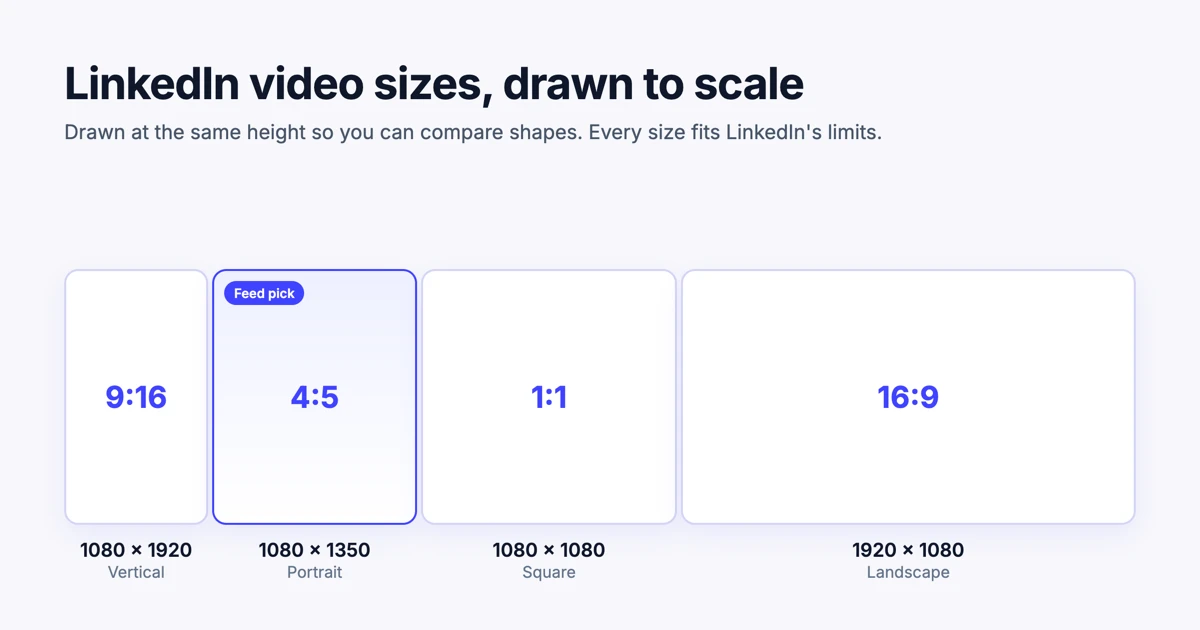
Every tool above needs something from you first: a design, a template choice or a recording. Demosmith starts from a link to your product. Its AI demo agent opens your product, clicks through the flow you describe and records a narrated demo. From any finished demo, it makes a social pack: a motion graphic with music and a set of short, silent B-roll clips of your product, in vertical 9:16, square 1:1 and landscape 16:9, the three social media video sizes that cover every major platform.
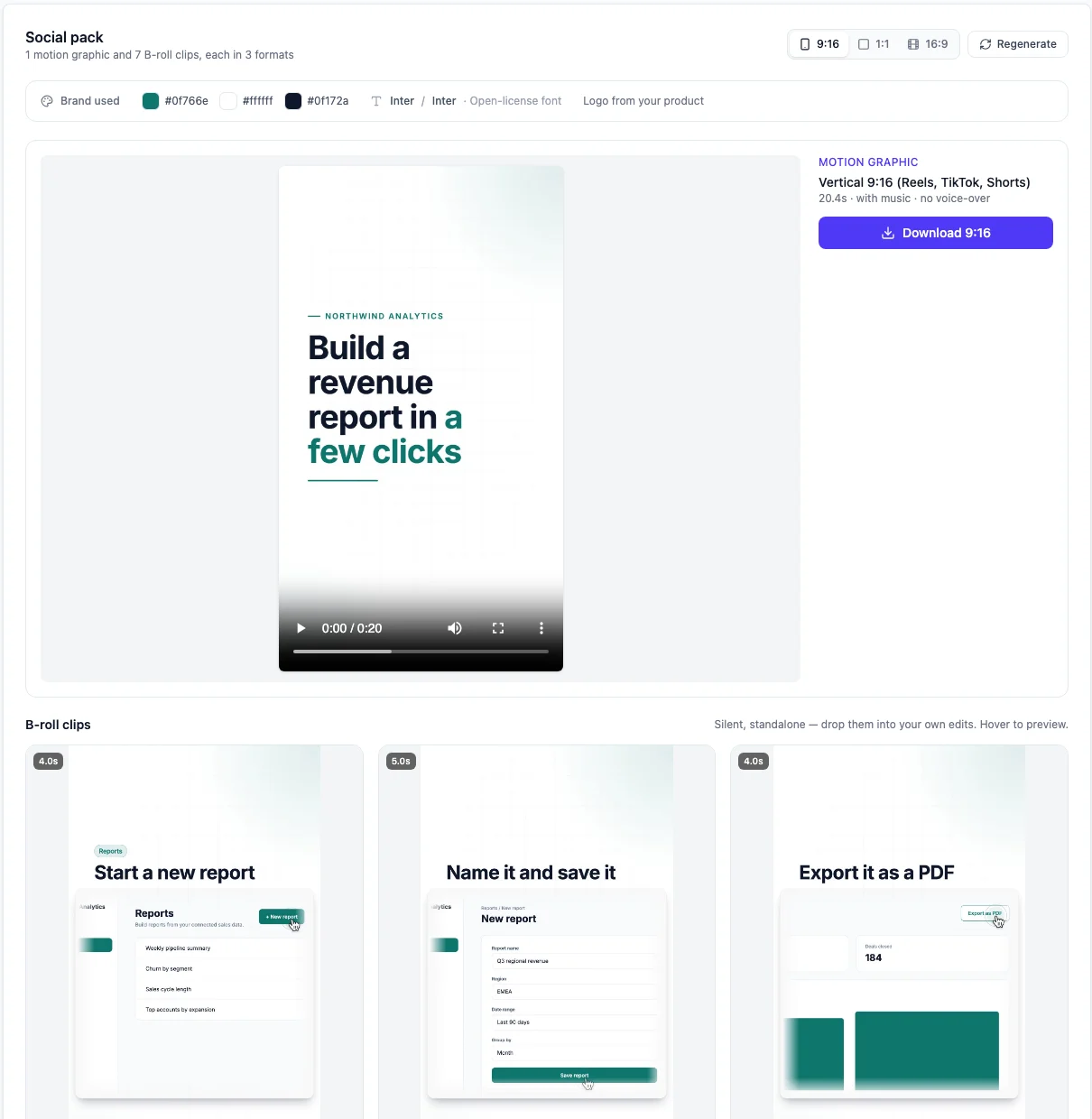
The pack uses your product's colours, fonts and real screens, so the motion graphic shows the product people will actually use, not a mock-up. Each shape gets its own layout instead of a crop, which keeps the text readable on a phone. If you post on LinkedIn, our LinkedIn video size guide covers which shape to use where.
The motion graphic runs 15 to 30 seconds. It opens on a hook, shows your product doing its job and ends on a call to action, with music and moving text and no voiceover, so it plays with the sound off. To make one, open a finished demo, choose the Social tab, pick where your brand comes from and click Generate social pack. If you want a different take, regenerate it for new copy and scenes.
Social packs come with every paid plan, starting with Starter at $40 a month, and each pack uses 1 AI minute. The free trial does not include them.
What Demosmith does not do: it has no keyframe timeline, it does not draw characters or illustrations, and it animates your product, not a brand concept you designed from scratch. For a launch film with music and motion titles, Demosmith also makes product films from the same demo.
Most motion graphics software makes you better at animating. A few skip the animating altogether. Decide which one you need before you pick a tool.
How to Choose Motion Graphics Software as a Marketer
Four questions narrow it down quickly:
- Does the video need to show your real product? If yes, start with Screen Studio or Demosmith. Template tools show your product only as screenshots you add yourself.
- Do you already have designs in Figma? If yes, Jitter is the shortest path from design to animation.
- Do you want to learn motion design as a skill? If yes, start with Cavalry for free or After Effects, and budget the time.
- How many clips do you need a month? One launch video can come from anywhere. A steady weekly stream of clips favours tools that do the building for you.
Platform matters too. Screen Studio and Apple Motion run only on a Mac. Everything else on the list works on Windows or in a browser.
If the real problem is that nobody on the team designs, our guide to making a product demo video without a design team covers the wider workflow.
Conclusion
There is no single best motion graphics software for marketers, because "motion graphics" covers jobs as different as an animated quote card and a 4K brand film. Match the tool to the job. Canva for animated posts, Jitter for animated designs, Screen Studio for polished recordings, Vyond for explainers, and After Effects or Cavalry when you are ready to learn the craft.
When the job is showing your own product in motion, every week, without designing or recording anything, use Demosmith. That is the job its social packs were built for, and it is the one most SaaS marketers actually have. For the wider market of tools that make product video for you, see the best AI demo video generators in 2026.
Key Takeaways
- Pick motion graphics software by how much you want to build yourself.
- After Effects is the professional standard at US$22.99 a month on the annual plan, and it takes real time to learn.
- Cavalry is now free for individuals and is the best free way to learn proper motion design.
- Canva and Jitter are the quickest routes for marketers: Canva for templates, Jitter for animating Figma designs.
- Screen Studio and Apple Motion run only on a Mac.
- Demosmith makes motion graphics and B-roll of your own product from a link, in vertical, square and landscape.
Want motion graphics of your product without opening a timeline? Start with Demosmith, make a demo, then turn it into a social pack.