What's New: Pronunciations in Brand Kit
A demo can be clear, well paced and correct on every screen, and still sound careless the moment the narrator says your product's name wrong. Viewers notice bad AI voiceover pronunciation straight away. If the voice cannot say the name, why would they trust it with the rest?
Demosmith now lets you fix that once. Brand Kit has a new Pronunciations tab. You write a word the way it appears in your script, spell it the way it should sound, and every narration after that says it your way. Your captions keep your spelling.
If you have not used Demosmith before: our AI demo agent opens your product from a link, clicks through the flow you describe and hands back a narrated demo video. You record nothing. This guide covers why AI voiceovers mispronounce product names, how to fix AI voiceover pronunciation in Demosmith, and how to respell a word so it comes out right the first time.
Why AI Voiceovers Mispronounce Product Names
An AI voice learns to read from huge amounts of ordinary text. Common words are easy. Your product name is often not a common word, and that is where it goes wrong.
- Made-up names have no agreed pronunciation. The voice guesses from the spelling, and spelling is a poor guide in English.
- Acronyms can go two ways. Some are said letter by letter, like CRM. Others are said as a word, like SaaS. The voice cannot know which one your team uses.
- Names in capitals look like acronyms, so the voice may spell out a name you say as a word.
- The same word can change within one video. A voice reads each sentence fresh, so a name it got right in the intro can come out differently two minutes later.
We measured that last one before launch. In a single video, an all-caps product name was read wrong on 2 of its 4 mentions: once as letters, once as a different word. Spelled the way it sounds, the same name came out right 35 times out of 36.
Most AI voices cannot know how your team says your product's name. A respelling gives them no room to guess.
How to Fix AI Voiceover Pronunciation in Demosmith
It takes about a minute per word:
- Open Brand Kit from the sidebar and choose the Pronunciations tab.
- Click Add word. In Written as, type the word exactly as it appears in your script and on screen.
- In Sounds like, spell it the way it should sound, for example TESS-uh-layt.
- Leave the language on All languages, or pick one. More on that below.
- Press play to hear the word in the preview voice, then click Save.
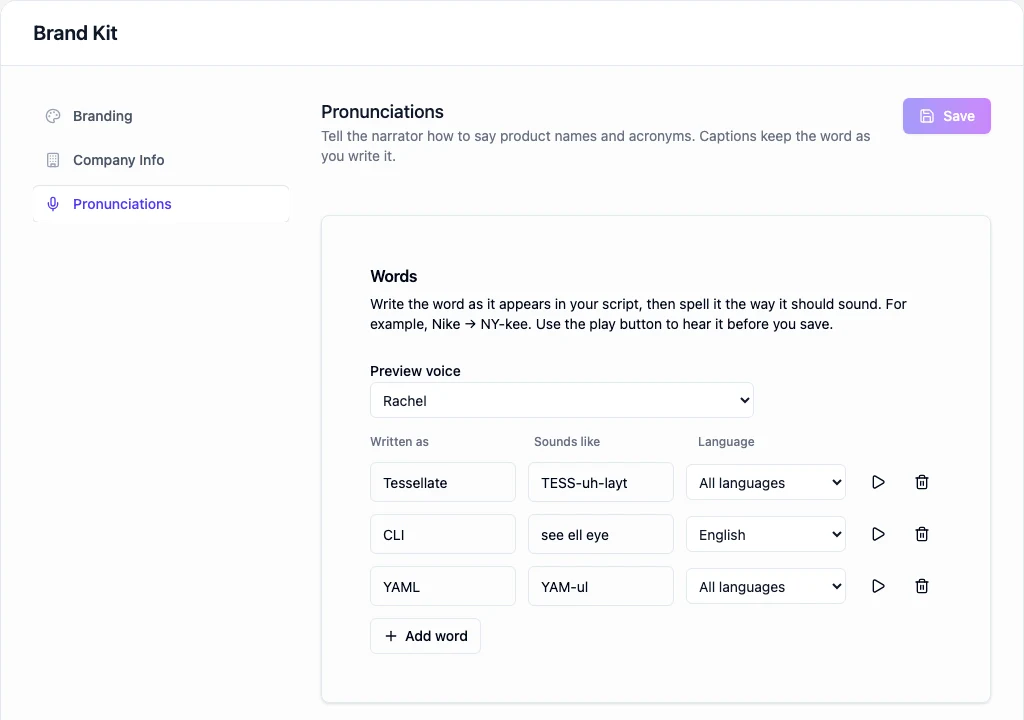
Choose the voice you use in your demos as the preview voice. Two voices can read the same respelling a little differently, so test with the one your viewers will hear. Previews do not use AI minutes.
You can add up to 100 words. That covers your product name, your feature names, the acronyms your team uses and the names of the companies you integrate with.
How to Respell a Word So It Sounds Right
You do not need phonetic symbols. Write the sounds with ordinary letters, the way you would explain the word to a colleague over chat.
- Split it into syllables with hyphens. "TESS-uh-layt" is easier for a voice to read than "tesselayt".
- Put the stressed syllable in capitals. TESS-uh-layt and tess-uh-LAYT are different words to a listener.
- Spell out letter-by-letter acronyms as letters. CLI becomes "see ell eye". An acronym said as a word gets respelled like one: YAML becomes "YAM-ul".
- Write numbers and symbols as words. "2FA" can become "two F A", and "v2" can become "version two".
- Keep it short. Sounds like takes up to four words. If you need more than that, the word in your script probably needs rewriting instead.
- Listen, then adjust one syllable at a time. If the stress lands wrong, move the capitals. If a vowel sounds off, swap it for one from a common word, like "ay" as in "day".
A good respelling often looks odd on the page. That is fine. Nobody reads it except the narrator.
One Language or Every Language
Each word applies to every narration language by default. That suits your product name, which should sound the same whether the demo is in English, Spanish or German.
Pick a single language when a word is said differently in different languages. Acronyms are the usual case. "See ell eye" uses English letter names, which suit an English narration. A Spanish viewer names those letters differently. Set that row to English, and the respelling stays out of your Spanish demos.
This matters most if you make each demo in several languages. Our guide to multilingual product demos covers how teams turn one demo into many, and the list you build here applies to every one of them.
Your Captions Keep Your Spelling
Only the voice hears the respelling. Your script, captions and transcript all show the word exactly as you wrote it in Written as. Viewers read "Tessellate" on screen while the narrator says TESS-uh-layt.
That is the reason to fix pronunciation here instead of misspelling words in your script on purpose. A phonetic spelling in the script would end up in the captions, and captions are what people read with the sound off.
Which Videos It Changes
The list applies to every narration you make after you save it. That covers regular voiceover, the AI presenter and the narration in interactive demos, so you set each word once.
Videos you already have keep their current voiceover. To fix one, re-record it from its demo page once your words are saved.
The list belongs to your workspace, so everyone on your team gets the same pronunciations. Owners and admins can edit it. There is no extra charge for it.
Conclusion
Your product name is the one word every demo says. It should never be the one the narrator gets wrong.
Add your product name first, then your feature names and acronyms. Test each one with the voice you use, and save. The next demo you make says them right, and so does every one after it.
Writing a clear description of the flow still matters most for a good demo, and our guide to writing a great Demosmith prompt shows how. For the wider market, see the best AI demo video generators in 2026.
Key Takeaways
- AI voices guess at made-up names and acronyms, and can say the same name two ways in one video.
- Brand Kit's Pronunciations tab tells the narrator how to say up to 100 words.
- Respell by syllable with hyphens, and put the stressed syllable in capitals.
- Each word can apply to one language or to all of them.
- Captions and scripts keep your real spelling. Only the voice changes.
- New narration uses the list straight away, including the AI presenter and interactive demos.
Have a name the narrator keeps getting wrong? Open Demosmith, add it under Brand Kit and make your next demo.