Demosmith vs HeyGen: Each Has a Presenter Now. The Footage Is What Differs
Say "AI avatar" and most people picture HeyGen. You write a script, pick a presenter, and HeyGen turns it into a video of a lifelike person reading your words. Demosmith started at the other end. You give it a link to your web app and describe what to show, and it clicks through the product itself and hands back an edited demo video.
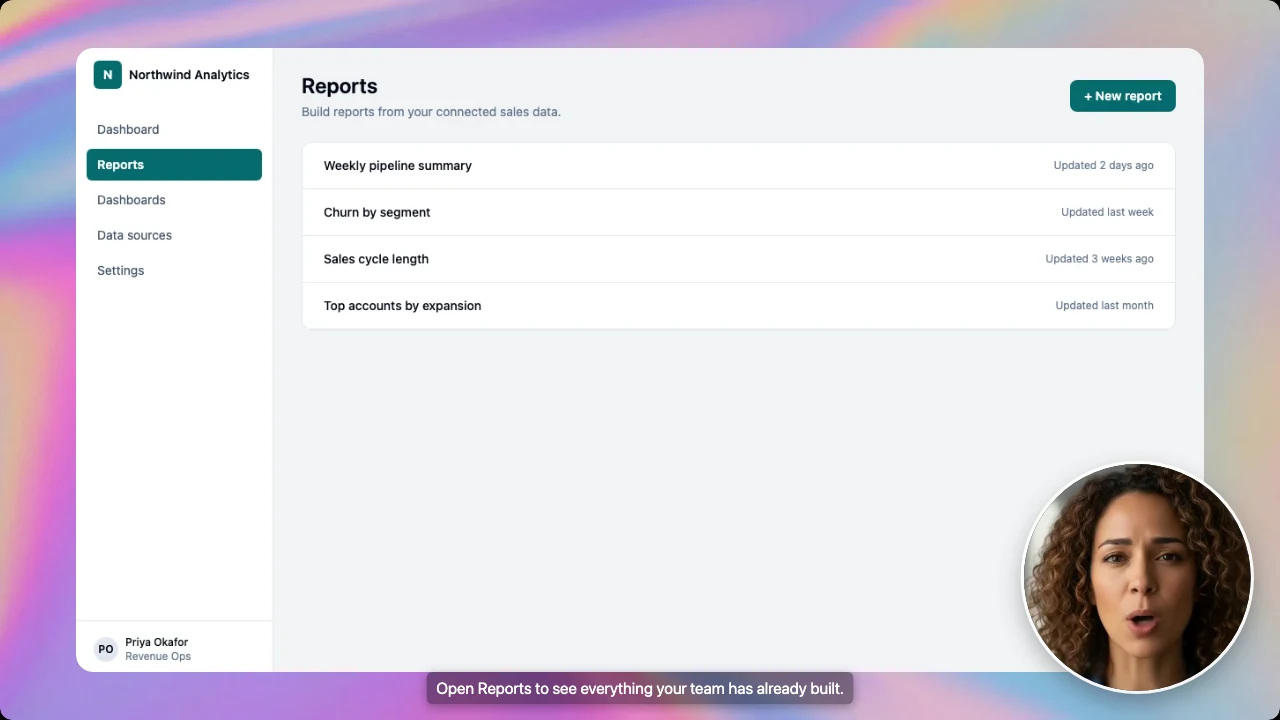
In October 2026, Demosmith added an AI presenter of its own, who talks viewers through the demo from a small circle in the corner. So each tool can now put a talking person on screen.
The difference is what fills the rest of the video. In HeyGen, the presenter is the video, and your product only appears if someone records it or adds screenshots. In Demosmith, your product is the video, and the presenter sits in the corner.
Below, we compare them on that and five other points. HeyGen clearly wins several, and we say which. If tools that record your product for you are new to you, start with what an AI demo agent is.
At a Glance: Demosmith vs HeyGen
HeyGen details come from heygen.com, its pricing page and its help centre, checked on October 15, 2026.
| Feature | HeyGen | Demosmith |
|---|---|---|
| Built for | Presenter videos from a script: training, marketing, sales and social | Demo videos of your web app, plus a clickable demo and a written guide |
| Where the footage comes from | The avatar, plus any screens you record or upload | Demosmith clicks through your live web app from a link and a short description |
| Opens your product by itself | No, someone records the screen | Yes |
| AI presenter | 700+ avatars on paid plans, plus photo avatars | Six presenters in a corner, speaking 28 languages |
| Avatar of you | Digital twin from a short recording of yourself | Six AI presenters to choose from |
| Voice cloning | Yes | 30 presenter voices to choose from |
| Languages | 175+ languages and dialects on paid plans | 31 |
| Translate a video you already have | Upload a file or YouTube link, with the lips matched | No, you cannot upload your own videos |
| Interactive output | Interactive video with quizzes and links, on Business | A clickable demo of your product, made from the finished video |
| Written docs | No | A written step-by-step guide, as a document or PDF |
| Course files for learning platforms (SCORM) | On Business | No |
| API | Yes | Not yet |
| Free option | Free plan: 3 videos a month, up to 1 minute each | 3-day trial, one demo, no card, no presenter |
| Starting price | $29/mo ($24/mo billed yearly) | $40/mo ($33/mo billed yearly) |
What HeyGen Does
HeyGen says more than 100,000 businesses use it, and reviewers on G2 rate it 4.8 out of 5 across more than 1,000 reviews.
Script to Presenter Video
You paste in a script, import slides or a PDF, or describe the video you want and let HeyGen draft it. Then you choose a presenter and a voice, and HeyGen makes the video. The editor adds templates, captions, music, stock footage and your brand colours. Videos come out wide, vertical or square, in up to 4K on Pro and above.
The Widest Choice of Presenters
Paid plans include more than 700 avatars, and the free plan more than 500. You can also turn a single photo into a talking presenter.
Or go further: record a short clip of yourself, and HeyGen builds an avatar that looks, moves and gestures like you. Add a copy of your voice and it sounds like you as well. Each extra version of yourself costs $29 a month.
175+ Languages and Video Translation
Paid plans cover more than 175 languages and dialects, against 30 or so on the free plan. HeyGen can also translate a video you already have. Upload it or paste a YouTube link, and it comes back in up to 10 languages at once, in the speaker's own voice with their lips matched. On Pro you can check the translated script first.
Product Demos, Recorded by You
HeyGen markets a product demo maker, but you supply the product. You add screenshots or screen recordings next to the presenter, and the narration explains each step.
HeyGen also has a built-in screen recorder: you click through your product while you talk, and the recording becomes the background of a scene. Either way, a person does the clicking. HeyGen does not sign in to your app or move through it on its own.
Training and Integrations
The Business plan adds videos with quizzes and links, course files your learning platform can import (SCORM), single sign-on, and connections to tools like HubSpot and Zapier. There is also an API, so developers can make videos from their own code.
Pricing
The free plan gives you up to 3 videos a month, each up to a minute long, with a watermark and no card needed. Creator is $29 a month, or $24 a month billed yearly.
Pro starts at $49 a month and rises with how much video you make. Business is $149 a month, or $119 billed yearly, plus $20 for each extra person. Enterprise is priced on request.
HeyGen charges in credits, and how many a video uses depends on its length and the presenter style you pick. Going by HeyGen's own figures, Creator's 600 monthly credits work out to roughly 19 to 37 minutes of presenter video.
What Demosmith Does
Demosmith turns a link to your product and a sentence about what to show into a finished demo. You might write "open Reports, create a report for EMEA over the last 90 days, then save it".
Demosmith opens your web app, clicks through those steps and records them. It then edits the video with zooms, captions and your brand colours, and writes and voices the script in any of 31 languages. You get a video file, a share link and an embed code for your site.
An AI Presenter in the Corner
The AI presenter is optional. When you set up a demo, you turn it on, pick one of six presenters and hover over a face to see them talk. A small preview of the video lets you click the corner where the presenter should sit, and you choose small, medium or large. There are 30 voices to pick from, and the presenter speaks 28 languages.
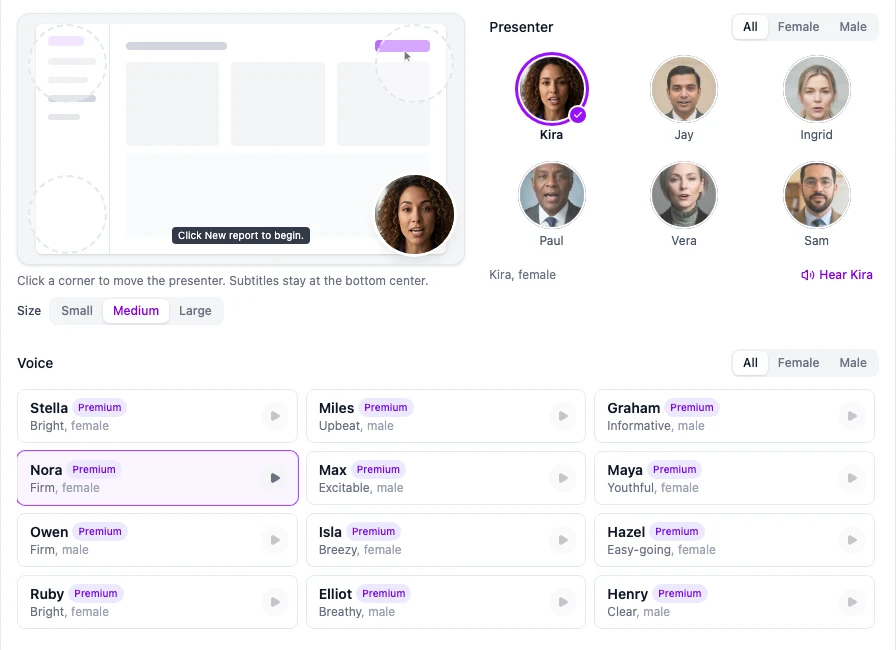
The presenter talks viewers through the demo, lips moving with the voiceover, while the product keeps the rest of the screen and the captions stay at the bottom. You can also add a presenter to a demo you made earlier.
Which Plans Include It
The presenter comes with every paid plan (Starter, Pro, Business and Enterprise) but not the three-day trial. You can move or resize the presenter later without starting over.
More Than a Video
Any finished Demosmith video can also become a clickable interactive demo for your website, and Docusmith turns the same recording into a written step-by-step guide you can export as a document or PDF. The presenter appears in the video only, not in the clickable demo or the guide.
What It Does Not Do
Demosmith works with web apps, and it makes the recording itself, so there is no upload of your own footage to edit. There is no API yet.
Key Differences Between Demosmith and HeyGen
Where the Footage Comes From
HeyGen makes a video of a person from a script. If the video needs your product, you supply it: record the screen and place the presenter over it, or build scenes from screenshots. The presenter is the subject, and the product is a backdrop you put together yourself.
Demosmith makes the product footage for you. It clicks through your live app, so the video shows your real screens and real results. The presenter is optional, and when you turn it on, it takes a corner rather than the whole frame. For a buyer who wants to see where to click, that matters.
HeyGen puts a presenter in front of a script. Demosmith puts a presenter in the corner of your real product.
Presenter Choice, Realism and Custom Avatars
HeyGen has the bigger range. It offers 700+ avatars on paid plans, and from a short recording it can build an avatar that looks and sounds like you.
Its avatars can fill the frame, gesture and change outfits. Demosmith's six presenters are built for a different job: they sit in the corner of a product demo and keep the viewer's eye on your product. If the face on the video has to be your founder or your account executive, choose HeyGen.
There is one middle option. Glimeo also clicks through your product for you, and its Pro and Business plans can make a presenter from a photo you upload. Our Demosmith vs Glimeo comparison covers that trade-off.
Languages
HeyGen covers 175+ languages and dialects and can translate a video you already have. Demosmith narrates and captions in 31 languages, and its presenter speaks 28, including English, Spanish, French, German and Portuguese.
If your markets are on Demosmith's list, that is plenty. For a long tail of regional languages, or for footage made elsewhere, HeyGen is the better tool. Our guide to multilingual product demos shows how teams decide which markets need a local version.
What You Get Back
A HeyGen project gives you a video, and on Business it can include quizzes, links and a course file for your learning platform. A Demosmith demo gives you a video, a clickable demo and, if you want one, a written guide. If your website needs a product tour and your help centre needs written steps, Demosmith makes them from the same recording. If you need training that plugs into a learning platform, HeyGen does that and Demosmith does not.
When Your Product Changes
Product demos go out of date every time you ship. In HeyGen, the presenter part is easy to update: edit the script and make the video again.
The screens are harder. Someone has to record the new version of the product, or take new screenshots, and swap them into every scene. In Demosmith, you ask for the same demo again and it records your product as it looks today.
Pricing and Minutes
HeyGen is cheaper to start, at $29 a month against Demosmith's $40, and it has a free plan where Demosmith has a three-day trial. HeyGen charges credits that vary with length and presenter style. Demosmith charges AI minutes, where an AI minute is a minute of finished video: 20 a month on Starter, 50 on Pro and 150 on Business.
So Starter covers 20 minutes of narrated product demo. A HeyGen credit buys presenter footage, though, not a recording of your product. Someone still has to record the screens, and that time is the hidden cost. Full plan details are on our pricing page.
When HeyGen Is the Better Choice
If you like the avatar format but want a different price or look, our HeyGen alternatives guide compares five rival avatar tools. Stay with HeyGen itself when:
- The person is the message. CEO updates, welcome videos, policy training and social ads, where no product needs to appear.
- You want to present as yourself. HeyGen can build a presenter from a short video of you, with a copy of your voice.
- Realism and range matter most. 700+ avatars that can fill the frame, gesture and change looks.
- You need many languages, or you already have the video. More than 175 languages and dialects, and it can translate videos you already have, with the lips matched.
- Your videos go into a learning platform. Business adds quizzes and course files your learning platform can import.
- Your developers want to make videos from code. HeyGen has an API. Demosmith does not yet.
- You want a free plan. HeyGen gives you 3 short videos a month for free. Demosmith offers a three-day trial.
When Demosmith Is the Better Choice
- The viewer needs to see your product. Demosmith records your real web app, and the presenter stays in a corner.
- Nobody on the team has time to record. A link and a sentence replace the recording and the editing.
- Your product changes often. Ask for the same demo again and it shows the product as it is today.
- You need a website tour and written steps as well. Any finished demo can also become a clickable tour and a written guide.
- Your product sits behind a login with a verification code. Demosmith pauses, asks you for the code and carries on.
If you are weighing other tools, our roundup of the best AI demo video generators covers the wider field.
Considering Synthesia as well? Demosmith vs Synthesia runs the same comparison against HeyGen's closest avatar rival.
The Bottom Line
HeyGen is the stronger avatar platform by a wide margin. It has more presenters, your own face and voice, 175+ languages, translation of videos you already have, learning-platform exports and an API. When the video is about a person talking, it is the tool to beat.
Demosmith is the better choice when the video is about your software. It records the product for you, keeps the presenter in a corner, and gives you a clickable demo and a written guide as well. When the product changes, you ask for the demo again.
Choose HeyGen when the presenter is the story. Choose Demosmith when the product is.
Key Takeaways
- Each tool now offers an AI presenter. HeyGen makes presenter videos from a script. Demosmith records your real web app and puts a presenter in the corner.
- HeyGen leads on range: 700+ avatars, an avatar made from you, and a copy of your voice. Demosmith's six presenters are designed to sit beside your product.
- HeyGen covers 175+ languages and dialects and translates videos you already have. Demosmith narrates and captions in 31 languages.
- HeyGen never opens your product. Someone records the screens, and has to record them again when the product changes.
- A finished Demosmith video can also become a clickable demo and a written guide. The presenter appears in the video only.
- HeyGen starts at $29 a month with a free plan. Demosmith starts at $40 with a three-day trial.