Demosmith vs Synthesia: Two Ways to Make a Training Video
Synthesia and Demosmith each make training videos without a camera, but they start from opposite ends. Synthesia starts from a script.
You write the lesson, pick an AI presenter, and they deliver it in front of slides, stock footage or a screen recording you made. Demosmith starts from your product. You give it a link and describe what to show, and it opens your web app, clicks through it and hands back a narrated video.
Until October 2026 the difference was easy to explain: Synthesia had presenters and Demosmith did not. Demosmith now has an AI presenter too, who talks viewers through the demo from a corner of the screen. So the question for training and onboarding teams has changed. Which tool fits the lesson you need to teach?
We wrote this for training, customer education and onboarding teams. If your lessons cover policy, safety or soft skills, Synthesia is the stronger tool, and we say so below. If they cover where to click in a web app, read on.
New to tools like Demosmith? Start with what an AI demo agent is. Marketing and sales teams comparing avatar tools should read Demosmith vs HeyGen instead.
At a Glance: Demosmith vs Synthesia
Synthesia details come from its pricing page and help centre, checked on October 15, 2026.
| Feature | Synthesia | Demosmith |
|---|---|---|
| Built for | Presenter-led training, onboarding and internal comms | Software demos and training, plus a clickable demo and a written guide |
| Where the footage comes from | Your script, avatars, media and screen recordings you make | Demosmith records your live web app from a link and a short description |
| Clicks through your product | No, you record it yourself with its screen recorder | Yes, Demosmith does the clicking |
| Presenters to choose from | 9 free, 125+ on Starter, 180+ on Pro, 240+ on Enterprise | Six, on every paid plan, speaking 28 languages |
| Avatars of your own people | Avatars of you or your trainers from Starter, plus a copy of your voice | Six AI presenters and 30 voices to choose from |
| Languages | 140+ languages and voices | 31 for voiceover and captions |
| Course files for learning platforms (SCORM) | Enterprise only | No |
| Interactivity | Buttons and branching on Pro, quizzes on Enterprise | A clickable demo learners step through, no quizzes |
| Step-by-step docs | Not listed | A written guide, as a document or PDF |
| Team collaboration | Guest comments on paid plans, live co-editing on Enterprise | No team invites yet |
| API | Yes | Not yet |
| Free option | Free plan, 10 minutes a month, watermarked | 3-day trial, one demo, no card |
| Starting price | $29/mo ($18/mo billed yearly) | $40/mo ($33/mo billed yearly) |
What Synthesia Does
Synthesia is one of the best-known AI video tools for business, built for training, HR and internal communications teams at large companies. Here is what it does well.
Video From a Script
You write a script, or start from slides, a document or a short description, and Synthesia builds scenes with a presenter, a voice, images and captions. Change a line later and you only pay for the new part. Shared links and embedded videos update when you edit, so a lesson already in your learning platform always shows the latest version.
A Big Library of Presenters, Including You
The number of presenters grows with the plan: 9 on the free plan, 125+ on Starter, 180+ on Pro and 240+ on Enterprise. Paid plans can also make presenters of you or your trainers: 3 on Starter, 5 on Pro and unlimited on Enterprise. You can copy your voice too, and put two presenters in one scene for a conversation.
140+ Languages
Synthesia lists more than 140 languages on every plan. It can dub a finished video into 70+ languages on its self-serve plans, and Enterprise translates a whole video in one click. Viewers can also pick their language in the player.
Built for Learning Platforms
Most company learning platforms import courses as SCORM files, which track who finished a lesson. Synthesia exports them on Enterprise, and when you update the video, the course file updates too, so nobody has to upload it again. Pro adds clickable buttons and branching, and quizzes come with Enterprise. Synthesia also connects to learning platforms like Docebo and Workday.
Screen Recordings You Make
For software lessons, Synthesia has a screen recorder that runs in Chrome or Edge. You click through the product yourself while it records. Synthesia turns what you say into a script you can edit, cuts out filler words and splits the recording into scenes, and a presenter can then read the script. You can also upload a recording of up to 30 minutes.
In October 2026 Synthesia also launched Syren, an early-stage assistant that drafts a video of up to three minutes from a description or your files. It does not record your product.
Pricing
The free plan gives you 10 minutes of video a month with a watermark. Starter costs $29 a month, or $18 a month billed yearly, and adds about 12 minutes on top of the free 10.
Pro costs $89 a month, or $64 billed yearly, and adds about 60. Enterprise is priced on request, with unlimited video. Paid plans run on credits shared across videos, dubbing and surveys, and a minute with the presenter on screen the whole time uses more of them.
What Demosmith Does
Demosmith makes the product video for you. You give it a link to your product and describe the lesson in a sentence, such as "show a new user how to build a revenue report for EMEA". Demosmith opens your web app, clicks through the steps and records them. Then it edits the video, writes and voices the script, and adds zooms, captions and your brand colours.
A Narrated Lesson Video
The video comes back trimmed, zoomed in on the clicks that matter, captioned and voiced in any of 31 languages. You can download it, share a link or embed it.
An AI Presenter in the Corner
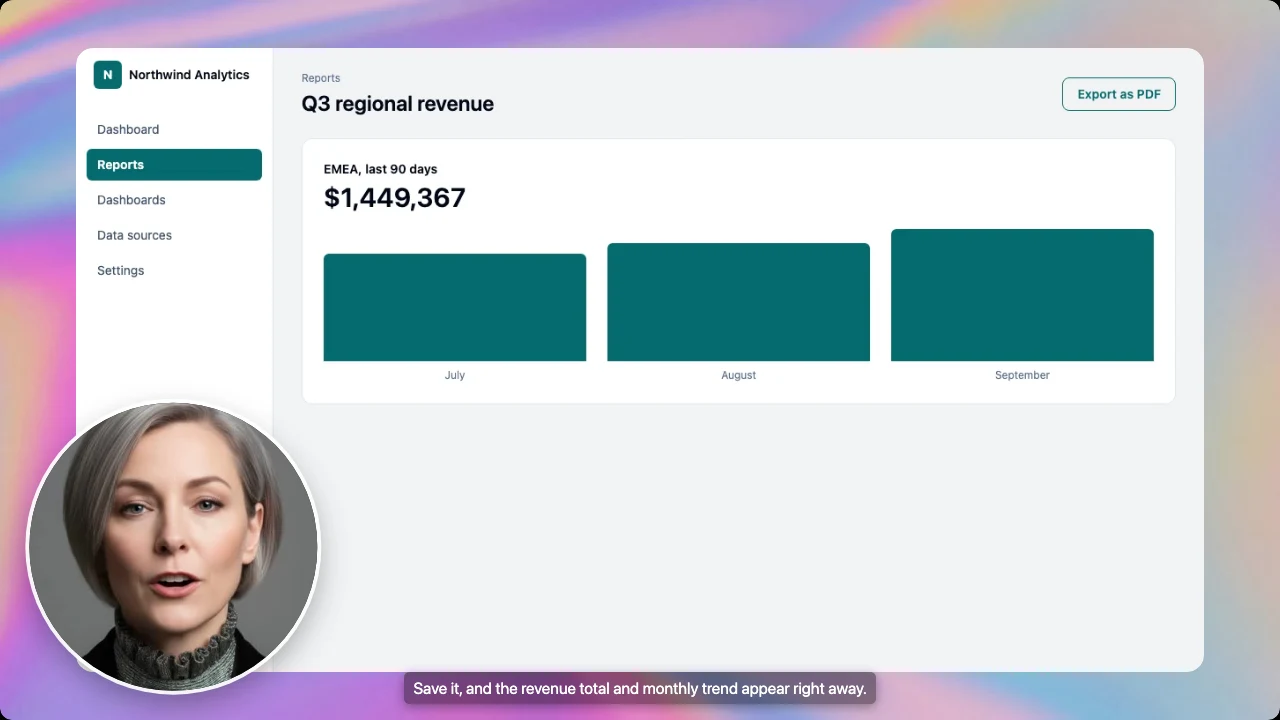
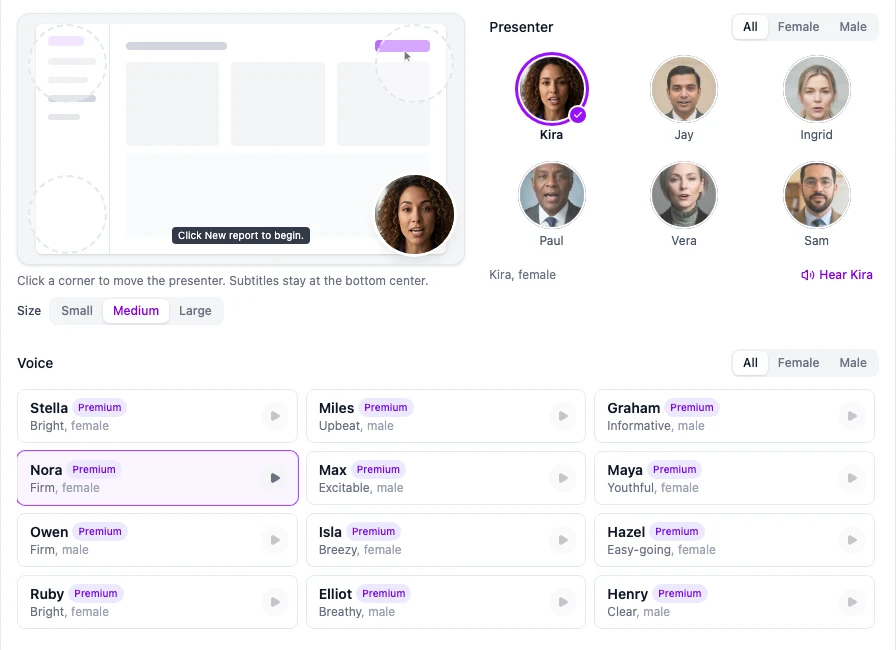
Demosmith's AI presenter talks learners through the lesson from a small circle in the corner. You choose one of six presenters, put them in any corner and pick a small, medium or large size, and the presenter speaks 28 languages. The product keeps the rest of the screen, so learners can still read every label. You can also add a presenter to a finished video later.
A Clickable Demo and a Written Guide, Too
Any finished Demosmith video can also become a clickable interactive demo that learners step through at their own pace. Docusmith turns the same recording into a written step-by-step guide for a help centre article or a printed handout. Our guide to turning a demo into a document shows how. The presenter appears in the video only.
Logins and Verification Codes
If your product asks for a verification code, a sign-in or a choice only you can make, Demosmith pauses and asks you, up to three times per video. A captcha still needs a person.
Pricing
Starter costs $40 a month with 20 AI minutes, Pro $99 with 50 and Business $250 with 150, or $33, $83 and $208 a month billed yearly. Enterprise is also available. An AI minute is a minute of finished video. The presenter comes with every paid plan, but not with the free three-day trial.
What It Does Not Do
Demosmith works with web apps, and it makes the recording itself, so there is no upload of your own footage to edit. There is no API, no course files for learning platforms, and no way to invite teammates yet.
Key Differences for Training and Onboarding Teams
Where the Footage Comes From
Synthesia works from your script plus whatever you put on screen: slides, stock footage, or a screen recording someone makes by clicking through the product. Demosmith works from the product itself. It does the clicking, so nobody on the training team has to drive the software, set up a clean demo account or start over after a misclick.
That shapes what each tool is good at. A lesson about a new expenses policy has no screens to record, and Synthesia handles it from start to finish. A lesson about submitting an expense claim in your finance app is mostly screens, and that is where Demosmith saves the most work.
Presenter Range and Custom Avatars
Synthesia has the bigger range. It offers 125+ presenters from Starter and 240+ on Enterprise, presenters made from your own trainers, copies of their voices, and scenes with several presenters talking. Demosmith's six presenters are built for a different job: they sit in the corner of a software lesson so learners keep their eyes on the screen. If learners expect to see your own head of training, choose Synthesia.
Demosmith keeps its presenter in a corner so the screen stays readable.
Learning Platforms and Course Files
If your training lives in a learning platform that needs SCORM course files, Synthesia has the answer on Enterprise: it tracks who completed each lesson, and the course file updates when the video changes. Pro adds buttons and branching, and Enterprise adds quizzes. Demosmith makes no course files and does not connect to learning platforms. You can still add its video, share link or embed to your platform, but it will not record who finished it.
For teaching customers, the gap matters less. A help centre or an onboarding email takes a link or an embed, and the clickable demo lets learners practise the steps. If you need course files on a smaller budget, our Demosmith vs Colossyan comparison looks at a tool that offers them from its Professional plan.
Languages
Synthesia lists more than 140 languages, and Enterprise translates a whole video in one click. Demosmith narrates and captions in 31 languages, and its presenter speaks 28, including English, Spanish, French, German and Portuguese. For staff spread across dozens of countries, Synthesia covers far more.
Three Formats From One Recording
A Synthesia project gives you a video, with clickable elements on Pro and above. A Demosmith demo gives you a video, a clickable demo and, if you ask for one, a written guide. Some learners watch, some click along and some skim, and one recording covers all three, so nobody writes a separate help article or builds a separate tour for each lesson. Our guide to automating onboarding videos at scale shows how teams build a library this way.
Keeping Software Training Current
This is where software training gets expensive. Synthesia keeps script changes cheap, and embedded videos update in place. But when your product changes, the screen recording inside the lesson goes out of date, and someone has to record it again and fit the script to it.
With Demosmith, a lesson is a link and a sentence. When the product changes, you ask for the same video again and it records the new screens. That uses AI minutes like any new video, but nobody sits at a screen recorder. After a redesign that touches fifty onboarding videos, you ask for fifty videos again instead of recording fifty by hand.
Price
Synthesia is cheaper to start. Starter costs $29 a month, or $18 billed yearly, for about 22 minutes of video counting the free 10, and there is a free plan. Demosmith Starter costs $40 for 20 AI minutes.
The two measure different things, though. A Demosmith minute includes recording your product, while a Synthesia software lesson still needs someone to record the screens. And if you need course files, quizzes or unlimited minutes from Synthesia, budget for Enterprise, because Starter and Pro do not include them. Full Demosmith plans are on the pricing page.
When Synthesia Is the Better Choice
- You train staff across a large company. Enterprise brings unlimited video, single sign-on, editing together in real time, and the security certifications big companies ask for.
- Your learning platform needs course files. SCORM exports on Enterprise, with quizzes and completion tracking.
- Your trainers want to appear on screen. Presenters made from your own people, and copies of their voices.
- You train in more than 31 languages. Synthesia lists 140+.
- The topic is not software. Compliance, safety, policy, leadership messages and soft skills, plus role-play practice sessions.
- You want a free plan. Ten minutes of watermarked video, renewed every month.
When Demosmith Is the Better Choice
- The lesson is about using a web app. Demosmith records your real product, so learners see the screens they will use.
- Your product changes often. Ask for the same video again instead of recording each lesson by hand.
- Learners need more than a video. A clickable demo to practise with and a written guide to skim, from the same recording.
- You want a presenter without hiding the product. A presenter in the corner, in 28 languages, on every paid plan.
- Your product sits behind a login with a verification code. Demosmith pauses and asks you for the code.
- You teach customers rather than staff. A share link or embed drops into a help centre or onboarding email.
Plenty of teams will use each tool for a different job: Synthesia for the policy module, Demosmith for the product walkthrough. To see the wider field, read our roundup of the best AI demo video generators or our list of Synthesia alternatives for training and onboarding.
The Bottom Line
Synthesia is the stronger training tool for large organisations: a big range of presenters, presenters of your own people, 140+ languages, and course files, quizzes and single sign-on on Enterprise. For lessons about people, policy or process, it is hard to beat.
Demosmith is the stronger tool when the lesson is your software. It records the real product for you, any finished video can also become a clickable demo and a written guide, and keeping a library up to date means asking for the videos again rather than recording them. The new AI presenter adds a face without covering the screen.
A Synthesia lesson starts with a script. A Demosmith lesson starts with your product, and the presenter is optional.
Key Takeaways
- Synthesia makes presenter videos from a script. Demosmith clicks through your live web app and makes the video from that recording.
- Synthesia offers up to 240+ presenters, presenters of your own people and copies of their voices. Demosmith offers six presenters shown in a corner, on every paid plan.
- Synthesia lists 140+ languages. Demosmith narrates and captions in 31.
- Synthesia exports learning-platform course files (SCORM) and adds quizzes on Enterprise only. Demosmith does neither.
- Any finished Demosmith video can also become a clickable demo and a written guide, and when your product changes you ask for the video again instead of recording it.
- Synthesia starts free and costs $29 a month for Starter. Demosmith starts at $40 a month after a three-day trial.